
If you’ve ever pulled up a backlink report and felt more confused after looking at it, you’re not alone. Most backlink tools are great at showing you data. They’re not so great at telling you what that data actually means.
That’s the gap this guide fills. A backlink checker tells you what links point to your site. A backlink profile audit tells you which of those links are actually doing something for you, which ones need a closer look, and what to do next. Those are two different jobs, and mixing them up is why so many “backlink audits” end in a spreadsheet nobody ever opens again.
What Is a Backlink Profile Audit?
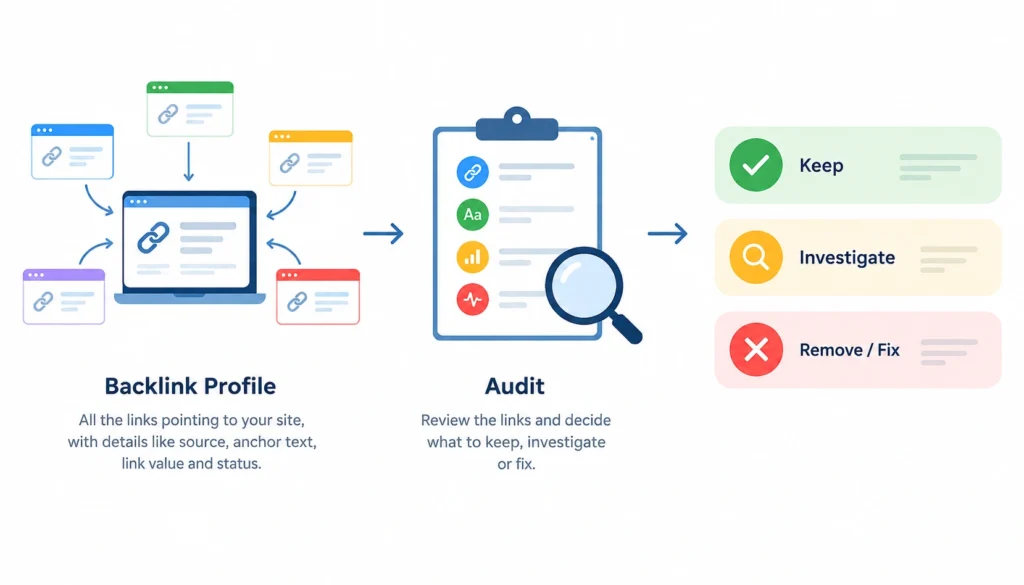
A backlink profile is the full set of links pointing to your website from other sites, along with the details around each one: which page it comes from, what text it uses, whether it passes ranking value, and whether it’s still live. An audit is the process of going through that set and figuring out what’s worth keeping, what needs investigating, and what’s worth removing or fixing.
What a backlink profile includes
At minimum, a backlink profile is made up of:
- The backlinks themselves
- The referring domains they come from
- The specific linking pages
- The anchor text used
- Link attributes (dofollow, nofollow, sponsored, UGC)
- The target URLs on your site
- The current status of each link (live, lost, or broken)
Backlink check vs. backlink audit
People use these two terms interchangeably, but they’re not the same thing.
| Backlink Check | Backlink Audit |
| Collects data | Interprets data |
| Shows you links | Evaluates them |
| Reports metrics | Identifies priorities |
| Finds backlinks | Decides what to do about them |
A tool can run a check in seconds. An audit takes judgment, and that’s the part most guides skip.
Why Should You Audit Your Backlink Profile?
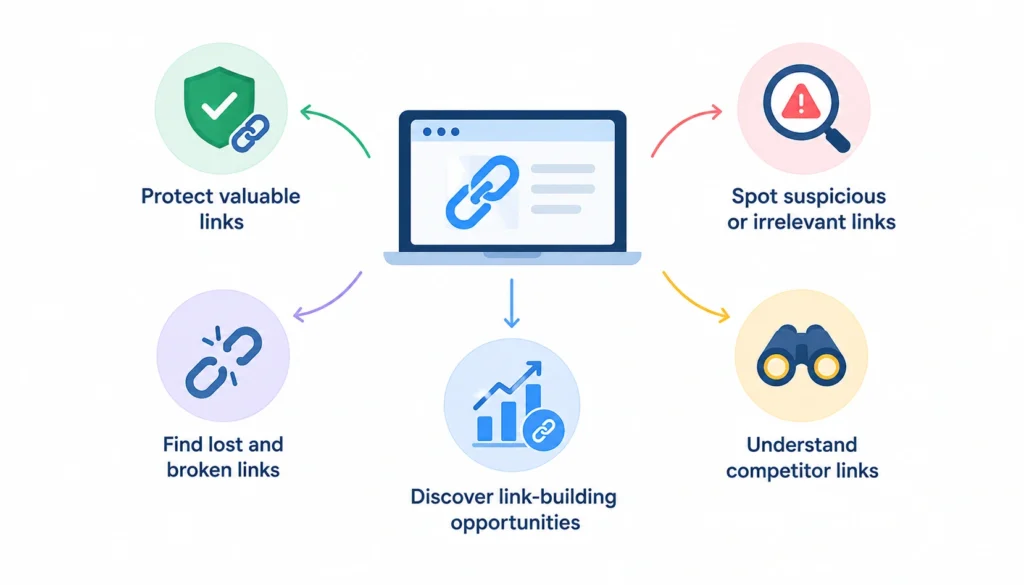
There are a handful of concrete reasons to audit your backlink profile beyond simply treating it as an “SEO best practice.” A regular audit helps you understand where your links are coming from, which ones are worth protecting, and where there may be opportunities to improve your link profile.
1. Find valuable backlinks
You want to know which links are actually contributing relevance, authority, and referral value to your site. Look for backlinks from relevant websites, useful pages, and legitimate editorial placements. Once you identify the links that are genuinely valuable, you can protect those relationships and look for similar opportunities.
2. Identify suspicious or irrelevant links
Not every unusual or low-quality backlink is automatically harmful. However, an audit can help you spot links that deserve a closer look, such as highly irrelevant sites, obvious link schemes, or unusual patterns of links created in a short period. The goal isn’t to remove every link that looks unfamiliar, but to understand what is actually in your profile before deciding whether action is necessary.
3. Discover lost and broken links
Backlinks can disappear when websites redesign their pages, delete content, change URLs, or remove links. You may also have valuable backlinks pointing to pages that now return 404 errors or redirect somewhere else. Finding these links gives you an opportunity to recover valuable link equity and referral traffic where possible.
4. Find link-building opportunities
A backlink audit can reveal patterns in the links your site already earns. You might discover that certain guides, research pieces, tools, or product pages consistently attract links. You can use those patterns to create similar resources, promote successful content, or identify websites that may be relevant for future outreach.
5. Understand competitor link profiles
Looking at your competitors’ backlink profiles can reveal websites that already link to businesses in your industry. If a site links to several competitors but not to you, it may represent a potential outreach opportunity, provided your content is relevant and offers a genuine reason for them to link. Competitor analysis can also show which types of content are attracting links in your niche.
What You Need Before Starting a Backlink Audit
A backlink audit is easier when you have the right data and a clear record of what you’re reviewing. You don’t need a complicated setup, but having a few basic resources ready will make the process faster and help you make better decisions.
- Your website and important URLs: Start with your domain and make a list of the pages that matter most to your business, such as your homepage, service pages, product pages, category pages, and high-value blog posts. This helps you see whether your most important pages are attracting useful backlinks.
- A backlink analysis tool: Use a tool such as Ahrefs, Semrush, Moz, or another backlink database to collect information about your backlinks and referring domains. Ideally, the tool should let you review anchor text, link attributes, lost links, referring pages, and historical data.
- Google Search Console: Google Search Console provides backlink information from Google’s perspective. Its link report can complement third-party tools, although it does not provide the same level of backlink detail as dedicated link databases.
- A spreadsheet or simple database: Keep your audit organized by recording details such as the referring domain, linking URL, target URL, anchor text, link type, link status, and your recommended action. This makes it easier to prioritize findings instead of reviewing the same links repeatedly.
- A record of past link-building or outreach campaigns: If you’ve previously run guest-post campaigns, digital PR, partnerships, directory submissions, or other link-building activities, keep those records nearby. Knowing which links were intentionally acquired can help you understand unusual patterns and avoid spending time investigating links that came from your own campaigns.
- A clear audit goal: Decide what you want the audit to accomplish before you begin. You may be checking for lost backlinks, evaluating link quality, preparing for a site migration, reviewing a recent link-building campaign, or simply establishing a baseline for future monitoring.
How to Audit Your Backlink Profile Step by Step
Step 1: Export Your Backlink Data
Pull a full export from your backlink tool. At a minimum, you want:
- Linking URL
- Referring domain
- Target URL on your site
- Anchor text
- Follow or nofollow status
- First-seen and last-seen dates
- Authority metrics from the tool
- Organic traffic estimate for the linking page
Cross-check this against Google Search Console’s links report. No single tool sees every backlink on the web, and the overlap between GSC and your third-party tool is usually where the most reliable data sits.
Step 2: Remove Duplicates and Clean the Data
Raw exports are messy. You’ll typically find the same domain linking dozens of times through sitewide footer or sidebar links, several URLs that are really just redirect variants of each other, and dead links that stopped resolving months ago.
Collapse sitewide links into a single row so they don’t skew your domain count. Flag redirects separately from live URLs. This step is tedious, but skipping it means every later step is working from bad numbers.
Step 3: Analyze Your Referring Domains
The number of unique referring domains usually matters more than your total backlink count. Five hundred backlinks from twelve domains tells a very different story than five hundred backlinks from three hundred domains.
Look at how concentrated your links are, whether the domains are relevant to your industry, and whether they send any real traffic of their own. A profile dominated by a handful of directory sites looks very different from one built on genuine editorial coverage.
Step 4: Evaluate Backlink Quality
This is where most audits get lazy and just sort by a single authority score. Quality is really made up of several factors working together.
Relevance
Does the linking site have anything to do with your industry or topic?
Editorial context
Was this link placed naturally inside content, or was it dropped into a directory, footer, or comment section?
Link placement
A link in the body of an article carries more weight than one buried in a sidebar widget.
Source-page quality
Is the linking page well-written and useful on its own, or is it thin, auto-generated filler?
Organic traffic
Does the linking page actually get visitors, or does it sit unseen?
Anchor text
Does the text used to link to you make sense in context?
Follow or nofollow status
Nofollow links don’t pass the same ranking signal, but they can still send real traffic and build brand visibility.
Sitewide vs. contextual
A single link inside a relevant article usually means more than the same link repeated across a thousand footer templates.
A link from a smaller, genuinely relevant industry blog can do more for you than an irrelevant link from a huge, high-authority news site. Authority scores from third-party tools are a rough proxy, not the whole picture.
Step 5: Analyze Anchor Text Distribution
Anchor text is the visible, clickable text of a link. Look at the mix across your profile: branded anchors (“Acme Tools”), naked URLs, generic phrases (“click here,” “learn more”), and keyword-rich anchors (“best project management software”).
A natural profile usually leans heavily branded and generic, with keyword anchors making up a smaller share. There’s no magic percentage to hit here.
What matters more is whether the distribution looks like something that happened organically over time, versus a pattern that looks engineered.
Step 6: Find Lost and Broken Backlinks
Links disappear for ordinary reasons: pages get deleted, sites get redesigned, content gets consolidated, or a webmaster just cleans house.
Check for links that have gone from live to lost in your tool’s history, target URLs on your site that now return a 404, and redirected URLs that may have lost some of their original value in the process.
Step 7: Identify Suspicious or Potentially Harmful Links
This step causes the most anxiety, and it shouldn’t. Most low-authority or unfamiliar links are just normal parts of a real backlink profile, not a threat. A simple way to sort them:
| Link Type | What to Do |
| Relevant editorial link | Keep |
| Low-authority but legitimate | Usually keep |
| Irrelevant link | Investigate |
| Suspicious pattern (bulk foreign-language spam, obvious link farms) | Investigate further |
| Clearly manipulative link | Consider remediation |
Google’s own spam policies for Search are the closest thing to an authoritative reference here. Google has also been fairly consistent in saying that most sites don’t need to worry about a small number of low-quality links pointing to them.
Its systems are generally built to ignore that kind of noise rather than penalize you for it. Treat that as reassurance to investigate calmly, not as a reason to panic-remove links.
Step 8: Analyze Links to Important Pages
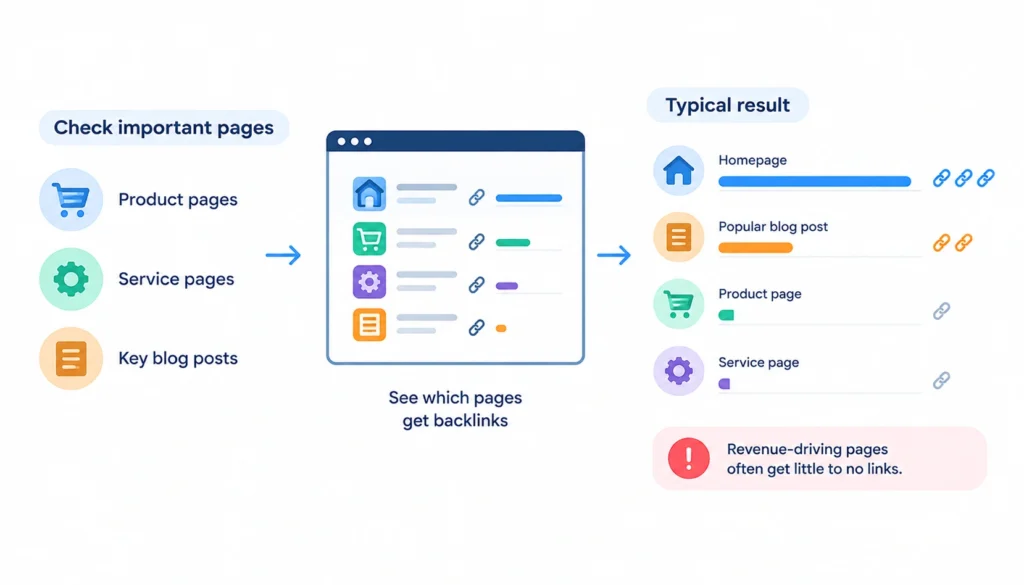
Check whether the pages you actually care about, like product pages, service pages, or key blog posts, are getting any backlinks at all.
It’s common to find that nearly all inbound links point to the homepage or one popular blog post while the pages that drive revenue get almost nothing. That’s a useful finding on its own, separate from any link-quality concerns.
Step 9: Compare Your Backlink Profile With Competitors
Run the same export process for two or three direct competitors. Look for domains that link to them but not to you, pages of theirs that attract disproportionate links, and industry publications or resource pages that seem to link out to multiple players in your space.
These are realistic outreach targets, since they’ve already shown willingness to link to companies like yours.
Step 10: Prioritize Your Actions
By this point you’ll have a long list of observations. Sort them into a simple sequence: keep what’s working, investigate what’s unclear, recover what’s fixable, improve what’s underperforming, and set up ongoing monitoring so you’re not starting from zero next time.
How to Tell If a Backlink Is Good or Bad
A quick scenario helps here. Say your site has 500 backlinks but only 80 referring domains. Before assuming that’s a problem, check where the concentration is coming from.
If 300 of those links are sitewide footer links from a single web design client, that’s a normal, explainable pattern, not a red flag. If they’re spread across dozens of unrelated foreign-language domains you’ve never heard of, that’s worth a closer look.
Signs of a valuable backlink
It comes from a site relevant to your industry, sits inside real editorial content, and appears on a page that gets actual visitors.
Signs a backlink needs investigation
It comes from a domain with no clear connection to your topic, sits in a footer or sidebar with hundreds of other outbound links, or is part of a batch that all appeared on the same day from similar-looking sites.
Why low authority doesn’t automatically mean a bad link
Plenty of small, legitimate sites simply haven’t built up much authority yet. A genuine mention from a niche blog with modest traffic is still a real, relevant link.
Why high authority doesn’t automatically mean a valuable link
A link from a huge news site that’s completely unrelated to your industry, buried in an automated “related articles” widget, often does less for you than a smaller but relevant, contextual link.
How to Analyze Your Backlink Profile Using SEO Tools
1. Google Search Console
Google Search Console (GSC) gives you backlink information directly from Google’s own systems. Its Links report can show which sites link to your property and which pages receive links.
It’s free and particularly useful as a first-party reference point, although it doesn’t provide the same breadth of historical data, link-level metrics, or competitor analysis available in dedicated backlink tools. It also shouldn’t be treated as a complete list of every backlink pointing to your site.
2. Ahrefs
Ahrefs provides a broad set of backlink data, including referring domains, backlinks, anchor text, linked pages, and historical trends. Its proprietary Domain Rating (DR) and URL Rating (UR) metrics can help you compare the relative strength of referring domains and pages within the Ahrefs database.
You can also use its historical data to see how your backlink profile has changed over time and identify newly acquired or lost links. Like other third-party tools, its database is an independent index rather than a complete representation of Google’s link data.
3. Semrush
Semrush’s Backlink Analytics provides information on backlinks, referring domains, anchor text, link attributes, and historical trends. Its Authority Score is Semrush’s own metric for evaluating the overall quality and strength of a domain.
You can also use the platform to compare your backlink profile with competitors and identify domains that link to competing websites. This makes it useful not only for auditing existing links but also for finding potential link-building opportunities.
4. Other backlink tools
Moz Link Explorer, Majestic, Ubersuggest, and SEO Review Tools provide different combinations of backlink, referring-domain, anchor-text, and link-quality data. Each platform maintains its own crawler, database, and scoring methodology, so the numbers will naturally differ between tools.
That’s important when interpreting authority metrics. A domain might receive different scores in Ahrefs, Semrush, Moz, or Majestic because those scores are third-party measurements, not Google ranking scores.
Use them as supporting signals alongside relevance, link placement, page quality, traffic, and context rather than treating any single metric as the final verdict on a backlink.
Backlink Audit Spreadsheet Template
A simple spreadsheet with these columns covers most of what you need:
Referring domain, referring URL, target URL, anchor text, link type, domain relevance, page relevance, traffic, authority metric, link status, first seen, last seen, risk or priority level, recommended action, and notes.
Filling this in as you go through Steps 1 through 9 turns the audit into something you can actually act on, instead of a data dump.
How to Fix Problems Found During a Backlink Audit
1. Recover lost backlinks
Reach out to the site if a link was removed by mistake, or if a redesign dropped it unintentionally.
2. Fix broken destination URLs
If a link points to a page on your site that now 404s, set up a redirect to the closest relevant live page.
3. Contact site owners for legitimate removal requests
If a link was placed somewhere you genuinely don’t want it (an old guest post you regret, for instance), a polite direct request is the first step.
4. Review potentially manipulative links
Confirm the link actually looks harmful before doing anything. Context and pattern matter more than a single low score.
5. Understand when disavow may be appropriate
Google’s disavow links tool exists for cases of large-scale, clearly manipulative links you can’t get removed, typically after a manual action or a confirmed negative SEO attack. It’s not a routine cleanup tool, and Google itself recommends most sites won’t need it.
6. Document every remediation decision
Keep a record of what you found, what you decided, and why. Future audits, and future you, will thank you.
How to Improve Your Backlink Profile After the Audit
Once the cleanup is done, shift toward growth: build content genuinely worth referencing, develop real relationships with relevant sites in your industry, follow up on link opportunities the audit surfaced, promote the pages that are already attracting attention naturally, and use the competitor gaps you found as a starting outreach list.
How Often Should You Audit Your Backlink Profile?
A light monthly check is enough to catch new spam patterns or sudden spikes early. A deeper quarterly audit, following the full ten-step process, keeps your profile genuinely understood rather than just monitored.
Run an extra audit outside that schedule after a major site migration, a full redesign, a sudden and unexplained ranking drop, an unusual spike in new backlinks, a large link-building campaign, or a domain change from an acquisition.
Backlink Audit Checklist
- Export backlinks
- Remove duplicates
- Review referring domains
- Evaluate relevance
- Check anchor text
- Review follow/nofollow status
- Find lost links
- Find broken links
- Investigate suspicious links
- Review important target pages
- Compare against competitors
- Prioritize actions
- Document changes
- Set up ongoing monitoring
Frequently Asked Questions
What is a backlink profile audit?
It’s the process of reviewing every link pointing to your site, evaluating each one for relevance and quality, and deciding what action, if any, it needs.
How do I audit my backlinks?
Export your data from a backlink tool and Search Console, clean it up, then work through referring domains, link quality, anchor text, lost or broken links, and suspicious patterns before prioritizing action.
How do I know if a backlink is good or bad?
Look at relevance to your industry, whether it sits in real editorial content, and whether the linking page gets actual traffic. A single authority number isn’t enough on its own.
Do bad backlinks hurt SEO?
A small number of low-quality links rarely causes real damage. Google’s systems are generally designed to ignore that kind of noise. Large-scale, clearly manipulative link schemes are a different matter.
Should I remove low-quality backlinks?
Not automatically. Investigate first. Many low-authority links are perfectly legitimate and not worth the effort to remove.
Are nofollow backlinks valuable?
They don’t pass the same ranking signal as dofollow links, but they can still send real referral traffic and build brand awareness, so they’re not worthless.
How often should I audit backlinks?
A light check monthly, with a full audit quarterly, is a reasonable baseline for most sites.
Can I audit backlinks for free?
Yes, at least partially. Google Search Console is free and shows a meaningful chunk of your profile. Most paid tools also offer limited free lookups.
What is the best backlink audit tool?
Ahrefs and Semrush are the most widely used, but no single tool sees every link on the web. Combining a paid tool with Search Console gives the most complete picture.
When should I use Google’s disavow tool?
Mainly if you’ve received a manual action for unnatural links, or you’ve confirmed a large-scale negative SEO attack you can’t resolve through removal requests. It’s not meant for routine cleanup.
Final Verdict
A backlink profile audit isn’t about chasing the highest link count or the biggest authority score. A large number of backlinks doesn’t automatically mean a stronger profile, and a single third-party metric can’t tell you whether a link is genuinely useful.
The goal is to understand where your backlinks come from, how relevant they are, what pages they point to, and whether they contribute meaningful value through relevance, trust, or referral traffic. From there, you can separate links worth protecting from those that deserve further investigation.
That distinction makes the rest of the process much more straightforward. You can recover valuable links that were lost, fix broken destinations, investigate unusual patterns, identify realistic link-building opportunities, and monitor important changes over time.
Instead of treating every backlink the same way, you end up with a clearer picture of your overall link profile and a more focused plan for improving it.