
Backlinks and inbound links are, in almost every SEO conversation, the same thing: a link from another website that points to yours. Some writers use “inbound” more broadly, to include traffic from social posts, emails, or campaigns, but that’s the exception.
The confusion is understandable. Two names for one idea, plus internal links and outbound links, makes the vocabulary feel heavier than it is.
This guide clears it up first. Then it covers what actually matters: which links help, which ones don’t, how to check what you have, and how to earn more without breaking Google’s rules.
Are Backlinks and Inbound Links the Same Thing?
Yes, in most SEO contexts. Both terms describe a link on someone else’s website that sends visitors to a page on your website.
The direction is what defines them. If the link points toward you, it’s a backlink. It’s also an inbound link.
1. What is a backlink?
A backlink is a link from one website to another, seen from the receiving site’s side. If a food blogger links to your recipe, that link is a backlink to your site. Wikipedia’s entry on backlinks gives the general definition if you want a neutral reference.
2. What is an inbound link?
An inbound link is a link that arrives at your site from an outside source. Mailchimp, Morningscore, and most SEO tools treat the phrase as a plain synonym for backlink.
3. Why people use the two terms interchangeably
Both words describe the same direction of travel. “Back” means the link points back to you. “Inbound” means it comes in. Different words, same arrow.
4. When “inbound” means something broader
A few writers, including some agencies, use “inbound link” to mean any route that brings a visitor in: a social profile, an email newsletter, a directory listing, a partner page. Under that reading, backlinks are the subset that come from other websites.
That’s a fair use of the word, but it isn’t the standard one. If you’re reading an article and the terms seem to contradict each other, check how the author defines them. Most of the time, the two words are just synonyms.
Backlinks vs Inbound Links: The Practical Difference
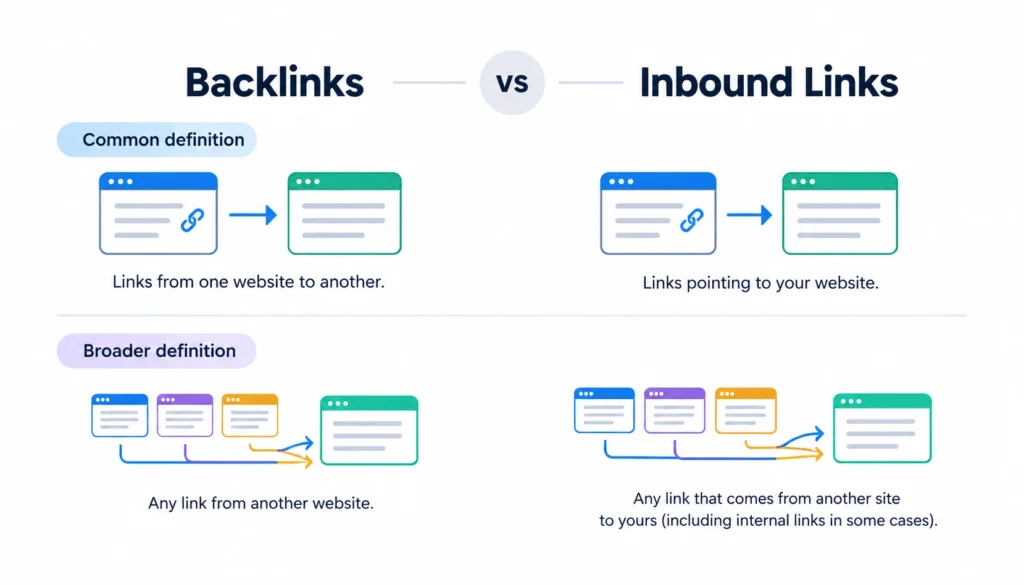
For day-to-day SEO work, there isn’t one. Here’s how the two terms compare under the common definition and the broader one.
| Factor | Backlink | Inbound link |
| Direction | Points to your site | Points to your site |
| Typical source | Another website | Another website (or, in broad use, any outside source) |
| Common SEO meaning | A link from an external site to yours | Same as a backlink |
| Can send traffic | Yes | Yes |
| Can help search engines find your pages | Yes | Yes |
If you use the broader definition, add one caution. A link from a social profile or an email isn’t automatically a ranking signal. It may send visitors, which is useful, but don’t count it the same way you’d count an editorial link from a publication.
How Backlinks, Inbound, Internal, and Outbound Links Differ
The real mix-ups happen between link types, not between the two terms above. This table keeps them straight.
| Link type | Starts on | Points to | Example |
| Backlink / inbound link | Another website | Your website | A trade publication links to your guide |
| Internal link | Your website | Your website | Your blog post links to your pricing page |
| Outbound (external) link | Your website | Another website | Your article cites a Google help page |
Outbound and external usually mean the same thing. One is the view from the site that’s linking, and the other describes where the link goes.
The same link can wear two labels at once. When you link out to a source, it’s an outbound link for you and a backlink for them.
Internal links matter more than many site owners realize. Google’s SEO Starter Guide says links help its systems discover pages and recommends clear, descriptive link text. You control internal links fully, so they’re the easiest place to start.
Why Do Backlinks Matter for SEO?
Links are one of the ways search engines discover and understand pages across the web. Google’s early ranking system, PageRank, was built around the idea that links between pages could provide useful signals about the importance and relevance of those pages. Google now uses many ranking signals, but links remain an important part of how its systems discover and connect content.
A relevant, naturally earned backlink can provide several benefits:
- Help search engines discover pages: A link from a page that search engines already crawl can help them find a new or updated page on your site.
- Provide context: The words surrounding a link, the linking page, and the topic of the referring website can help establish what your page is about.
- Send referral traffic: A backlink can bring visitors directly from another website, especially when it appears in a useful article or resource that people already trust.
- Build brand visibility: Being mentioned and linked to by relevant websites can introduce your brand to audiences who may not have found you through search.
- Support your site’s credibility: Relevant editorial links from reputable sources can act as third-party references that strengthen your site’s overall reputation.
However, a backlink is not an automatic ranking boost. The quality, relevance, context, and reason behind the link matter more than simply counting how many links a website has. A single relevant link from a respected publication may be more valuable to your business than dozens of unrelated links from low-quality websites.
No one outside Google can say exactly how much weight a particular link carries. Be cautious of anyone promising a specific ranking increase from a certain number of backlinks. Links work alongside other factors, including content quality, search intent, technical accessibility, site experience, competition, and the overall usefulness of the page.
The goal, therefore, should not be to collect as many backlinks as possible. It should be to earn relevant links that make sense for users, support your content, and come from sources that are genuinely worth being associated with.
What Makes a High-Quality Backlink?
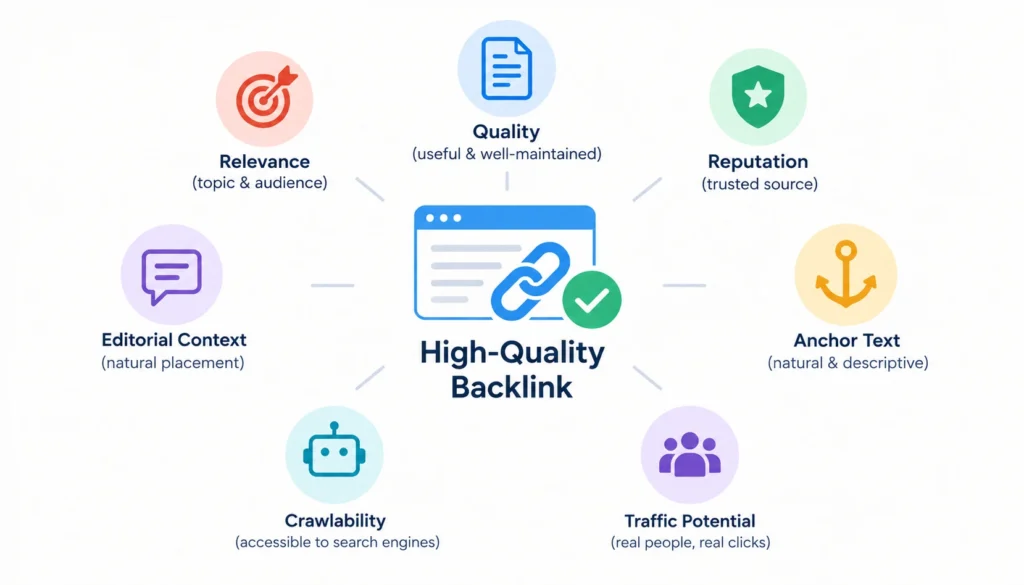
There’s no official backlink quality score from Google that tells you whether a particular link is “good” or “bad.” Instead, you can evaluate a backlink using several practical factors based on Google’s published guidance and established SEO practice.
Relevance of the topic. A link is more useful when the linking page and your page cover related subjects. For example, a cybersecurity publication linking to your API security guide makes clear sense because the two topics are closely connected. A link from a pet-supplies blog to the same guide would be difficult to justify unless there is a genuine reason for the connection.
Quality of the linking page. Look at the actual page containing your link, not just the website’s overall reputation. A useful, original, well-maintained article that provides information to readers is a much better environment for a backlink than a thin page created mainly to publish links. The page should have a clear purpose and provide value even without your link.
Reputation of the site. Consider whether the website is known and respected within its industry. A publication that consistently produces useful content and references credible sources is generally a stronger place to earn a mention than a site filled with unrelated or low-quality content. Don’t rely on a third-party authority score alone; evaluate the site’s actual content, audience, and reputation.
Editorial context. Strong backlinks usually make sense within the surrounding content. The writer links to your page because it supports a claim, provides additional information, or gives readers a useful resource. For example, a sentence discussing authentication errors might naturally link to your detailed API security guide. Links placed in unrelated footers, sitewide widgets, or pages containing dozens of unrelated links deserve more scrutiny.
Natural anchor text. Anchor text is the clickable wording of a link. It should describe the destination naturally and fit the surrounding sentence. A mix of brand names, page titles, descriptive phrases, and natural wording is generally more realistic than repeatedly using the exact same keyword-rich anchor text across many websites.
Crawlability and accessibility. Search engines need to be able to access the linking page and understand the link. If the page is blocked from crawling, inaccessible, or the link cannot be properly followed, its potential SEO and discovery value may be limited. This is one reason it’s useful to look beyond simply seeing that a backlink exists in an SEO tool.
Traffic potential. A backlink can be valuable even when its direct SEO impact is difficult to measure. If the linking website has an audience that cares about your subject, visitors may click through, discover your brand, subscribe, request a demo, or become customers. Referral traffic is therefore another useful way to judge whether a backlink is worth pursuing.
A practical example
Imagine a small SaaS company publishes a detailed guide on API security. A respected security newsletter writes about authentication errors and links to the guide as a supporting resource. The link is topically relevant, appears in an editorial context, uses natural anchor text, and is likely to send genuinely interested readers to the SaaS company’s website.
Now compare that with 50 backlinks from unrelated directories that have little connection to software or cybersecurity. The second group may produce a larger backlink count, but the links provide much less evidence of genuine editorial value or audience relevance.
The takeaway: Don’t judge a backlink by its existence or by a single third-party metric. Look at the relevance, quality, context, reputation, anchor text, accessibility, and potential referral value of the link as a whole.
Backlink Quality vs Backlink Quantity
A big number looks impressive in a report. It says little about whether the links are doing anything.
Ten links from relevant, trusted sites usually beat 100 links from random places. The ten also carry far less risk.
Backlinks vs referring domains
A referring domain is a unique website that links to you. This is the number that shows how widely your site is cited.
Suppose one blog links to you five times. You have five backlinks but only one referring domain. Now suppose five different sites each link to you once. You have five backlinks and five referring domains.
The second profile is stronger. It shows more independent sources vouching for you. When you review your links, look at referring domains first, then total backlinks.
Don’t send every link to your homepage
Homepage links are fine, but links to specific pages matter too. A link to a detailed guide tells search engines and readers what that exact page is about. It also helps the page rank for its own topic. Deep links like this tend to look more natural than a profile where everything points to the homepage.
Types of Backlinks and Link Attributes
Most links on the web are plain links with no special label. Google documents three attributes you can add to a link’s rel setting to explain the relationship. You can read them in Google’s guide to qualifying outbound links.
| Attribute | When it’s used |
| rel=”nofollow” | You don’t want to endorse the page you’re linking to |
| rel=”sponsored” | The link is an ad, paid placement, or other paid arrangement |
| rel=”ugc” | The link appears in user-generated content, such as comments or forum posts |
Google treats these as hints about how to handle the link. A nofollow or UGC link isn’t “bad.” A forum mention can still send real visitors and build awareness.
What “dofollow” actually means
There’s no dofollow attribute in HTML. People use the word for a normal link without a nofollow, sponsored, or UGC label. If you see the term in an SEO tool, that’s all it means.
What Is Anchor Text and Why Does It Matter?
Anchor text is the visible, clickable part of a link. It gives readers and search engines a hint about the destination.
These are the usual types:
- Branded: your company or product name
- Naked URL: the web address itself
- Exact match: the precise keyword you want to rank for
- Partial match: a phrase that includes the keyword plus other words
- Generic: phrases like “click here” or “read more”
A natural profile mixes all of these, with plenty of branded and descriptive anchors. A profile where nearly every link uses the same exact-match phrase looks planned, and Google’s spam policies warn against manipulative link text.
You rarely control the anchor text on a link someone gives you. Don’t beg for specific wording. Write content people want to cite, and they’ll describe it in their own words.
How to Get High-Quality Backlinks and Inbound Links
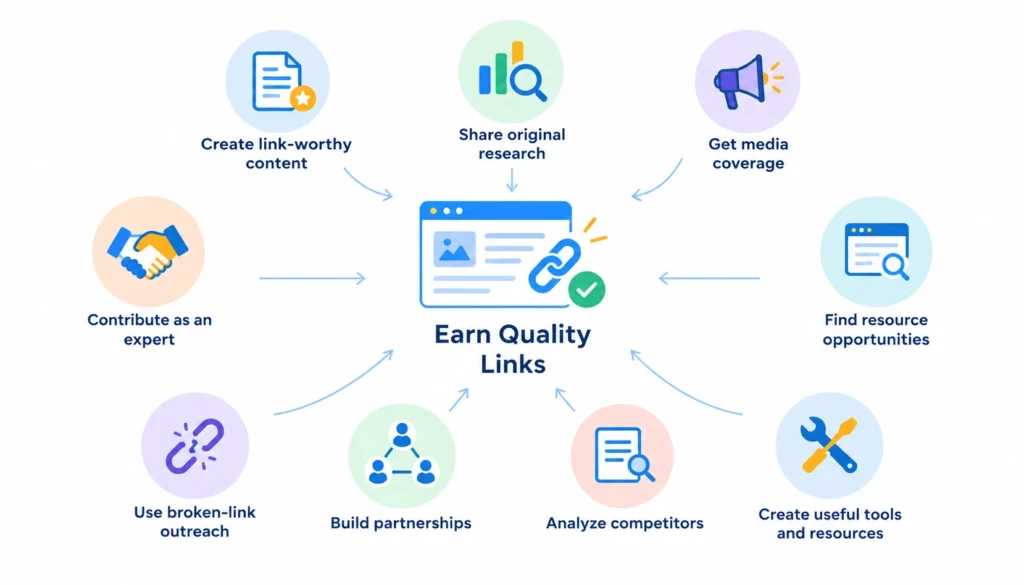
The safest approach is to earn links because you made something worth citing. These methods work when you do them honestly.
Publish original research. Surveys, data studies, and benchmarks give writers a source to cite. Even a small, well-run study can attract links in a narrow field.
Build useful tools and templates. A free calculator or checklist solves a real problem, and people link to things that solve problems.
Contribute expert comments. Journalists and bloggers often look for quotes. When you offer a short, specific answer, you may get a mention with a link to your site.
Use resource-page outreach. Many sites keep lists of helpful guides. If yours fits, send a short, polite note explaining why. Don’t mass-send the same template.
Try broken-link outreach. If a page links to a dead resource and you have a good replacement, tell the site owner. You’re doing them a favor. You can also use [lost backlink reclamation] to recover links that previously pointed to your site but were removed, broken, or redirected.
Work with partners. Suppliers, customers, event organizers, and industry groups often have natural reasons to link to you.
Study competitors. Look at who links to the pages ranking for your target topic. You can’t copy their links, but you can learn what kind of content earns them.
Share your work. A great guide that no one sees won’t attract links. Tell the people who’d care, in newsletters, communities, and social channels.
Communities like SEO on Reddit are useful for hearing how other practitioners approach outreach. Treat what you read as opinion, not as proof of how Google works.
Backlink Tactics to Avoid
Google’s spam policies list link spam as a violation. These practices are the ones to stay away from:
- Buying links to pass ranking signals
- Excessive link exchanges (“link to me and I’ll link to you”)
- Using automated programs to create links
- Posting links in low-quality directories or bookmark sites
- Stuffing keywords into guest posts with optimized anchor text at scale
- Joining private networks built to pass links
Paid links aren’t banned outright. If you pay for a placement, the link should carry the sponsored attribute. The problem is paying for links that are meant to pass ranking signals without disclosure.
Shortcuts also tend to be short-lived. A link scheme that works this month can turn into a cleanup project next year.
Can Bad Backlinks Hurt SEO?
Sometimes, but less often than SEO tool warnings suggest. Every site picks up a few odd links, such as scraper sites and spammy directories. Google says its systems are built to ignore most of them.
The real risk comes from links you or someone working for you created to manipulate rankings. That can lead to a manual action, which Google reports in Search Console.
If you see a spike of strange links, don’t panic. Look for patterns first. Did you hire an agency? Did a past SEO buy links? Was there a campaign you forgot about?
Should you disavow backlinks?
For most sites, no. Google’s own guidance says the disavow tool is meant for unusual situations, usually when you have a large number of unnatural links you can’t get removed and they’ve caused or may cause a manual action. If you aren’t in that spot, leave it alone. Disavowing good links by mistake can do more harm than the bad ones.
How to Check Your Backlinks
Start with Google Search Console. It’s free and shows the sites that link to you, your most-linked pages, and common anchor text in its Links report. It doesn’t list every link, but it comes straight from Google.
Third-party tools build their own link databases, and each one finds a different set, For a broader approach to organizing and monitoring acquired links, see this guide to [backlink management for SaaS websites]
- Ahrefs and Semrush are popular for competitor research, referring-domain reports, and finding new or lost links.
- Moz and Majestic offer their own link indexes and metrics. Treat their scores as estimates, not as Google data. If you need a more organized workflow for tracking and monitoring links, see our guide to [backlink management tools].
- Screaming Frog crawls your own site, so it’s best for auditing internal links and broken links.
If you can, compare at least two sources. No single tool sees the whole web.
How to Evaluate a Backlink in 60 Seconds
Use this quick check when you’re deciding whether a link is worth chasing, or reviewing one you already have.
- Is the topic relevant? The linking site should relate to yours.
- Is the page useful? Read it. Would a real person find it helpful?
- Is the site credible? Look for real authors, a clear purpose, and content that isn’t a wall of ads.
- Is the link editorial? It should sit naturally in the text.
- Is the anchor natural? Descriptive, not stuffed.
- Could it send relevant visitors? Traffic is a good sign.
- Any signs of manipulation? Payment, link swaps, or a page full of unrelated outbound links are warning signs.
- Is the attribute right? Paid links should be marked sponsored.
If the link passes most of these, keep it. If it fails several times, don’t spend time on it.
Good, Weak, and Risky Backlinks: Three Examples
A strong backlink. An industry publication writes a guide on email deliverability. It links to your technical article on SPF and DKIM setup, using the words “how to set up SPF and DKIM.” The page is relevant, the link is editorial, and readers will click it.
A weak backlink. A general directory lists your business alongside thousands of unrelated companies. Anyone can add a listing, and the page gets little real traffic. It won’t hurt you much, but it won’t help either.
A risky backlink. A site sells “guest posts” and publishes your article with a keyword-rich link. The content is thin, and the site’s only purpose is selling links. This is the kind of link Google’s spam policies target.
How Many Backlinks Does a Website Need?
There isn’t a universal number. Claims like “every site needs 50 backlinks” ignore competition, search intent, and the strength of the pages already ranking.
A better method is to compare. Search for the topic you want to rank for, open the top results, and check their referring domains with a backlink tool. That shows what level of competition you face.
Also check whether those pages rank because of links, content depth, brand strength, or all three. A local plumber and a national software company face very different bars.
Do Backlinks Still Matter for SEO?
Yes, but they aren’t a magic switch. Backlinks can help search engines find pages, understand context, and judge which sources others trust. They can’t rescue a page that doesn’t match what searchers want.
Quality and relevance count for more than raw volume. Strong content, a clear site structure, and sensible internal links make every external link work harder.
Think of link building as the part of SEO that comes after you’ve built something worth linking to. If the page is weak, links won’t fix it.
Backlinks and AI Search: What Changes?
Search is changing, and AI-generated answers now appear next to traditional results. Nobody outside these platforms knows exactly how each one weighs links, so be skeptical of confident claims that say otherwise.
What’s reasonable to say:
- Links still help search engines discover and relate pages.
- Being cited by credible third parties can strengthen your reputation, which helps both traditional and AI-driven discovery.
- Google’s spam policies cover attempts to manipulate AI responses as well as regular search results.
The practical advice stays the same. Be the source people want to reference, and don’t chase tricks.
Backlinks and Inbound Links FAQs
Are backlinks and inbound links the same?
In most SEO writing, yes. Both mean a link from another website to yours. Some writers use “inbound link” more broadly to cover any outside source that sends visitors.
What is an example of an inbound link?
A local newspaper mentions your bakery and links to your website. That link is an inbound link to your site, and it’s also a backlink.
What’s the difference between inbound and outbound links?
An inbound link comes from another site to yours. An outbound link goes from your site to another one.
Are all backlinks good for SEO?
No. Relevant, editorial links from credible sites help most. Irrelevant, paid, or automated links offer little and may break Google’s guidelines.
What makes a backlink high quality?
Relevance, a useful linking page, a credible site, natural placement, descriptive anchor text, and the potential to send real visitors.
Can backlinks hurt SEO?
Links you create to manipulate rankings can. Random spammy links you didn’t ask for are usually ignored by Google.
How do I find backlinks to my website?
Start with the Links report in Google Search Console. Add a tool such as Ahrefs, Semrush, Moz, or Majestic for a wider view.
How many backlinks do I need?
It depends on your topic and competition. Check the referring domains of pages already ranking for your target query.
Conclusion
In SEO, backlinks and inbound links usually mean the same thing: links from other websites that point to yours. The real question isn’t how many you have. It’s whether those links are relevant, earned naturally, and useful to the people who click them.
Start with the basics. Check your current profile in Google Search Console, count your referring domains, and look for gaps in your best pages. Then build content other sites want to cite.