
A SaaS company can spend months earning links and still not know which ones are live, which point to old pages, and which quietly disappeared last quarter.
That’s the gap this guide fills. Backlink management for SaaS websites means treating links as an asset you maintain, not a campaign you finish.
SaaS sites also change constantly. Features get renamed, URLs get restructured, and blog posts get merged. Every change can break a link someone else gave you for free.
Below is a working system you can run with a spreadsheet and a few tools, or scale up with a platform.
What Is Backlink Management for SaaS Websites?
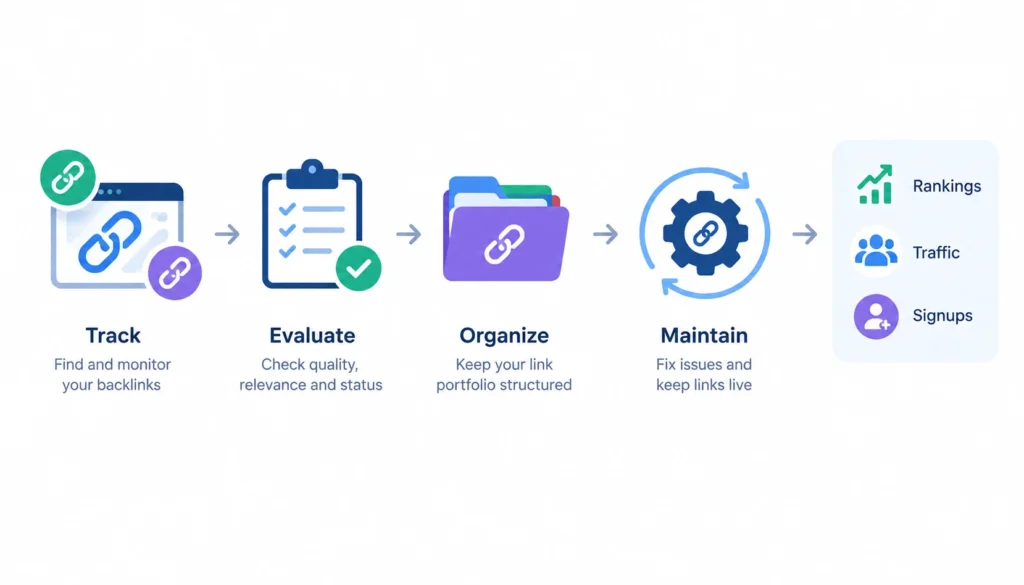
Backlink management for SaaS websites is the process of tracking, evaluating, organizing, and maintaining the external links that point to a SaaS site. It covers which links exist, where they point, whether they’re still live, and how they affect rankings, traffic, and signups.
In plain English: you know what links you have, you notice when they change, and you act on it.
1. Backlink management vs. link building
Link building is about getting new links. Backlink management is about everything that happens to those links afterward.
| Link building | Backlink management |
| Acquires links | Tracks and protects acquired links |
| Prospect-focused | Portfolio-focused |
| Outreach-heavy | Monitoring-heavy |
| Campaign-based | Continuous |
| Measures links earned | Measures retention and business impact |
You need both. Most teams only do the first.
2. Why SaaS websites need a different approach
A local bakery gets links to one homepage. A SaaS company gets links to product pages, feature pages, integration pages, comparison pages, docs, free tools, and blog posts.
A few things make SaaS different:
- Commercial keywords are competitive, so link support for money pages matters more.
- Integration ecosystems create natural partner links.
- Review sites and directories send links that vary a lot in quality.
- Products and URLs change often, which breaks links.
- Customers and partners link to you, and you have no control over when they edit their pages.
3. The SaaS backlink lifecycle
I use this sequence as a mental model:
Discover → Qualify → Acquire → Record → Monitor → Audit → Recover → Measure
Most teams stop at “Acquire.” The rest of this guide covers the steps after it.
Why Backlink Management Matters for SaaS SEO
Backlinks are one signal among many. They don’t guarantee rankings, and nobody can promise you a specific lift from a specific link. But links you’ve already earned are worth protecting, because replacing them costs time and money.
You protect what you’ve earned. Links disappear when pages are deleted, sites redesign, or editors tidy up old posts. If you don’t check, you won’t know.
You support the pages that make money. A strong link profile pointed mostly at your homepage does little for a pricing-adjacent feature page you want to rank.
You find opportunities you already have. Your partners, customers, and integration marketplaces are often linking to you in ways nobody has reviewed.
You connect links to outcomes. Once links are tracked per page and per source, you can see which ones bring visitors, trials, and demos.
Build a SaaS Backlink Inventory
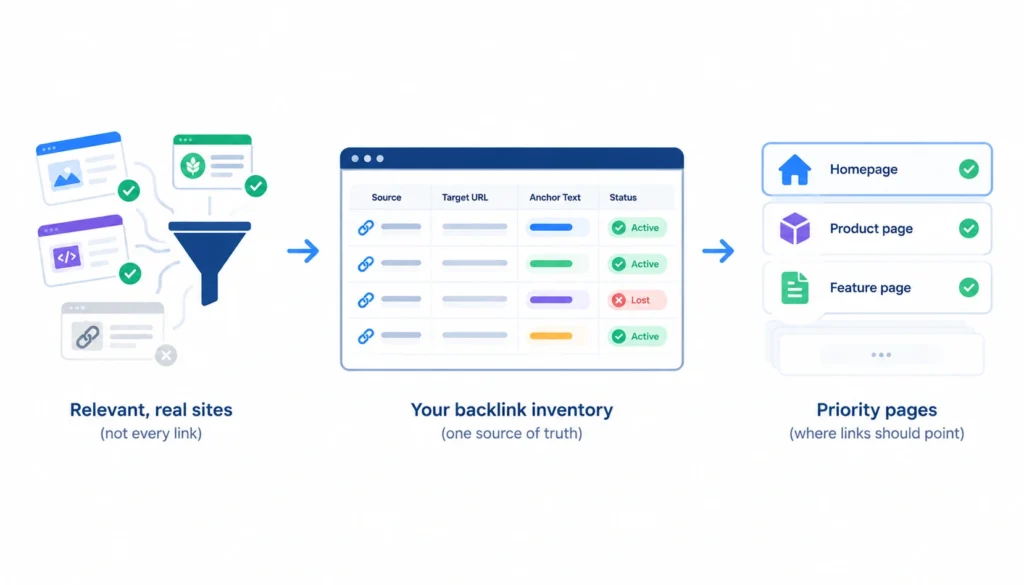
A backlink inventory is a single source of truth for the links that matter. Don’t try to log every link. Start with the ones from relevant, real sites and the ones pointing to your priority pages.
What to track
| Field | Why it matters |
| Linking domain | Identifies the referring site |
| Linking URL | The exact page the link sits on |
| Target URL | Which of your pages receives it |
| Anchor text | Helps you review anchor patterns |
| Link attribute | Follow, nofollow, sponsored, or UGC |
| Context | Editorial mention, directory listing, sidebar, footer |
| First seen | When it appeared |
| Last checked | How fresh your data is |
| Status | Active, removed, redirected, or broken |
| Referral traffic | Actual visitors it sends |
| Source or campaign | How you earned it |
| Owner | Who follows up when something changes |
The “owner” column is the one teams skip. Without it, a lost link is everyone’s problem and therefore nobody’s.
Categorize links by source
Tag each link by where it came from: customers, partners, integrations, directories, publications, blogs, review sites, communities, or digital PR. This shows you which channels produce links that last and which produce links that vanish.
Categorize links by target page
Tag each link by what it points to: homepage, product page, feature page, integration page, comparison page, use-case page, research, free tool, or blog post. You’ll use this later to spot pages with too little support.
How to Evaluate the Quality of a SaaS Backlink
Metrics like Domain Rating or Domain Authority are third-party scores. Google doesn’t use them. They’re handy for a first pass, but a “DR 70” site that has nothing to do with your market may be worth less than a small, focused blog your buyers read.
Here’s the checklist I’d use instead.
| Factor | Strong signal | Warning signal |
| Relevance | Same industry or audience | Unrelated topic |
| Organic visibility | Page and site get real search traffic | Little or no visibility |
| Context | Editorial mention inside useful content | Forced or hidden placement |
| Target page | Relevant resource for the linking page | Unrelated page |
| Anchor text | Natural wording | Repeated keyword-stuffed anchors |
| Referral traffic | Some visitors click through | Zero clicks over months |
| Link status | Live and indexable | Removed, broken, or on a deindexed page |
Two more points:
- Attributes matter. Google asks sites to mark paid links with rel=”sponsored”, user-generated links with rel=”ugc”, and links they don’t want to vouch for with rel=”nofollow”. Google’s documentation on qualifying outbound links explains this. For background on how nofollow works, see the Wikipedia article on nofollow.
- A nofollow link isn’t useless. It can still send visitors and build brand awareness. Just don’t count it the same way as an editorial link when you judge SEO impact.
For a deeper framework, this [guide to evaluating backlink quality] explains the factors to consider when deciding whether a backlink is actually valuable.
The Best Backlink Sources for SaaS Websites
This guide focuses on management, but you still need links to manage. These are the sources that fit SaaS best, and each one creates something you’ll need to track.
Integration and partner pages. If your product connects with another platform, that platform may list you in a marketplace or partner directory. These links are relevant by nature. Record them, since they often change when partners redesign.
SaaS directories and review platforms. Sites like G2, Capterra, and Product Hunt can send visitors and links, but quality varies. Some listings are nofollow or poorly indexed. Treat them as visibility and trust signals first, SEO second.
Comparison and alternative pages. Other sites write “best tools for X” roundups. Being included, with a link to the right page on your site, is worth pursuing. Make sure the link lands on your comparison or feature page, not just the homepage.
Customer and case-study links. Happy customers sometimes mention you in blog posts or on their own sites. Ask them to link to a relevant page, and log it.
Original research and data. If you publish data your industry can cite, it earns links on its own. Keep the research URL stable forever.
Free tools, calculators, and templates. These attract links because they’re useful. They also need maintenance. A broken tool loses links fast.
Unlinked brand mentions. Search for mentions of your product name without a link. A polite request to add one often works, especially when the mention is already positive.
Digital PR and expert commentary. Quotes in industry publications can earn links. Founders and product leads are usually your best sources.
Guest contributions and editorial placements. These work when you offer something useful to the audience. Avoid anything that looks like a paid placement without proper attributes.
Podcasts and events. Show notes and speaker pages often include links. They’re easy to forget, so add them to your inventory.
For a sense of what practitioners say works and doesn’t, the r/SEO and r/bigseo communities on Reddit are worth browsing. Treat anecdotes there as leads to test, not proof.
How to Monitor SaaS Backlinks
Monitoring means checking your links on a schedule and catching changes before they pile up.
1. What to monitor
- New links
- Lost links
- Broken links (your target URL returns a 404)
- Redirected links (your target URL now redirects)
- Anchor text changes
- Attribute changes (a link becomes nofollow or sponsored)
- Linking site status (offline, deindexed, or penalized). For a more detailed process, see this [backlink monitoring guide] covering how to track new, lost, broken, and changed links over time.
2. How often should you check?
There’s no official schedule. This is practical guidance based on how fast things change.
| Team type | Suggested rhythm |
| Small SaaS | Monthly check of new and lost links |
| Growing SaaS | Weekly alerts, monthly review |
| Enterprise SaaS | Continuous alerts, weekly review, quarterly cleanup |
| Agency with several clients | Weekly per client, with a shared report |
3. Manual vs. automated monitoring
Manual checking works up to a few dozen important links. Open the page, confirm the link is there, and update your sheet.
Past that, automate. Use alerts from your backlink tool for new and lost links, and a crawler to check status codes on your target URLs. Automation finds changes. A person still decides what to do about them.
How to Find and Recover Lost SaaS Backlinks
A lost link isn’t always the publisher’s fault. Often it’s yours.
Step 1: Find out why it disappeared
Common causes:
- The editor removed the link
- The linking page was deleted
- The linking site went offline or was redesigned
- Your target URL changed
- Your target URL now returns a 404
- The link became nofollow or sponsored
- The content was rewritten
Step 2: Check your own side first
Visit the old target URL. If it’s a 404, or it redirects somewhere irrelevant, the link may technically still exist but no longer help you. This is the fastest fix. Restore the page or add a proper 301 redirect to the closest relevant page.
Step 3: Contact the publisher when it makes sense
If the link was removed and the source is worth having, send a short, friendly note. Say what you noticed, ask if it was intentional, and offer something useful, like an updated stat or a better resource. Don’t pressure anyone.
Step 4: Decide whether to restore, redirect, or leave it
| Situation | Best action |
| Your page was deleted by mistake | Restore it |
| Your page was moved on purpose | 301 redirect to the new equivalent |
| Publisher removed the link, source is strong | Polite outreach |
| Linking page is gone, site is weak | Leave it |
| Link turned nofollow | Note it, don’t chase it unless the source is exceptional |
Lost-link recovery checklist
- Confirm the link is actually gone.
- Check the target URL’s status code.
- Check for a redirect chain.
- Look at the linking page’s status.
- Decide who owns the follow-up.
- Contact the publisher if the source is worth it.
- Update the inventory.
Manage Backlinks During a SaaS Website Migration
Migrations are where SaaS teams lose the most links. A rebrand or a URL cleanup can orphan dozens of links in one release.
Google’s guidance on site moves with URL changes recommends permanent (301) redirects from old URLs to their new equivalents, and keeping them in place for a long time. Google suggests at least a year.
Situations that trigger this
- URL restructuring
- Product or feature renaming
- Domain changes or rebrands
- Moving the blog to a subdomain or subfolder
- HTTP to HTTPS
- Removing old feature pages
Create a backlink migration map
Before you launch anything, do this:
- Export your top linked pages from your backlink tools and Google Search Console.
- List every URL that has external links.
- Map each old URL to the closest new URL.
- Set up 301 redirects.
- Crawl the old URLs after launch and confirm each one lands on the right page.
- Re-check your top referring domains after a few weeks.
- Ask your most important linkers to update their URL where it’s easy.
A realistic example
Say a project-management SaaS retires /features/team-collaboration and replaces it with /features/shared-workspaces. A backlink export shows 18 referring domains link to the old page, including a few integration partners.
The SEO lead maps the old URL to the new one, ships the redirect, and checks it works. They log all 18 domains in the inventory. For the three partners with the strongest pages, they email a short note with the new URL. The rest stay on the redirect. No link is lost, and nothing breaks quietly.
That’s the whole job, and it takes about an afternoon.
How to Manage Anchor Text for SaaS Backlinks
Anchor text is the clickable words in a link. Looking at the mix tells you whether your profile looks natural.
| Anchor type | Example |
| Branded | “Acme CRM” |
| Naked URL | “acmecrm.com” |
| Product or feature name | “Acme’s pipeline view” |
| Partial match | “CRM for small teams” |
| Exact match | “best CRM software” |
| Generic | “click here,” “this tool” |
Most healthy SaaS profiles lean toward brand and URL anchors, because that’s how people naturally link to a company.
What an unnatural profile can look like
- A large share of links using the same commercial phrase
- Many links with identical anchors from unrelated sites
- Sudden jumps in exact-match anchors from low-quality pages
Don’t chase a percentage
You’ll see advice like “keep exact matches under 5%.” There’s no official number. What matters is whether the pattern looks like something real editors and customers would produce. If you don’t control the anchors, don’t worry. If you did, loosen up and let the brand name do the work.
How to Manage Backlinks by SaaS Page Type
Different pages need different support. Here’s how I’d think about each.
Homepage. It will naturally collect the most links, mostly branded. That’s fine, but don’t let it be the only target.
Product pages. These are hard to earn links to directly. Support them through partners, case studies, and strong supporting content that links internally.
Feature pages. Integration and partner links often fit here. Keep URLs stable.
Integration pages. They’re the easiest SaaS-specific link asset. Marketplace listings and partner posts should point to a dedicated page, not a generic one.
Comparison and alternative pages. These earn links from roundups and review content. Keep them accurate and updated, since outdated comparisons lose trust.
Linkable assets (research, tools, templates). These attract editorial links. Protect their URLs and keep them working.
A quick audit: sort your inventory by target URL. If 70% of your links point at the homepage and your top revenue page has two, you’ve found a gap.
Backlink Management Tools for SaaS Websites
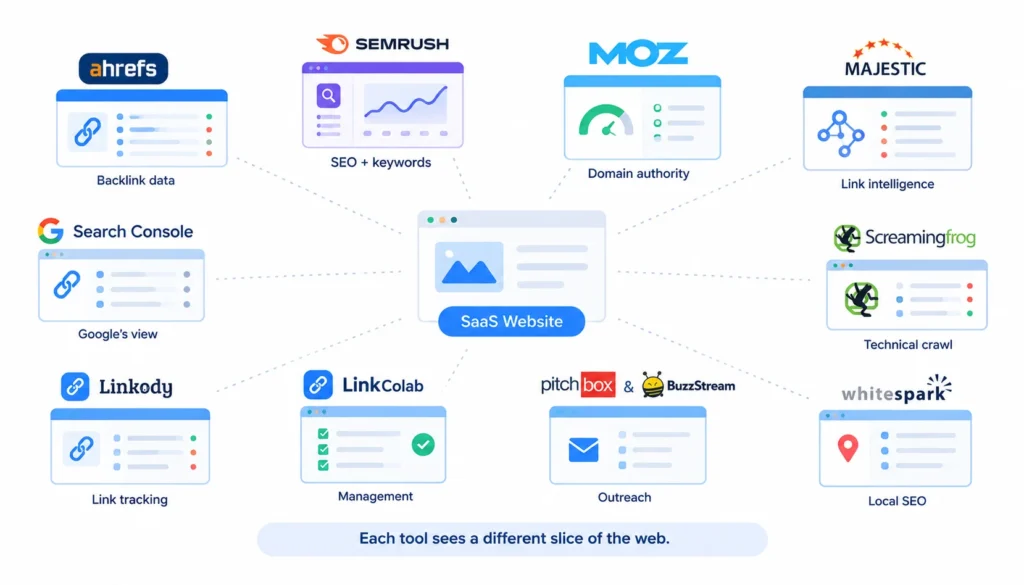
No single tool is complete. Each one sees a different slice of the web.
| Tool | Best use |
| Google Search Console | Google’s own data on links to your site. Free, but not a complete list |
| Bing Webmaster Tools | A second free source, including backlink data |
| Ahrefs | Backlink research, new and lost links, competitor analysis |
| Semrush | SEO suite with backlink auditing and monitoring |
| Moz | Link metrics and analysis |
| Majestic | Link-focused index and historical data |
| Screaming Frog | Crawling your own site to check status codes and redirects |
| Backlink management platforms (for example, LinkColab) | Organizing and monitoring links you’ve acquired in one place |
Check each platform’s current features and pricing yourself, since they change. I’d start with Search Console plus one paid tool, and add a management platform once your inventory outgrows a spreadsheet.
Google’s Links report help page explains what Search Console shows, including top linked pages and top linking sites.
SaaS Backlink Audit: A Monthly Workflow
Set aside two hours a month. Here’s the order I’d follow.
- Review new backlinks. Check relevance and anchor text. Add worthwhile ones to the inventory.
- Review lost backlinks. Note why each one disappeared and who will follow up.
- Check high-value referring domains. Make sure your best links are still live and unchanged.
- Check important commercial pages. Confirm they return a 200 status and haven’t been redirected by accident.
- Review anchor-text changes. Look for unusual patterns.
- Investigate broken and redirected URLs. Fix 404s and shorten redirect chains.
- Look at competitor link opportunities. See which relevant sites link to competitors but not to you.
- Update the inventory. Fill in status, last checked, and owner.
Once a quarter, do a deeper cleanup: remove dead entries, re-tag sources, and review whether any pattern looks risky.
If you want a step-by-step process for reviewing your entire link profile, use this [backlink profile audit guide] as a practical reference.
How to Measure Backlink Management Performance
Counting links is easy and not very useful. Measure what the links do.
| Metric | What it tells you |
| Referring domains | How many unique sites link to you |
| Link retention rate | Links still live ÷ links acquired in a period |
| Link quality mix | Share of links from relevant, editorial sources |
| Referral traffic | Visitors sent by links |
| Rankings for priority pages | Whether supported pages move |
| Organic traffic | Search visits to those pages |
| Leads, trials, demos | Conversions from referral and organic visits |
| Pipeline and revenue | Business contribution, where you can attribute it |
| Cost per worthwhile link | Spend ÷ links that meet your quality criteria |
Be careful with attribution. Rankings move for many reasons. If a page gains links and rises, the links may be part of the story, but you can’t prove they were the cause. Report trends and say what you don’t know.
SaaS Backlink Management Mistakes to Avoid
Tracking only the count. A hundred weak links aren’t better than twenty strong ones.
Treating DR or DA as quality. They’re rough filters, not verdicts.
Ignoring lost links. You can’t recover what you don’t notice.
Sending every link to the homepage. Your product and feature pages get nothing.
Ignoring migrations. One careless release can undo a year of link earning.
Building links on irrelevant sites. They add little and can look manipulative.
Overusing exact-match anchors. It looks forced.
Buying links for ranking purposes. Google’s spam policies list buying or selling links to manipulate rankings as link spam. They also name excessive link exchanges and automated link creation. If you pay for a placement, it should carry the right attributes.
Reaching for the disavow tool as routine cleanup. Google’s disavow documentation describes it as an advanced tool for cases like a manual action or a link scheme you can’t undo. Most sites don’t need it.
A Practical SaaS Backlink Management Framework
Here’s the whole system in one pass.
- Inventory. Record every important link.
- Qualify. Judge relevance and quality with the checklist above.
- Prioritize. Focus on links that support revenue-relevant pages.
- Monitor. Catch new, lost, broken, and changed links.
- Recover. Fix what you can and reach out where it’s worth it.
- Measure. Tie links to traffic, rankings, and conversions.
- Improve. Use the data to decide where to earn links next.
Where to focus by growth stage
| Stage | Focus |
| Early-stage | Directories, partners, founder-led PR, customer mentions, launches |
| Growth-stage | Integration partnerships, digital PR, comparison pages, original research, industry publications |
| Enterprise | Partner ecosystems, research campaigns, industry associations, analyst and media coverage, links across regions and products |
For background on the basics, Wikipedia’s Backlink article is a neutral place to start.
Frequently Asked Questions
What is backlink management?
It’s the ongoing work of tracking, evaluating, organizing, and maintaining the external links pointing to your site. It includes monitoring new and lost links, fixing broken targets, and measuring results.
Why is backlink management important for SaaS websites?
SaaS sites change URLs often and rely on partner, directory, and integration links. Without tracking, links break or vanish unnoticed, and priority pages go unsupported.
How do I monitor SaaS backlinks?
Combine Google Search Console with a paid backlink tool for alerts on new and lost links. Use a crawler to check your own target URLs for 404s and redirects. Log everything in an inventory with an owner for each follow-up.
How do I find lost backlinks?
Use the “lost” or “removed” report in your backlink tool and compare it against your inventory. Then check whether the cause is on your side (a changed or broken URL) or the publisher’s side.
What makes a backlink worth having for a SaaS company?
Relevance, real organic visibility on the linking page, an editorial context, a fitting target page, a natural anchor, and an active status. Referral traffic is a bonus.
Final Verdict
Good backlink management for SaaS websites isn’t complicated. It’s a habit: know what you have, check it regularly, fix what breaks, and tie it back to business results.
Start small. Build the inventory for your top 50 links, assign owners, and run the monthly audit for three months. You’ll find lost links, broken redirects, and pages that need more support, and you’ll know what to do about each one.