
Backlink management for agencies is the process of organizing, checking, monitoring, and reporting on backlinks across many client sites and campaigns. It covers where each link lives, what it points to, how good it is, who owns it, what it cost, and whether it’s still there next month.
It sounds simple until you’re running 12 clients with a few campaigns each. Then a few hundred links become a few thousand, and nobody can say which ones are still live.
This guide gives you a practical system for handling that. The core loop is centralize, standardize, verify, monitor, recover, report, measure. Backlink management is much more than checking whether a link is live. It protects the money you and your clients spend on link building.
What Is Backlink Management for Agencies?
A backlink is a link from another website to yours. Wikipedia’s overview of backlinks covers the basics if you need a refresher.
For an agency, the challenge isn’t understanding backlinks. It’s handling them at volume, for several clients, with several people touching the data. That’s what agency backlink management solves.
Backlink management vs. link building
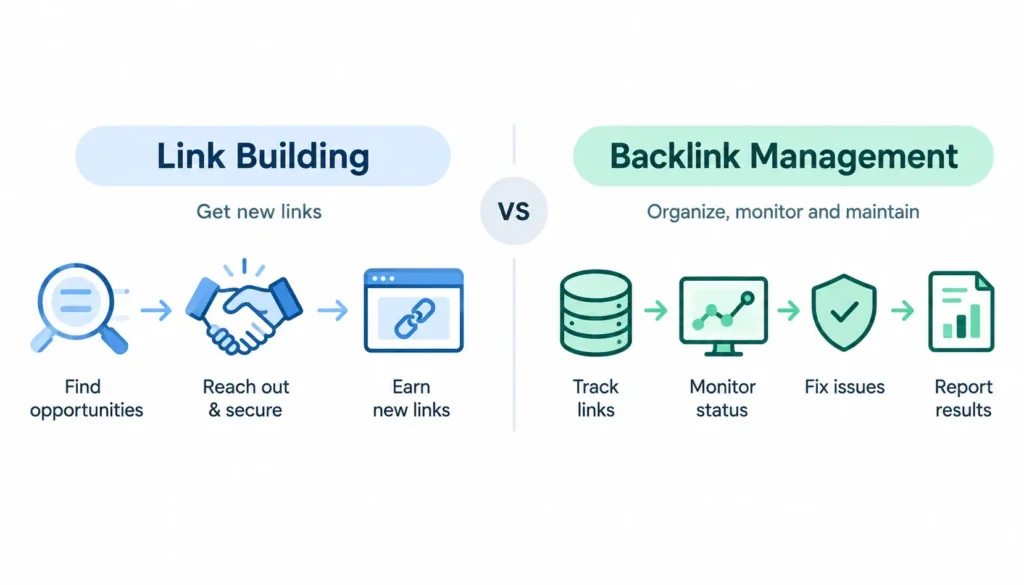
These terms get mixed up, and the confusion causes real problems when you choose tools or assign work.
| Activity | What it does |
| Link prospecting | Finds sites that might link to you |
| Outreach CRM | Tracks prospects and conversations |
| Link building | Acquires new links |
| Backlink management | Organizes and maintains the links you’ve already earned |
| Backlink monitoring | Detects changes to those links |
| Backlink audit | Evaluates the quality of a whole profile |
| Link reclamation | Recovers valuable links that were lost |
| Reporting | Communicates results to clients |
Link building gets the link. Backlink management makes sure it was worth getting and stays that way.
Backlink management vs. backlink monitoring
Monitoring answers one question: did something change? Management answers the bigger ones. Who built this link? Was it approved? Which campaign paid for it? What do we do now that it’s gone?
Monitoring is one part of management. Many tools do the first and leave the rest to you.
The backlink management lifecycle
Every link moves through the same stages:
Prospect → Acquire → Verify → Record → Monitor → Maintain → Recover → Report → Measure
The rest of this guide follows that path.
Why Backlink Management Matters for SEO Agencies
Multiple clients means multiple risks. One messy client is annoying. Twenty messy clients is a business problem.
Lost links leak value quietly. Pages get deleted, sites get redesigned, editors remove links. Without monitoring, you won’t notice until a client asks why rankings dropped. Wikipedia has a good page on link rot if you want to see how common this is on the web.
Reporting takes over your week. If someone rebuilds the same report from scratch each month, you’re paying senior salaries for copy-and-paste work.
Margins depend on it. Every hour spent hunting for a link record is an hour you can’t bill. Every lost link you don’t recover is money spent twice.
Data becomes strategy. Once your records are clean, you can see which vendors deliver, which campaigns retain links, and which link types earn their cost.
Why Google Sheets Alone Breaks Down at Agency Scale
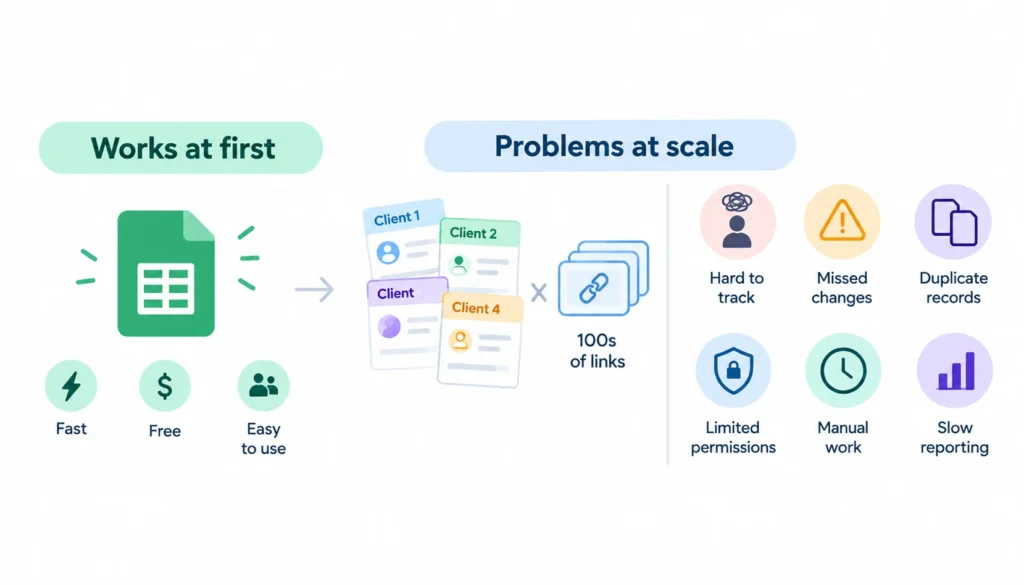
Most agencies start in a spreadsheet, and that’s fine. It’s fast, free, and everyone knows how to use it.
The trouble shows up around the time you have several clients and a few hundred links.
Where spreadsheets fail
- No automatic checks. Someone has to open each link by hand.
- Weak client separation. One wrong share and a client sees another client’s data.
- Duplicates pile up. Two people log the same link with different spellings.
- No real permissions. Everyone can edit everything.
- Reporting is manual. Every month, someone rebuilds the numbers.
- History disappears. When a status is overwritten, you lose the timeline.
When a spreadsheet is still enough
A spreadsheet works well if you have a handful of clients, a small team, and a few hundred links. It also works if you check links monthly and your reporting is simple.
When to move to dedicated software
Consider switching when you notice any of these:
- You can’t say how many links are currently live
- Lost links are found by clients, not by you
- Reporting takes more than a couple of hours per client
- More than two or three people edit the same file
- You need alerts, not just records
Spreadsheet vs. software at a glance
| Factor | Spreadsheet | Dedicated software |
| Clients | Few | Many |
| Backlinks | Hundreds | Thousands |
| Team size | 1 to 3 | 3 or more |
| Monitoring | Manual | Automatic |
| Reporting | Manual | Templates or white-label |
| Automation and API | Limited | Usually included |
| Cost | Low | Ongoing subscription |
Airtable and Notion sit in between. They give you a real database with permissions and views, without the price of a full platform.
Build a Centralized Backlink Management System
A good system rests on one idea: every link has exactly one home, and that home has a clear address.
Use a Client → Campaign → Target URL structure
Organize everything in three layers:
- Client: who you’re working for
- Campaign: why the link was built (digital PR, guest posts, reclamation)
- Target URL: which page receives the link
Each backlink then sits under a target URL, under a campaign, under a client. You can now answer “how are the links to the pricing page doing?” in seconds.
Create one source of truth
Pick one place where the official record lives. Other tools can feed it, but this is the version everyone trusts. If two documents disagree, the source of truth wins.
Separate client data
Give each client its own workspace, filter, or view. This protects confidentiality and makes client-facing reporting safe.
Standardize naming
Decide once how you’ll write client names, campaign names, and dates. “Acme Inc”, “Acme” and “ACME” become three clients in any report. Use a short naming guide and stick to it.
Set ownership
Every link needs a named owner. When a link drops, someone must know it’s theirs to handle.
The Backlink Tracking Database: What Fields Should You Track?
Here’s what a good backlink tracker holds for every link. Start with the essentials and add columns as your process matures.
| Field | Why it matters |
| Client | Account ownership |
| Campaign | Attribution |
| Source URL | Where the link lives |
| Target URL | What it points to |
| Anchor text | Anchor analysis |
| Link attribute | Follow, nofollow, sponsored, or ugc |
| Link type | Editorial, guest post, directory, etc. |
| Status | Where the link is in its lifecycle |
| First seen / acquired | Start of tracking |
| Last checked | Monitoring freshness |
| HTTP status | Whether the page loads |
| Indexable? | Whether the page can be indexed |
| Referring domain | Source-level analysis |
| Source traffic | Rough value signal |
| Quality grade | Your internal score |
| Owner | Accountability |
| Vendor | Supplier tracking |
| Cost | Financial analysis |
| Contract or expiry date | For paid or time-limited placements |
| Recovery status | Action tracking |
| Notes | Context nobody should have to guess |
You don’t need every field on day one. But cost, owner, status, and target URL are worth adding early because they’re painful to rebuild later.
One tip from experience: record the date of every status change, not just the current status. That history is how you’ll later calculate retention and vendor reliability.
Create a Standard Backlink Quality-Control Process
Quality control keeps bad links out of your database. A short checklist beats a long policy nobody reads.
Run this check on every new placement:
- Verify the source page. Does it load, and is the link visible?
- Verify the target URL. Does the link point to the right page, with no typos or redirects?
- Check relevance. Does the page’s topic fit the linked content?
- Review placement. Is the link inside real content, or buried in a footer or sidebar?
- Check the anchor. Does it read naturally and match your plan?
- Check the link attribute. Is it follow, nofollow, sponsored, or ugc, and does that match how the link was acquired?
- Check indexability. Look for a noindex tag or a canonical pointing elsewhere.
- Review traffic and authority signals. Use them as clues, not verdicts.
- Assign a grade. A simple A, B, C, or reject scale is enough.
- Decide. Approve, request a fix, or reject.
Give QA a service level, such as “every new link is checked within two business days.” It turns a vague intention into a habit.
How to Evaluate Backlink Quality for Agency Campaigns
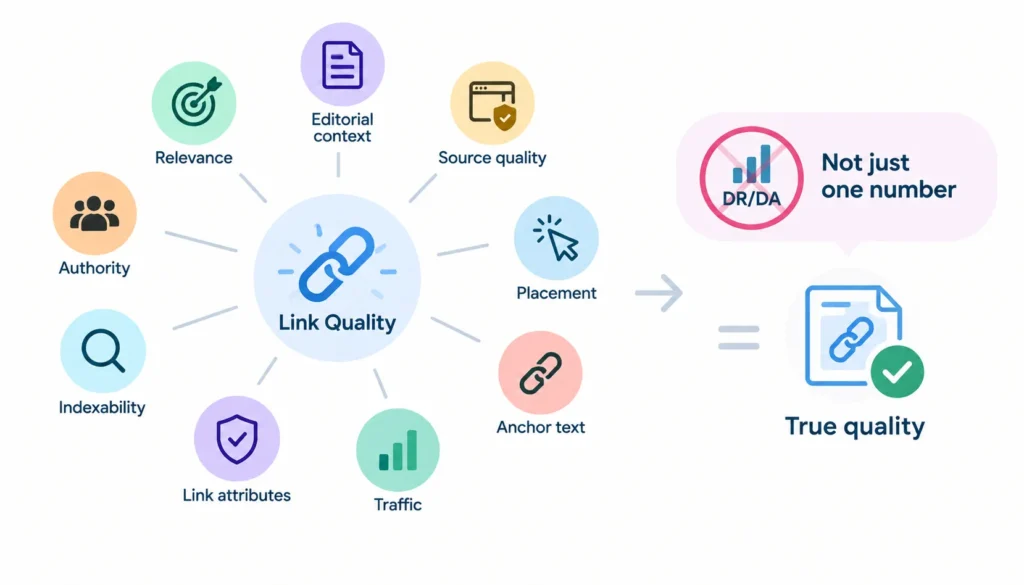
A live link is not automatically a good link. Quality is a mix of signals, and no single number tells the whole story.
Relevance. Is the linking page about something related to your client’s topic? A link from a relevant page usually beats a stronger-looking link from an unrelated one.
Editorial context. Would a real editor have placed this link without being asked? Links that sit naturally in useful content tend to be the safest and most valuable.
Source and page quality. Look at the site itself. Does it publish real content for real readers, or does it exist to sell links?
Organic traffic. A page that earns visitors is more likely to be a healthy place to be linked from. It’s a hint, not proof.
Placement. A link in the body of an article means more than a link in a sitewide footer.
Anchor text. It should be natural and varied. Watch for patterns that look forced.
Attributes and indexability. A link on a page that isn’t indexed does little for search visibility.
Why DR, DA, and similar scores shouldn’t stand alone
Domain Rating, Domain Authority, and similar scores come from third-party tools. Google doesn’t use them, and each vendor calculates them differently.
Use them to sort and compare, not to approve or reject. A high score on an irrelevant site is still an irrelevant link.
What tools can’t tell you
A tool can tell you that a link exists, what it says, and how the page scores. It can’t tell you whether the placement makes sense, whether the content is worth reading, or whether the whole thing looks like an honest recommendation. That part is human judgment.
Create a Backlink Status and Lifecycle System
Statuses turn a messy list into a workflow. Keep them few and clear.
Prospect → Outreach → Negotiation → Pending placement → Pending QA → Live → Changed → Lost → Reclamation requested → Recovered
There’s also a Rejected status for links that fail QA or fall through.
A few rules keep this clean:
- A link can only be in one status at a time.
- Moving to “Live” requires a QA sign-off.
- “Changed” means something is different (anchor, attribute, destination) and needs review.
- “Lost” must trigger a task with an owner.
If you use a database tool like Airtable, you can build this as a single-select field and automate the rest.
Assign Backlink Management Roles Across Your Agency
Links get lost because nobody was responsible for them. Fix that by defining roles.
- Link builder: finds and secures placements, logs them
- QA specialist: verifies and grades each link
- SEO strategist: decides which targets, anchors, and campaigns matter
- Account manager: communicates with the client
- Reporting owner: builds and sends reports
Here’s a simple responsibility matrix (R = does the work, A = final approval, C = consulted, I = informed):
| Task | Builder | QA | Strategist | Account manager |
| Acquire link | R | I | C | I |
| Log link | R | C | I | I |
| Approve link | I | R | A | I |
| Monitor status | I | R | I | I |
| Reclaim lost link | R | C | A | I |
| Report to client | I | C | C | R/A |
Who approves a link? Ideally someone other than the person who built it. A second pair of eyes catches problems the builder is too close to see.
How to Monitor Backlinks at Scale
Monitoring means checking your links on a schedule and flagging changes. At agency scale, this must be automated, and someone must act on the alerts.
What to monitor
- New links appearing
- Links that disappear
- Anchor text changes
- Follow/nofollow changes
- Redirects on the source or target
- 404 errors
- Noindex tags appearing on the source page
- Changes to your own target URLs (especially after site migrations)
How often to check
There’s no universal answer, but a sensible split looks like this:
| Link type | Suggested frequency |
| High-value or paid links | Daily or weekly |
| Standard campaign links | Weekly |
| Lower-priority links | Monthly |
Match the frequency to the link’s importance and cost. Checking everything daily wastes effort. Checking everything monthly means you find problems weeks late.
Set alert thresholds
Not every change deserves a page. A lost link from a strong, relevant site is urgent. A dropped directory link may not be. Decide in advance which changes trigger a message to Slack or Teams and which just go into a weekly review.
Use Google’s data as one input
Google Search Console’s Links report is a free, first-party source. Google notes it isn’t a complete list of every link, so use it alongside other tools rather than as your only record.
How to Recover Lost Backlinks
Some lost links are worth chasing, and some aren’t. Here’s how to decide and act.
- Find out why it’s gone. Was the page deleted? Was the link removed? Did the site redirect or restructure?
- Prioritize. Recover links that were relevant, high quality, or expensive first.
- Fix what you control. If the loss is caused by a broken or changed URL on your client’s site, add a redirect to the right page.
- Contact the publisher. Be short and polite. Point out the specific page, mention the change, and ask if they can restore the link.
- Replace what you can’t recover. If the link is gone for good, put a replacement on the pipeline.
- Track the result. Record whether recovery worked, and how long it took.
Not every lost link is an emergency. A low-value link disappearing from a low-quality page is often not worth the effort.
Over time, your recovery rate (links recovered divided by links lost) tells you how effective your process is.
Manage Anchor Text Across Multiple Clients
Anchor text is the clickable words in a link. Agencies usually see these types:
- Branded: the company name
- Partial match: includes a keyword phrase within a longer sentence
- Exact match: just the target keyword
- Naked URL: the bare web address
- Generic: “click here,” “this article”
Track anchor types per client so you can spot when one pattern dominates.
Be careful about chasing a “perfect” percentage. No universal ideal exists. A healthy profile depends on the client’s industry, how people naturally link to them, and how the links were earned. Patterns that look engineered are the real risk.
A good rule: write anchors the way a real editor would write them, and let variety happen naturally.
Backlink Management and Google Link Spam Policies
Your database should also help you stay on the right side of Google’s rules.
Google’s spam policies list several link practices as link spam, including buying or selling links for ranking purposes, excessive link exchanges, and automated link creation. Wikipedia’s page on spamdexing gives useful background on why search engines take this seriously.
Google’s guidance on qualifying outbound links says:
- Use rel=”sponsored” for paid or advertising links
- Use rel=”ugc” for user-generated content like comments and forum posts
- Use rel=”nofollow” when you don’t want to vouch for a link (see Wikipedia’s page on nofollow for its history)
What this means for your tracker. Record how each link was acquired (earned, paid, exchanged) and what attribute it carries. If a paid placement has no sponsored or nofollow attribute, flag it. That’s a policy concern, and you want to catch it before Google does.
Guest posting, digital PR, and outreach are all legitimate when they produce genuine editorial value. The trouble starts when the goal is mainly to manipulate rankings.
Should Agencies Disavow Toxic or Spammy Backlinks?
Usually, no.
Google’s disavow documentation says most sites don’t need the tool, and that it’s an advanced feature to use with care. Google is generally good at ignoring links it doesn’t trust.
What “toxic link” scores actually measure
Toxic scores come from third-party tools. They flag patterns those tools associate with risk. That’s useful as a hint, but it isn’t a Google verdict. A “toxic” label doesn’t mean a link is hurting anyone.
A simple decision path
- Suspicious link exists. Note it and keep monitoring.
- It looks paid or manipulative and you can reach the site. Ask for removal.
- You have a large volume of artificial links, or a manual action. Only then consider a disavow file.
Document every decision
If you do disavow, record why, when, and who approved it. Future you will be grateful.
Backlink Management Tools for Agencies
No single tool does everything. It helps to think in categories.
All-in-one SEO platforms. Ahrefs, Semrush, Moz, Majestic, and SE Ranking offer backlink data, competitor research, and reporting. They’re great for discovery and analysis, and often weaker at managing agency workflows.
Dedicated backlink monitoring tools. These focus on tracking whether specific links stay live. Linkody and BacklinkManager are examples, and some also add client organization features.
Link-building CRMs and outreach platforms. BuzzStream, Pitchbox, Respona, and Hunter manage prospects and conversations. They handle the front end of the lifecycle, not the maintenance.
Spreadsheets and databases. Google Sheets, Airtable, and Notion work as flexible trackers, especially when combined with automation.
Automation tools. Zapier and Make connect your systems and move data between them.
Reporting platforms. Looker Studio turns your data into dashboards clients can read.
How the categories compare
| Category | Best for | Multi-client | Monitoring | Outreach | Reporting | Automation |
| SEO suites | Research, audits | Varies | Partial | No | Yes | Limited |
| Monitoring tools | Link status | Often | Strong | No | Basic | Some |
| Outreach CRMs | Prospecting | Yes | No | Strong | Basic | Some |
| Spreadsheet/database | Flexible tracking | Manual | No | No | Manual | Via add-ons |
| Automation platforms | Connecting tools | n/a | n/a | n/a | n/a | Strong |
| BI/reporting | Dashboards | Yes | No | No | Strong | Some |
Features change often, so check each vendor’s current documentation before deciding. Most agencies end up combining two or three tools rather than finding one that does it all.
How to Choose Backlink Management Software
Don’t pick by feature count. Pick by how your agency actually works.
Ask these questions:
- How many clients and links do we manage now, and in a year?
- How many people need access? Can you control who sees what?
- How often do we need checks? Daily, weekly, or monthly?
- Do we need white-label reports that carry our branding?
- Is there an API or integrations for Slack, Sheets, or your project tool?
- Can we export our data if we leave? This one matters more than most people expect.
- What’s the cost per client at our size?
- Can it track vendors and costs, or only links?
Run a trial with real client data before committing. Import 100 links and see how long it takes to answer basic questions about them.
Automate Backlink Management Without Losing Human QA
Automation should remove repetitive work, not judgment.
Good things to automate:
- Link-status checks
- Alerts for lost or changed links
- Monthly report generation
- Task creation when a link is lost
- Slack or Teams notifications
- Syncing data between your tracker and other tools
Things to keep human:
- Final quality approval
- Relevance judgment
- Risk assessment
- Strategy decisions like which pages to promote
A simple example: when a link’s status changes to “Lost,” your automation creates a task for the owner, posts a message in the client channel, and sets a due date. A person still decides whether the link is worth chasing.
Client Backlink Reporting: What Should Agencies Show?
Good reports separate three types of numbers.
Activity metrics show what you did: links acquired, referring domains gained, links lost and recovered.
Quality metrics show how good the work was: relevance, source traffic, authority signals, anchor spread.
Business outcomes show what happened: traffic to target pages, ranking movement, leads, and conversions, where attribution is defensible.
A useful monthly report includes:
- A short executive summary in plain language
- New links and referring domains
- Lost and recovered links
- A quality breakdown
- Anchor and target-page distribution
- Performance of target pages
- Next month’s plan
What not to promise
Don’t promise rankings from backlink data. Links are one of many factors, and correlation isn’t always causation. Report what you did, what changed, and what you plan to do next. Be honest when results lag.
“We built 50 links” isn’t a result. It’s an activity.
How to Measure Backlink Campaign ROI
Backlink ROI has an SEO side and a business side. Track both.
Operational and financial measures:
- Cost per acquired backlink: total campaign cost divided by links secured
- Cost per retained backlink: cost divided by links still live after a set period
- Cost per qualified referring domain: cost divided by relevant domains that passed QA
- Link retention rate: links still live divided by links acquired
- Recovery rate: links recovered divided by links lost
- Campaign margin: revenue minus vendor and labor costs
Performance measures:
- Ranking movement on target pages
- Organic traffic to those pages
- Leads and conversions
A campaign with cheap links that vanish in three months may cost more per retained link than an expensive one that lasts. That’s the kind of insight only clean data gives you.
Backlinks shouldn’t be your only KPI. Content, technical health, and brand all shape results too.
Backlink Vendor and Partnership Management
If you buy placements, work with freelancers, or run exchanges with partners, track those relationships too.
- Track vendors separately from clients. A vendor works across many accounts.
- Record what was purchased or negotiated, including price and terms.
- Track expiry dates on time-limited placements.
- Track obligations, such as promised replacements.
- Score vendors on link quality, retention, response time, and policy compliance.
Over a year, this tells you which suppliers deserve more work and which ones to drop. Also record whether each placement follows Google’s link policies and carries the right attribute.
Agency Backlink Management SOP
Standard operating procedures keep quality steady when people change. Keep each one to a page.
- New link intake: how links are logged, what fields are required
- Quality control: the checklist above, plus who approves
- Monitoring: frequency, alert rules, who reviews alerts
- Lost-link reclamation: the recovery steps and timelines
- Monthly audit: a scan for duplicates, missing data, and stale records
- Client reporting: template, deadline, reviewer
- Quarterly review: vendor scores, campaign ROI, tool stack
Store these where the team will actually see them, and update them when the process changes.
Backlink Management Checklist for Agencies
Daily
- Review critical alerts
- Handle urgent lost links
- Verify new placements
Weekly
- Review status changes
- Process reclamation requests
- Check campaign progress
Monthly
- Audit link quality
- Review anchor distribution
- Update client reports
- Review campaign KPIs
Quarterly
- Review vendor performance
- Review campaign ROI
- Look at competitor link changes
- Update SOPs
- Reassess your tool stack
Common Backlink Management Mistakes Agencies Should Avoid
- Counting links instead of judging them. Volume is easy to report and easy to fake.
- Using DR or DA as the only filter. They’re helpful signals, but incomplete.
- Keeping every client in one messy file. It works until it doesn’t.
- Not recording the target URL. You’ll regret it after a site migration.
- Skipping ownership. Unowned links are unmonitored links.
- Ignoring lost links. They add up quietly.
- Reporting everything as a win. Clients notice, eventually.
- Disavowing on autopilot. Google says most sites don’t need to.
- Automating strategy. Tools can flag, people should decide.
- Leaving processes undocumented. Knowledge that lives in one person’s head walks out the door with them.
Backlink Management Example: From New Placement to Client Report
This is a fictional example to show the workflow.
A small agency manages a B2B SaaS client. The campaign is digital PR, and the target is the client’s /industry-report/ page.
- Prospect identified. A builder pitches an industry publication that covers the topic. The record is created with status “Outreach.”
- Link acquired. The publication cites the report in an article. Status moves to “Pending QA.”
- QA completed. The QA specialist confirms the link is live, points to the right URL, sits in the body copy, carries no unusual attributes, and is indexable. Grade: A. Status becomes “Live.”
- Record created. The database now holds the client, campaign, source and target URLs, anchor, date, owner, and cost (zero, since it was earned).
- Link monitored. Weekly checks confirm it’s still there. Six weeks later, an alert shows the article was moved to a new URL. The owner updates the record and the link stays live.
- Traffic measured. Analytics shows referral visits to the report page and a small rise in organic entrances over the following months.
- Campaign attributed. The record ties those results to the digital PR campaign.
- Report generated. In the monthly report, the account manager shows the link, the quality grade, the referral traffic, and the retention status, with a plain-English summary.
Every step leaves a trace in the record. That’s what makes the result explainable to a client.
Frequently Asked Questions About Backlink Management for Agencies
What is backlink management for agencies?
It’s the process of organizing, verifying, monitoring, maintaining, and reporting on backlinks across multiple client sites and campaigns, including status, quality, ownership, and cost.
How do agencies manage backlinks for multiple clients?
They use a central system organized as client, campaign, and target URL. They standardize fields, assign owners, run QA on every new link, monitor status changes, and report on a schedule.
What should a backlink tracker contain?
At minimum: client, campaign, source URL, target URL, anchor text, link attribute, status, dates, owner, cost, and notes. Add quality grade and vendor as you grow.
How often should agencies monitor backlinks?
It depends on value. High-value or paid links are worth checking daily or weekly. Standard campaign links weekly or monthly is usually enough.
What is the best backlink management software?
It depends on your size and workflow. Many agencies combine an SEO suite, a monitoring tool, and a spreadsheet or database rather than relying on one product.
Are Google Sheets enough for backlink management?
For a small number of clients and a few hundred links, yes. As volume, team size, and reporting needs grow, manual work becomes the bottleneck.
How do you monitor lost backlinks?
Use a tool or script that checks each link on a schedule and alerts you when it’s missing or changed. Then assign an owner to investigate.
How do you evaluate backlink quality?
Look at relevance, editorial context, source quality, placement, anchor text, attributes, and indexability. Treat third-party scores as supporting evidence.
Should agencies disavow spammy backlinks?
Usually not. Google says most sites don’t need the tool. Consider it only for large-scale artificial links or a manual action.
What metrics should agencies report to clients?
Links acquired, referring domains, lost and recovered links, quality breakdown, target-page performance, and business outcomes where attribution is defensible.
What is the difference between backlink management and link building?
Link building acquires links. Backlink management organizes, verifies, monitors, and protects them afterward.
Can backlink management be automated?
Partly. Status checks, alerts, task creation, and reporting can be automated. Approval, relevance, risk, and strategy should stay with people.
Final Takeaway
Backlink management for agencies isn’t just keeping a list of links. It’s an operating system that protects the money and effort your team puts into link building.
Start small. Give every link a home, an owner, and a status. Add QA, monitoring, and recovery as you grow. Report honestly, and measure what each link costs and what it delivers.
When the data is clean, the decisions get easier.