
Most people check their backlinks when something goes wrong. Rankings drop, a link vanishes, or a strange spike shows up in a report. By then you’re reacting instead of managing.
This backlink management checklist gives you a repeatable system instead. It follows one lifecycle: Inventory → Evaluate → Verify → Monitor → Diagnose → Recover or Remove → Measure → Repeat. Each step has clear checks, a suggested frequency, and a decision rule for what to do when a check fails.
What Is Backlink Management?
Backlink management is the ongoing process of tracking, evaluating, verifying, and maintaining the links that point to your website. It covers finding new links, checking their quality and technical status, recovering lost ones, handling harmful ones, and measuring whether your links help rankings, traffic, and revenue.
A backlink is simply a link from another website to yours. Search engines have used links as a signal since Google’s early days, when PageRank treated links as a kind of vote. Search has changed a lot since then, but links still matter, and they still need looking after.
1. Backlink management vs. backlink monitoring
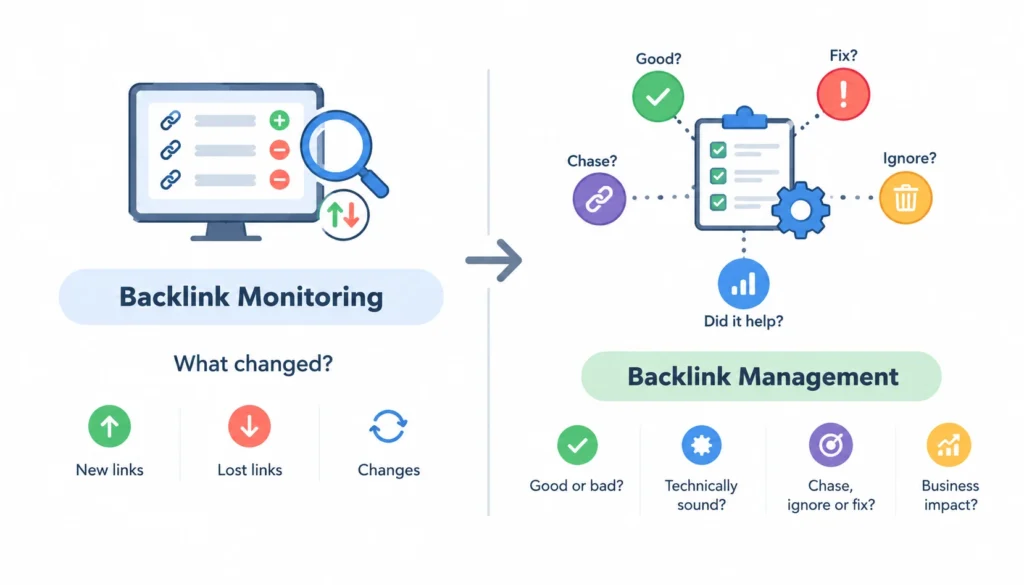
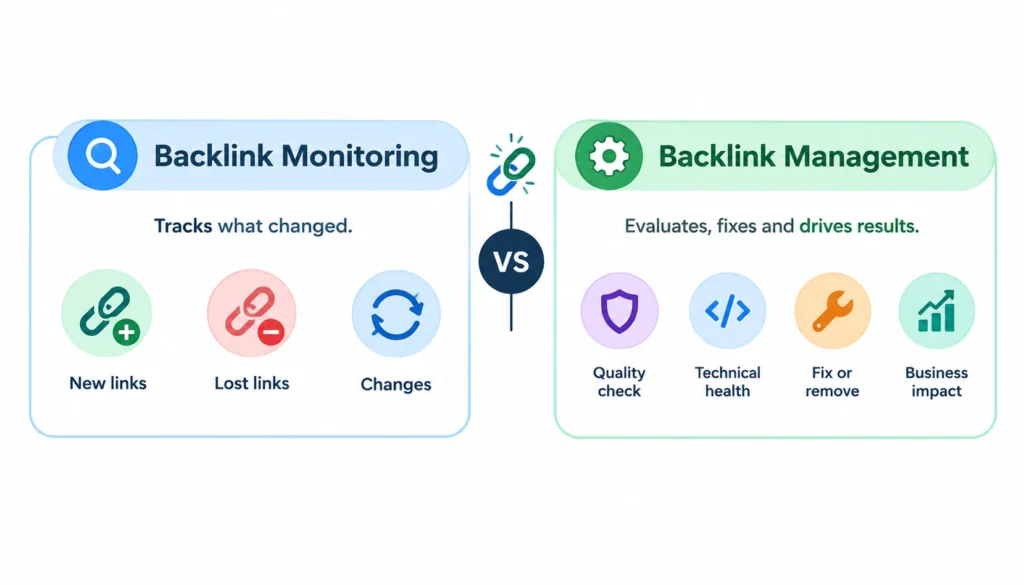
Monitoring is one part of management. It answers one question: what changed?
Management answers the next ones. Was the change good or bad? Is the link technically sound? Should you chase it, ignore it, or fix it? And did it do anything for the business?
2. Why backlink management matters
Links are not permanent. Pages get deleted, sites get redesigned, and editors remove links during updates. This slow loss is sometimes called link rot, and it happens to every site.
Without a system, you won’t know which links disappeared, which new ones are worth keeping, or which ones deserve a closer look. A good process also stops you from overreacting to links that look odd but cause no harm.
3. What a healthy backlink profile looks like
There’s no perfect formula, but healthy profiles tend to share a few traits:
- Links come from sites that are related to your topic.
- Most links sit inside editorial content, written by people who chose to link.
- Anchor text looks varied and natural.
- Links point to pages that deserve them, not only your homepage.
- New links arrive at a fairly steady pace.
- No single source or tactic dominates the profile.
The Complete Backlink Management Checklist
1. Build your backlink inventory
You can’t manage what you haven’t written down. Start by exporting backlinks from Google Search Console and at least one third-party tool such as Ahrefs, Semrush, Moz or Majestic. Each tool has its own crawler, so each one sees a different slice of the web.
Merge the exports into one spreadsheet. For every link, record:
- Referring domain
- Linking page URL
- Target URL on your site
- Anchor text
- Link attribute
- First-seen and last-seen dates
- Source (campaign, outreach, organic, unknown)
- A short note on relevance or traffic
That sheet becomes your single source of truth. Update it each month, and add a “decision” column (keep, monitor, investigate, recover, remove) so your reasoning is on file.
2. Check new backlinks
Review new links every week. For each one, ask a few quick questions:
- Did we expect this link, or did it come out of nowhere?
- Is the referring site related to our topic?
- Is the linking page related to the page it links to?
- Is the link placed inside editorial content?
- Is the page indexed, and is the link live?
- Does it point to the right URL?
Most new links will pass in under a minute. The few that don’t are the ones worth your time.
3. Evaluate backlink quality
Quality is a judgment call, not a single number. These are the factors to weigh.
Relevance. Does the linking page cover a topic close to yours? A link to a payroll tool from an accounting blog makes sense. The same link from a casino review page does not.
Source-site quality. Does the site publish original work, have real editors, and look like something a person would use? Sites that exist only to sell links usually don’t.
Page-level quality. A strong domain can still host weak pages. Check the exact page that links to you. Is it useful, well written, and kept up to date?
Organic visibility. A page that ranks and gets search traffic is a better home for your link than one nobody visits. Your SEO tool will show estimated organic traffic for most pages.
Editorial standards. Did the author link to you because your page helped the reader? Or does the page read like it was written to hold links?
Outbound-link patterns. A page that links out to dozens of unrelated sites in a paragraph or two is a warning sign.
Referral potential. Could a real reader click this link and find it useful? If yes, the link has value beyond SEO.
Here’s a quick example. Imagine two links.
Link A comes from a mid-sized industry blog, in a paragraph that cites your research. The domain rating is modest. The page gets steady search traffic, and a few visitors reach your site each week.
Link B comes from a high-DR site, but it’s one of 80 outbound links in a sidebar list of “partners,” on a page with almost no traffic. The score looks impressive and the link is worth very little.
Link A is the better one to keep and learn from.
4. Review anchor text distribution
Anchor text is the clickable text of a link. It tells readers, and search engines, what the linked page is about. Common types include:
| Anchor type | Example |
| Branded | “Acme Analytics” |
| Naked URL | “acmeanalytics.com” |
| Partial match | “analytics tools for retailers” |
| Exact match | “retail analytics software” |
| Generic | “click here”, “this site” |
| Image | Alt text of a linked image |
Look at the profile as a whole. A natural profile usually leans on brand names and URLs, with a mix of other types. A pile of identical exact-match anchors pointing at one money page looks forced.
There’s no official percentage to hit, so ignore anyone who sells a magic ratio. Compare your profile with your competitors’ and with your own history. Look for sudden changes.
5. Verify link placement
Where a link sits on the page tells you a lot about it. Check:
- Is it in the main body of the content?
- Does the surrounding paragraph make sense with your link in it?
- Does the anchor text read naturally?
- Is it in a footer, sidebar or author box shared across many pages?
- How many other outbound links are on the page?
Links inside relevant body copy usually carry the most weight with readers. Site-wide footer links rarely do.
Technical Backlink Verification Checklist
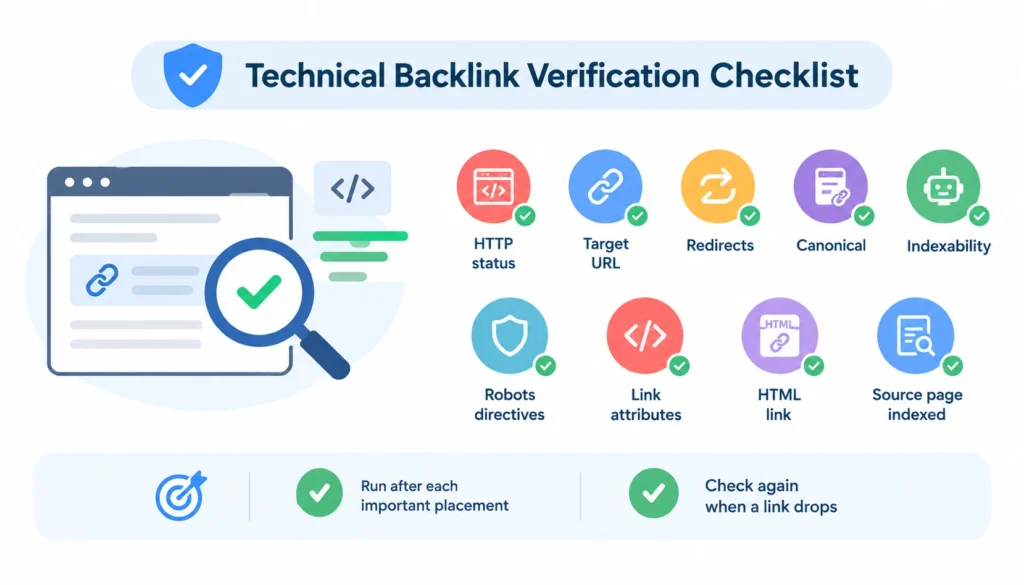
A link can look perfect on screen and still fail in the code. This is where many people skip a step, and it’s where you catch quiet problems. Run these checks on the linking page after every important placement, and again whenever a link drops out of your reports.
1. Check the HTTP status
The linking page should return a 200 status. A 404 or 410 means the page is gone, so the link is gone too. A 5xx error may be temporary, so recheck a few days later before you mark it lost.
2. Check the target URL
Confirm the link points to the URL you intended. Typos, old URLs and tracking parameters happen more often than you’d think. If it points at a dead page on your own site, fix that on your side.
3. Check redirects
On your site, a 301 redirect from an old URL to a new one usually passes the link’s value along. Chains of several redirects waste crawl effort and can break. Point links at the final URL when you can.
4. Check canonicalization
Look at the canonical tag on the linking page. If it points to a different URL, search engines may treat that other page as the main version. Your link may then be credited to the canonical page, or not counted at all.
5. Check indexability
Search the linking URL in Google using the site: operator, or inspect it in a crawler. A page that isn’t indexed is much less likely to pass anything useful. If you control the placement, give new pages a little time and check again.
6. Check robots directives
Look for a noindex meta tag or an X-Robots-Tag header on the linking page. Also check whether the page is blocked in the site’s robots.txt file. Blocked or nonindexed pages weaken the value of a link.
7. Check rel attributes
View the page source and find your link’s <a> tag. Look for a rel value.
- nofollow tells search engines the site doesn’t vouch for the link.
- sponsored marks paid or affiliate links.
- ugc marks links in user-generated content such as comments and forums.
Since 2019, Google has treated these as hints rather than strict commands. You can read the details in Google’s guidance on qualifying outbound links and the Wikipedia entry on nofollow.
A nofollow link is not worthless. It can still send visitors, build awareness and make your profile look natural. But if you paid for a link that should have been a normal one, ask for a fix. And if the link is meant to be paid, make sure it’s labeled sponsored.
8. Confirm it’s a real HTML link
Search engines need a standard <a href> element. Links created only through JavaScript click handlers, or inside images with no anchor tag, may not be crawled. Use “view source” or a crawler to confirm the link exists in the HTML.
7. Check whether the source page is indexed
This is worth repeating because it’s the check most often skipped. Use Google Search Console’s URL Inspection tool for pages you own, and the site: search or a crawler for pages you don’t.
Backlink Monitoring Checklist
Monitoring turns all of this into a routine. Set it up once, then let the alerts do the first pass.
1. Monitor new backlinks
Turn on new-backlink alerts in your main tool. Review them weekly and log them in your inventory.
2. Monitor lost backlinks
Set up lost-link alerts too. Treat any loss pointing to an important page as a task, not a notification.
3. Monitor changed backlinks
Sometimes a link doesn’t vanish. Its anchor changes, a nofollow gets added, or the target URL gets swapped. Compare your latest export with the last one.
4. Monitor referring-domain growth
Total backlink counts can mislead. One site with 3,000 footer links inflates the number without adding much. Referring domains give a clearer view of how many separate sites vouch for you.
5. Monitor anchor-text changes
Watch for a sudden rise in one exact-match anchor. It may point to a campaign gone wrong, or to someone else’s spam.
6. Monitor suspicious link spikes
A large jump in links from unfamiliar low-quality sites needs a look. Most are harmless noise. A few signal a bad vendor or a negative campaign.
7. Monitor important target pages
Your top landing pages, product pages and best content deserve their own watch list. A lost link here costs more than a lost link to an old blog post.
8., Set up alerts
Use the alert features in Ahrefs, Semrush or your tool of choice. Add a weekly calendar reminder as a backup, because alerts get ignored.
How Often Should You Audit Your Backlinks?
For most sites, a weekly, monthly and quarterly rhythm works well. Smaller sites can slow this down. Large sites or active link campaigns may need more.
Weekly backlink checks
- Review new links
- Review lost links
- Look for major changes or spikes
- Check links from active campaigns
Monthly backlink review
- Update your inventory
- Review link quality for new links
- Check anchor distribution
- Review referring-domain growth
- Look at competitor link wins
- Note new link opportunities
Quarterly backlink audit
- Audit the full profile
- Compare with the previous quarter
- Work through the lost-link recovery list
- Review risk and suspicious links
- Measure performance and return on spend
When to run an immediate audit
Don’t wait for the calendar if any of these happen:
- Rankings or traffic drop suddenly
- You get a manual action notice in Search Console
- Your link count spikes without explanation
- You migrate or redesign your site
- You finish a large link-building push
How to Identify Problematic Backlinks
Plenty of links look strange. Few are actually a problem. Learn the difference before you start cleaning anything.
Warning signs
- Spammy or irrelevant domains: a site with no clear topic, no real content, or text that reads as machine-spun.
- Link schemes: Google’s spam policies describe link spam, including buying or selling links that pass ranking credit and excessive link exchanges.
- Excessive exact-match anchors: dozens of identical commercial anchors from unrelated sites.
- Suspicious velocity: hundreds of links appearing within days, with no campaign or press hit to explain it.
- Link farms and private blog networks: groups of sites that exist mainly to link to each other. See the Wikipedia overview of link farms.
- Thin linking pages: pages with a few lines of text and a long list of outbound links.
- Odd outbound patterns: a page that links to payday loans, supplements and your SaaS tool in the same paragraph.
Why a low DA or DR link isn’t automatically harmful
Domain Authority (DA), Domain Rating (DR) and Trust Flow are scores from Moz, Ahrefs and Majestic. They are useful for comparing sites. They are not Google ranking factors, and Google doesn’t use them.
A small, relevant blog with a low score can send you better readers than a famous site with a link buried in the footer. Low authority does not equal harmful.
Should You Remove or Disavow a Backlink?
This is the section where people make expensive mistakes. Google says most sites don’t need the disavow tool. Its disavow help page explains that the tool is mainly for sites with a large number of spammy or artificial links, where those links have caused or are likely to cause a manual action. It also warns that using it incorrectly can hurt your search performance.
So work through it step by step.
Step 1: Investigate the backlink
Open the page. Read it. Check the technical details covered above. Ask who placed the link and why.
Step 2: Check whether it breaks Google’s policies
Is this a paid link without a sponsored label? A link from a network built for ranking manipulation? Or is it just a low-quality page that nobody cares about? Only the first two are real concerns.
Step 3: Try to get it removed
If you or a vendor created the link, contact the site owner and ask for removal or a nofollow/sponsored attribute. Keep a record of each attempt.
Step 4: Decide whether disavow is necessary
Consider it only if you have a large set of artificial links, you can’t get them removed, and you have a manual action or a real risk of one. Anything short of that, leave it alone.
Step 5: Document the decision
Write down what you found, what you did and why. Your future self will be grateful, and so will anyone who inherits the account.
When not to disavow
- The link is just low-DA or low-traffic.
- The site looks a bit odd but you see no sign of manipulation.
- You’re reacting to a tool’s “toxic score” without reading the page.
- You haven’t seen any manual action or unnatural-link issue.
Automated toxicity scores are a starting point for investigation. They are not a verdict.
Lost Backlink Recovery Checklist
Lost links are worth chasing because someone already decided your content was worth citing. Getting a link back is usually easier than earning a new one.
Here’s a typical case. You notice a link from an industry guide has dropped out of your report. You open the page and find it now returns a 404. The publisher redesigned the site and the old URL didn’t carry over. You email them, point to the new URL, and they restore the link a week later. You recheck it a few days afterward and update your inventory.
That’s the whole loop: found, diagnosed, contacted, restored, verified.
1. Find the lost link
Pull the lost-link report from your tool. Cross-check against the linking page itself, because tools sometimes mark a link lost when their crawler simply failed to reach it.
2. Work out why it disappeared
The usual causes:
- The linking page was deleted
- The page URL changed
- The site was redesigned or migrated
- The editor removed the link
- The link now redirects somewhere else
- The linking page was deindexed
- Your own target page was deleted, moved or changed
The last one is yours to fix. If your page is gone, restore it or add a 301 redirect to the closest relevant replacement.
3. Prioritize what to recover
Sort lost links by:
- Relevance of the source
- Quality of the referring domain
- Referral traffic it was sending
- Importance of the target page
- How easy recovery looks
Start at the top of that list and stop when the effort outweighs the value.
4. Contact the publisher
Keep the email short and friendly. Say which page used to link to you, what changed, and offer the working URL. Don’t guilt-trip. Many removals are accidents.
5. Fix your own redirects and pages
If the problem sits on your site, repair it before you email anyone. Broken targets and redirect chains are common and fully within your control.
6. Verify the recovered link
When the link comes back, run through the technical checks again. Confirm the status, the target URL, the attribute and the anchor text. Then update the inventory.
Competitor Backlink Management Checklist
Your competitors’ links show you which sites in your space are willing to link out. Review them as part of your regular routine, not as a one-off project.
- Pick three to five real competitors. Use the sites that rank for the searches you care about, not just the brands you know.
- Export their referring domains. Do this monthly or quarterly.
- Spot recent wins. Which sites linked to them in the last few weeks?
- Run a link-gap report. Find domains that link to two or more competitors but not to you.
- Sort each link by type. Digital PR, guest contributions, resource pages, partnerships, directories, reviews, podcasts, industry publications.
- Separate replicable links from relationship-based ones. A listing on a public resource page is something you can pursue. A link earned through a ten-year partnership isn’t.
Then add the best opportunities to your outreach list with a clear reason each site should link to you.
Backlink Performance Measurement
Counting links is easy. Knowing whether they helped is the hard part.
Metrics to track
| Metric | What it tells you |
| Referring domains | How many separate sites link to you |
| New backlinks | How fast you’re acquiring links |
| Lost backlinks | How much link decay you’re facing |
| Anchor distribution | Whether your anchor profile looks natural |
| Referral traffic | How many real visitors links send |
| Organic visibility | Whether rankings and impressions are moving |
| Conversions | Whether linked traffic leads to business results |
| Link retention | How long links stay live |
| Acquisition cost | What each link costs in time or money |
| ROI | Whether the whole effort pays for itself |
Why DA and DR shouldn’t be your only KPIs
A rising DR looks nice in a report, but it doesn’t tell you whether more people find you or buy from you. Pair authority scores with traffic, rankings on the target page, and conversions. If a link campaign lifts DR and nothing else, question it.
How to use Google Search Console
Search Console’s Links report shows your top linked pages, top linking sites and top linking text. It’s free and comes straight from Google. But Google’s Links report help page states that the report isn’t a complete list of every link to your site. Treat it as a reliable sample.
How to combine Search Console with third-party tools
Use both. Search Console tells you what Google chooses to show. Tools like Ahrefs and Semrush give you deeper history, lost-link tracking and competitor data. Together they cover each other’s gaps.
DA vs. DR vs. Trust Flow
| Metric | Provider | What it measures | How to use it |
| DA | Moz | Estimated domain-level authority | Compare sites |
| DR | Ahrefs | Backlink-based domain strength | Compare sites |
| Trust Flow | Majestic | Trust-oriented link quality signal | Supporting signal |
None of these are Google scores. Use them to compare, never as the final word.
Best Tools for Backlink Management
You don’t need every tool. Most teams do fine with Search Console plus one paid platform and a crawler.
| Tool | Best for |
| Google Search Console | Free link data straight from Google, top linking sites and anchors |
| Ahrefs | Backlink discovery, new and lost links, competitor analysis, alerts |
| Semrush | Backlink audits, competitor research, monitoring and reporting |
| Moz | Link analysis and DA-based comparisons |
| Majestic | Trust Flow, Citation Flow and link history |
| Screaming Frog SEO Spider | Crawling pages to verify status codes, redirects, canonicals and link attributes |
A simple free vs. paid stack
Free: Search Console, Google Analytics, a spreadsheet, and the free tier of any crawler or backlink checker.
Paid: one major backlink database, plus a crawler for technical checks. Add a second database only if your budget allows. Each one sees different links, so the overlap is never complete.
Check current pricing and plan limits on each vendor’s site, since they change often.
Backlink Management Checklist by Frequency
Weekly
- Review new links
- Review lost links
- Look for suspicious spikes
- Check links from active campaigns
- Check links to critical target pages
Monthly
- Review link quality
- Check anchor distribution
- Review referring-domain growth
- Check competitor links
- Log new link opportunities
- Review referral traffic
Quarterly
- Run a full backlink audit
- Work through link reclamation
- Do a risk review
- Compare with the last quarter
- Analyze performance
- Review ROI
Backlink Management Decision Tree
Use this when a new or unusual link lands in your report.
For a new backlink:
- Is it relevant? If not, investigate.
- If yes, is the source and page trustworthy? If not, monitor and investigate.
- If yes, is the link technically valid? If not, ask the publisher for a correction.
- If yes, add it to monitoring and your inventory.
For a problematic link:
- Can you get it removed? If yes, request removal.
- If no, does it meet Google’s criteria for disavow (large-scale artificial links with manual-action risk)? If no, don’t disavow.
- If yes, consider a carefully scoped disavow and document it.
Common Backlink Management Mistakes
Focusing only on DA or DR. These scores don’t tell you whether a link is relevant, editorial or useful.
Treating every low-quality link as toxic. Most weak links are simply ignored by search engines.
Ignoring lost links. A quiet leak of good links adds up over a year.
Never checking link attributes. A nofollow you didn’t expect can change what a placement is worth.
Ignoring page-level relevance. The domain might fit, but the page may not.
Watching only the total backlink count. Referring domains and quality say more.
Using one database. Every tool misses links. Cross-check at least two sources.
Checking only when rankings fall. By then, the cause is harder to trace.
Building links without tracking cost. If you don’t know what a link costs and what it returns, you can’t improve.
Disavowing on a hunch. Google warns against it. Get evidence first.
If you want to see how other practitioners handle these problems, the r/SEO and r/bigseo communities on Reddit often discuss real audit and disavow cases. Treat the advice as anecdotal and verify it against Google’s own documentation.
Master Backlink Management Checklist
Copy this list into your own document and tick items off as you go.
1. Inventory
- Export backlinks from Search Console
- Export backlinks from at least one third-party tool
- Merge exports into one sheet
- Record referring domain, linking URL and target URL
- Record anchor text and link attribute
- Record first-seen and last-seen dates
- Add a decision column (keep, monitor, investigate, recover, remove)
2. Quality and relevance
- Check topical relevance of the site
- Check relevance of the exact linking page
- Review page-level quality
- Check estimated organic visibility
- Look at outbound-link patterns
- Confirm editorial placement
- Note referral potential
3. Anchor text
- Categorize anchors (branded, URL, partial, exact, generic, image)
- Compare the mix to competitors and your own history
- Flag sudden anchor spikes
4. Technical verification
- Confirm the linking page returns 200
- Confirm the link points to the right URL
- Check redirects and chains
- Check the canonical tag
- Check for noindex and robots blocks
- Check rel attributes
- Confirm a real HTML <a href> link
- Confirm the source page is indexed
5. Monitoring
- Turn on new-link alerts
- Turn on lost-link alerts
- Compare exports for changed links
- Track referring-domain growth
- Watch important target pages
6. Problem-link handling
- Investigate suspicious links manually
- Check them against Google’s spam policies
- Request removal where you can
- Disavow only with clear justification
- Document every decision
7. Lost-link recovery
- Verify the link is truly gone
- Diagnose the cause
- Prioritize by value and recoverability
- Fix your own redirects and target pages
- Contact the publisher
- Re-verify the restored link
8. Competitors
- Export competitor referring domains
- Review recent competitor wins
- Run a link-gap analysis
- Sort opportunities by type and effort
9. Performance and reporting
- Track referral traffic from links
- Track ranking changes on linked pages
- Track conversions
- Calculate acquisition cost and ROI
- Send a monthly summary
- Run a full quarterly audit
Frequently Asked Questions
What is backlink management?
It’s the ongoing work of tracking, evaluating, verifying, maintaining and measuring the links that point to your website. It goes beyond monitoring by including quality checks, technical verification, recovery and reporting.
How do I manage backlinks?
Build an inventory, review new and lost links weekly, evaluate quality and technical status, handle problem links carefully, recover valuable losses, and measure results. Repeat the cycle on a schedule.
How often should I audit backlinks?
Check new and lost links weekly, review quality and anchors monthly, and run a full audit quarterly. Audit immediately after a traffic drop, a manual action, a migration or an unexplained link spike.
How do I check backlink quality?
Look at relevance, the quality of the linking page, organic visibility, editorial context, outbound links and referral potential. Use DA and DR only to compare sites, not to decide.
Are low-quality backlinks always harmful?
No. Many weak links are simply ignored. Concern is warranted when you see clear signs of manipulation, such as paid links without labels, link networks, or large unnatural patterns.
Final Thoughts
A good backlink management checklist doesn’t need to be complicated. It needs to be used. Start with the inventory, add the weekly checks, and build the monthly and quarterly routines as you go.
Keep your judgment ahead of the tools. Authority scores are helpful but incomplete, odd-looking links are usually harmless, and the disavow tool is a last resort. If you stay consistent, you’ll spot problems early, win back links you would have lost, and know which ones actually move your business forward.