
Most advice on backlinks is about getting more of them. Far less is about looking after the ones you already have. That gap is where most backlink management mistakes happen.
Good backlink management is not about collecting the biggest number of links. It is about knowing which links matter, which ones need attention, and which ones you can safely ignore.
This guide gives you a simple five-step process: find, evaluate, prioritize, fix, monitor. It covers the ten mistakes I see most often, a way to audit your profile, and a decision table for the question everyone eventually asks: should I keep this link, remove it, or disavow it?
What Are Backlink Management Mistakes?
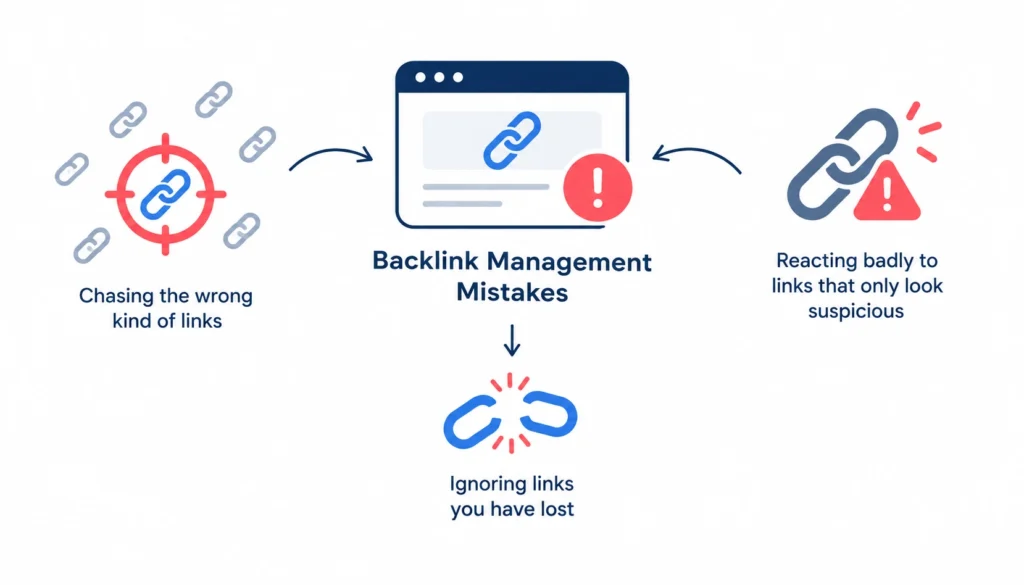
Backlink management mistakes are errors in how you build, review, or maintain the links that point to your site. They include chasing the wrong kind of links, ignoring links you have lost, and reacting badly to links that only look suspicious.
A backlink is simply a link from another website to yours. Search engines have used links as a signal since the early days of PageRank, so what you do with them still matters.
It helps to separate three types of problems:
- Building mistakes: getting the wrong links in the first place, such as buying them.
- Management mistakes: neglecting links after you have them, such as ignoring lost links.
- Audit mistakes: misreading your profile, such as disavowing links that were never a problem.
Why backlink management matters after you earn a link
A link is not a trophy you win once. The page linking to you can be deleted. Your own target page can move or return a 404. A link can be changed to nofollow, or swapped for a competitor.
If nobody checks, you lose links quietly. You also miss the early warning signs when something strange starts pointing at your site.
10 Common Backlink Management Mistakes
Here is the short version, followed by the detail on each one.
- Chasing backlink quantity
- Buying links meant to manipulate rankings
- Over-optimizing anchor text
- Ignoring topical relevance
- Building links from the same type of site
- Sending most links to the homepage
- Ignoring lost, broken, and redirected backlinks
- Treating every suspicious backlink as toxic
- Disavowing without investigating
- Treating backlink management as a one-time audit
1. Chasing backlink quantity instead of quality
Total backlink count is easy to report and easy to inflate. That is why it is such a poor goal.
Imagine two sites. One has 500 links from thin directories and scraped pages. The other has 30 links from industry publications that actually cover its topic. The second site almost always has the stronger profile, because those links come from real editorial decisions.
Track referring domains (the number of unique sites linking to you) alongside total links. One site linking to you 400 times from its footer is still one referring domain.
How to fix it: set quality criteria before you pursue any link. Ask whether the site is relevant, whether a real person would click the link, and whether you would be happy for the link to exist if search engines did not.
2. Buying links that are meant to manipulate rankings
Google’s spam policies list buying or selling links for ranking purposes as link spam. The same policy also covers excessive link exchanges, automated link creation, and large-scale guest posting campaigns with keyword-rich anchors.
That does not mean every paid placement is forbidden. Sponsored content and advertising are normal. The problem is paid links that pass ranking credit without being labeled.
Google’s guidance on qualifying outbound links says paid links should use rel=”sponsored” (or nofollow), and user-generated links should use rel=”ugc”.
How to detect it: look for link packages on your invoices, groups of links that appeared on the same day, and placements on sites that openly sell “guest post” slots.
How to fix it: ask the site to add the right attribute or remove the link. Stop buying links that depend on passing ranking credit.
3. Over-optimizing anchor text
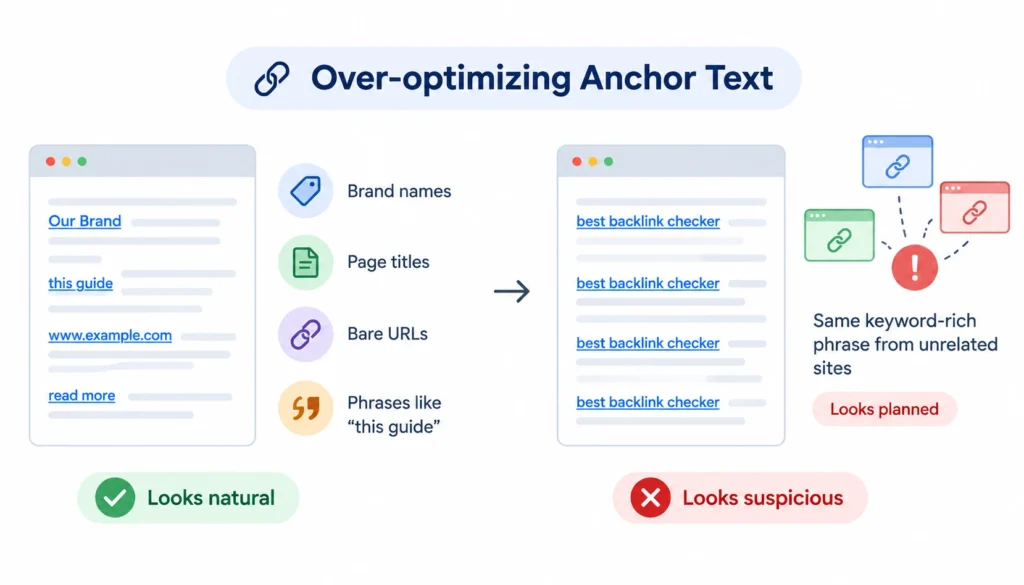
Anchor text is the clickable words of a link. People link naturally with brand names, page titles, bare URLs, and phrases like “this guide.” They rarely all use your exact target keyword.
When many links from unrelated sites repeat the same keyword-rich phrase, the pattern looks planned. This is especially true if the links come from paid or guest-post placements.
What a natural anchor-text profile looks like
Expect a messy mix: your brand name, your domain, partial phrases, generic words, and the occasional exact match. There is no magic percentage, and anyone quoting one is guessing.
What matters is the context. An exact-match anchor inside a genuine editorial mention is fine. The same anchor repeated across fifty low-grade guest posts is a pattern worth fixing.
How to fix it: you rarely control other people’s anchors, so adjust what you do next. When you earn or request links, let the publisher write the anchor naturally. Lean toward brand and descriptive phrases in future outreach.
4. Ignoring topical relevance
A link from a site that covers your subject tells search engines something useful. A link from a site with no connection to you tells them very little.
Here is a quick comparison. A software company gets a link from a respected industry blog, inside an article that discusses the problem the software solves. Separately, it gets a link in the sidebar of a travel coupon site. Both count as backlinks. Only one is worth planning around.
Irrelevant links are usually harmless on their own. The mistake is spending time and budget to get more of them.
How to fix it: judge relevance at three levels: the site, the page, and the text around the link.
5. Building links from the same type of site
If every link comes from guest posts, or every link comes from directories, your profile is fragile. A single change in how search engines treat that source can undo your work.
A healthy profile usually includes several sources: editorial mentions, digital PR, industry publications, resource pages, partnerships, and real customer or community mentions.
How to fix it: tag every link in your inventory by source type. If one type makes up most of the list, plan the next quarter around the gaps.
6. Pointing too many backlinks at the homepage
Homepage links are normal. People link to brands. But a profile where almost everything points to the homepage leaves your product, service, and content pages with little support.
A more useful profile spreads links across the pages that matter commercially, plus a few strong informational pieces that people actually want to cite.
How to fix it: create pages worth linking to, such as original research, tools, or detailed guides. Then point outreach at those pages instead of the homepage.
7. Ignoring lost, broken, and redirected backlinks
Lost links are an easy-to-miss leak. A link can disappear because the page was removed, the site was redesigned, or the author edited it out.
Broken backlinks are a related problem. If another site links to a URL on your site that now returns a 404, that link does nothing for you. A 301 redirect to the closest relevant page often fixes it. Long redirect chains are worth cleaning up too.
When a lost backlink is worth reclaiming
Not every lost link deserves effort. Prioritize by:
- The quality and relevance of the linking site
- How important the target page is to your business
- Whether the link sent real referral traffic
- Where the link sat on the page (inside the main content or in a footer)
If the answer is yes on two or three of those, find out what happened. Sometimes a polite email to the site owner is all it takes.
8. Treating every suspicious backlink as toxic
This is the mistake I would most like to retire.
A third-party tool flags a link as “toxic.” The site owner panics. But a link that looks ugly is not the same as a link that is harmful, and neither is the same as a link that triggers a penalty.
Think of it as four separate things:
- Low quality: a weak page or site with no obvious intent behind the link.
- Irrelevant: unrelated to your topic, but not manipulative.
- Suspicious: it has features that look odd and need a closer look.
- Manipulative: created or paid for to influence rankings.
Only the last group is a real risk. Google says it has long worked to ignore spammy links automatically, so a weird scraper site mentioning you is rarely a crisis.
How to fix it: use a decision path. Keep, monitor, investigate, request removal, and only then consider disavowing.
9. Disavowing links without investigating
The disavow tool lets you tell Google to ignore certain links. Google describes it as an advanced feature that most sites do not need. It is meant for situations such as a manual action for unnatural links, or a large number of artificial links you believe could cause one.
Uploading a long disavow file because a tool gave a link a bad score can backfire. You may disavow links that were helping you.
When disavowal can make sense:
- You received a manual action related to unnatural links.
- You or a past agency built a pattern of paid or manipulative links that you cannot get removed.
When it usually is not needed:
- Random spam links you did not create.
- Low-quality but harmless mentions.
- Links flagged only by a third-party toxicity score.
10. Treating backlink management as a one-time audit
A backlink profile changes every week. New links appear, old ones vanish, and your own site changes under them.
An audit once every few years is not management. Set up regular monitoring so you can monitor your backlinks and see problems while they are still small.
How to fix it: schedule a light monthly check of new and lost links, and a deeper audit quarterly or twice a year. Increase the frequency if you are running active campaigns or working with an agency.
Backlink Quality: What Should You Actually Evaluate?
Authority scores like Domain Authority or Domain Rating are third-party estimates. They can help you sort a long list, but they are not Google metrics. When you evaluate backlink quality, authority scores like Domain Authority or Domain Rating are third-party estimates. They can help you sort a long list, but they are not Google metrics. Use them to prioritize, not to decide.
When you look at a single link, check these things:
1. Relevance
Does the linking site and page cover a topic related to yours? Relevance is the first filter.
2. Editorial context
Did someone choose to link because your page was useful? A link inside a helpful paragraph beats a link dropped into a list of unrelated URLs.
3. Referring-domain quality
Look at whether the site looks real: original content, a genuine audience, a clear topic. Be wary of sites that publish on every subject and sell placements openly.
4. Page-level quality
A good site can still have weak pages. Check that the exact page linking to you has real content and is indexed.
5. Anchor text
Is it natural for the sentence? Does it match the page it points to?
6. Link placement
Content links usually mean more than links in footers, sidebars, or sitewide templates. Google’s spam policies specifically mention widely distributed links in footers or templates as a manipulation pattern.
7. Follow and link attributes
Check for nofollow, sponsored, and ugc. A nofollow link from a relevant, busy site can still send traffic and build brand awareness. Do not dismiss it.
8. Referral traffic
If real people click the link, that is a good sign. Check your analytics for the referring page.
9. New or lost status
Sort by date. A sudden cluster of new links deserves a quick look. So does a cluster of lost ones.
10. Acquisition pattern
How did the link come to exist? If you cannot explain it, or the link only exists because money changed hands, treat it with more caution.
How to Audit Your Backlinks Step by Step
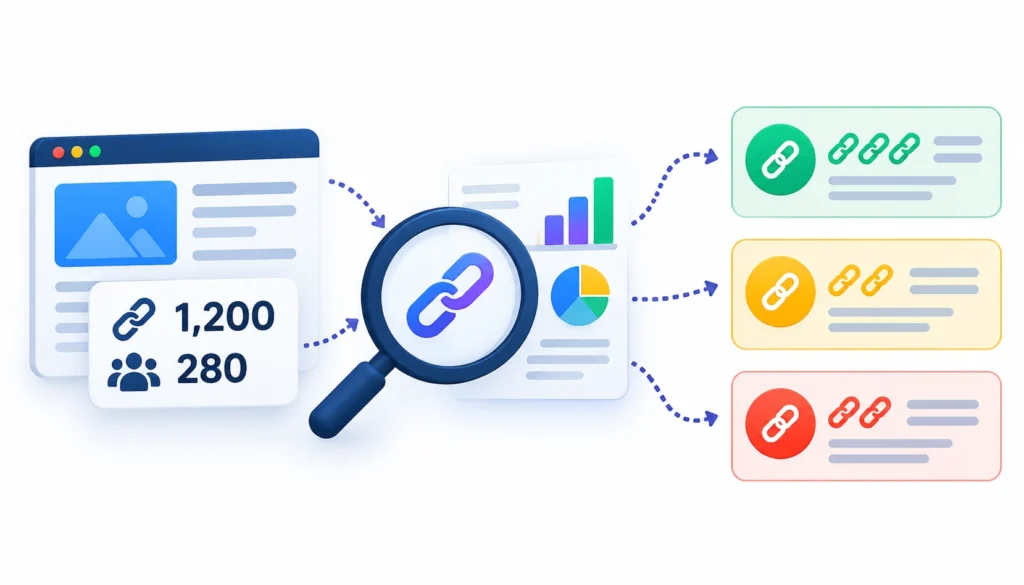
Here is a realistic example. Say a site has 1,200 backlinks from 280 referring domains. Judging it by the 1,200 figure tells you almost nothing. Instead, group the links and look at what they say.
For a broader process, you can also audit your backlink profile to identify patterns, prioritize issues, and determine which links deserve attention.
Step 1: Collect backlink data
No single tool sees every link. Start with Google Search Console, which shows linking sites, most-linked pages, and common anchor text for your own verified property. Add data from Ahrefs, Semrush, or Majestic, and Bing Webmaster Tools if you use it. Export everything into one spreadsheet.
Step 2: Group backlinks by referring domain
Remove duplicates and group by domain. Now you can see 280 sites instead of 1,200 rows. Many problems become obvious at this level.
Step 3: Review anchor-text patterns
Sort anchors by frequency. Look for repeated commercial phrases, especially from unrelated sites.
Step 4: Check link relevance
Open a sample of the linking pages. Skim the topic and the placement. A few minutes of manual checking beats trusting any score.
Step 5: Identify suspicious patterns
Watch for the same phrase on many unrelated domains, many links arriving on one day, link-selling pages, and obvious networks of near-identical sites. A link farm is a typical example of what Google considers manipulation.
Step 6: Review new and lost backlinks
Compare this export with the last one. List valuable losses, and note any new links you do not recognize.
Step 7: Prioritize problems
Rank issues by risk and effort. A paid link pattern you created matters more than ten random spam links. A lost link from a major industry site matters more than a lost footer link.
Step 8: Decide: keep, monitor, remove, or disavow
Use the matrix in the next section. Write down your reasoning so someone else can follow it later.
Step 9: Record actions
Log every outreach email, every removal request, and every redirect you add. If you ever need to file a reconsideration request, this record will save you days.
Step 10: Recheck on a schedule
Put the next audit date on the calendar before you close the sheet.
Backlink Decision Matrix: Keep, Remove, or Disavow?
Use this as a starting point. Every site is different, so adapt it to your situation.
| Backlink situation | Risk | Recommended action |
| Relevant editorial link | Low | Keep |
| Useful nofollow link | Low | Keep |
| Relevant link that sends referral traffic | Low | Keep |
| Irrelevant but harmless link | Low to moderate | Monitor |
| Link from a spammy site, no manipulation by you | Low | Usually leave alone |
| Repeated exact-match anchors across weak sites | Moderate | Stop the pattern, diversify future links |
| Paid link passing ranking credit | High | Ask for sponsored or nofollow, or removal |
| Link from a PBN or link farm that you or an agency built | High | Investigate, request removal, then consider disavow |
| Link tied to a manual action | Urgent | Investigate immediately |
| Broken backlink to an important page | Opportunity | Redirect or restore the page |
| Lost high-value backlink | Opportunity | Investigate and try to reclaim |
Google’s own Search Console manual actions report is where you check whether a penalty actually exists. If there is no manual action, a messy-looking profile is usually a monitoring task, not an emergency.
Backlink Management Mistakes Agencies Make
If an agency handles your links, ask for transparency. These are the problems that come up most.
1. Reporting backlink counts instead of outcomes
“We built 40 links this month” says nothing about rankings, traffic, or leads. Ask for reports that tie links to pages and business results.
2. Selling fixed-number backlink packages
A promise of 20 links a month pushes the agency to hit a number, not to find good placements. Quality links rarely arrive on a schedule.
3. Reusing the same referring domains
If your reports show the same ten sites over and over, the profile is not diversifying.
4. Overusing exact-match anchors
This one is common in agency work because it is easy to request. Ask to see the anchors used on every placement.
5. Not documenting placements
You should be able to see every URL where a link was placed. If you cannot, you cannot audit it.
6. Not monitoring lost links
An agency that reports links built but never checks whether they stayed live is only reporting half the story.
7. Using third-party metrics as the whole quality check
Domain scores can be gamed. Ask how the agency checks relevance and real traffic.
8. Failing to explain risky links
A good agency tells you when a link might be a problem and why. If you are told everything is fine without evidence, ask more questions.
Backlink Metrics You Should Track
Pick a small set and track it consistently. These are the ones I would start with:
- Referring domains: the number of unique sites linking to you.
- Relevant referring domains: the subset that actually fit your topic.
- New backlinks: links gained since the last check.
- Lost backlinks: links gone since the last check.
- Target-page distribution: which of your pages receive links.
- Anchor-text distribution: the mix of brand, generic, and keyword anchors.
- Link attributes: the split of follow, nofollow, sponsored, and ugc links.
- Referral traffic: visitors who arrive through those links.
- Rankings and organic traffic: the outcome the links are meant to support.
- Conversions from referral traffic: whether those visitors do anything useful.
Backlink count is not the final goal. It is one input among several.
How to Build a Healthier Backlink Management System
A simple system is more useful than an elaborate one you never open.
- Keep a backlink inventory. One spreadsheet with the linking URL, target URL, anchor, attribute, source type, date found, and how you got it.
- Schedule monitoring. Monthly for new and lost links, deeper audits quarterly or twice a year.
- Write quality criteria first. Decide what you will and will not accept before outreach begins.
- Watch anchor-text patterns. Re-check the mix after every campaign.
- Track your best links separately. Mark the twenty or thirty that matter most and watch them closely.
- Reclaim lost links. Set a rule, such as “investigate any lost link from a relevant site that sent traffic.”
- Compare with competitors. Look at which sites link to them but not to you. That is a ready-made outreach list.
- Document every campaign. Note what you did, what it cost, and what came of it.
Best Backlink Management Tools
Choose tools by the problem they solve.
- Google Search Console: free, first-party data about links to your own site. Start here. It will not show every link, but it shows what Google reports.
- Ahrefs: strong for finding links, tracking new and lost ones, and studying competitors.
- Semrush: useful if you want backlink audits and monitoring inside a wider SEO toolset.
- Majestic: focused on link data, handy as a second opinion.
- Bing Webmaster Tools: free, with its own link data, and worth adding for more coverage.
Tool “toxicity” scores are estimates. Use them to build a review list, never as an order to disavow.
Backlink Management Checklist
- Review new backlinks
- Review lost backlinks
- Check referring domains
- Review anchor text
- Check relevance
- Look for paid or manipulative patterns
- Check important target pages for errors and redirects
- Investigate suspicious links
- Review agency placements
- Reclaim valuable lost links
- Document every action
- Compare against competitors
- Monitor results
Frequently Asked Questions
What are the most common backlink management mistakes?
The most common backlink management mistakes are prioritizing link quantity over quality, buying links meant to manipulate rankings, over-optimizing anchor text, ignoring relevance and lost links, never auditing referring domains, and disavowing links without investigating first.
What makes a backlink bad for SEO?
A link is a problem mainly when it was created to manipulate rankings. Examples include paid links without proper attributes, link farms, and automated link creation. Low-quality or irrelevant links are usually just low value.
Can bad backlinks hurt my website?
Manipulative links can, especially if they lead to a manual action. Random spam links usually do not, because Google says it works to ignore them. Check Search Console for a manual action before assuming damage.
Should I disavow toxic backlinks?
Usually not, unless you have a manual action or a pattern of manipulative links you cannot remove. Google describes the tool as advanced and not needed by most sites.
How often should I audit my backlinks?
Check new and lost links monthly. Run a fuller audit every three to six months, or sooner if you are running campaigns or have just changed agencies. There is no official schedule, so choose a rhythm you will keep.
Is backlink quality more important than quantity?
In practice, yes. A smaller set of relevant, editorially earned links is easier to defend and usually more useful than a large pile of weak ones.
How do I check my backlinks for free?
Use Google Search Console and Bing Webmaster Tools for data on your own site. Some paid tools also offer limited free backlink checkers.
Can an SEO agency create harmful backlinks?
Yes. Agencies that buy links, use link networks, or mass-produce guest posts can leave you with links that break Google’s spam policies. Ask for the full list of placements and review it.
Final Takeaway
Avoiding backlink management mistakes does not mean having a perfectly clean-looking profile. A real profile always has some odd links in it.
What you want is a relevant, defensible, useful set of links, and the habit of knowing when a link deserves action. Audit, evaluate, prioritize, act, monitor, and repeat.
If you want to compare notes with other practitioners, communities like r/SEO and r/TechSEO on Reddit often discuss real audit cases. Treat any advice you read there as opinion, and check it against Google’s documentation.