

Most people don’t lose track of publishers on purpose. It happens slowly. A contact lives in one inbox, a price sits in a chat thread, and a half-finished guest post hides in a shared drive.
Then a client asks, “Which sites have we already used?” and nobody can answer in under an hour.
If you want to manage multiple website and publisher connections without that chaos, you need one system that holds everything: your websites, your publisher contacts, your conversations, and your placements. This guide shows you how to build it, step by step, using tools most teams already have.
What Does It Mean to Manage Multiple Website and Publisher Connections?
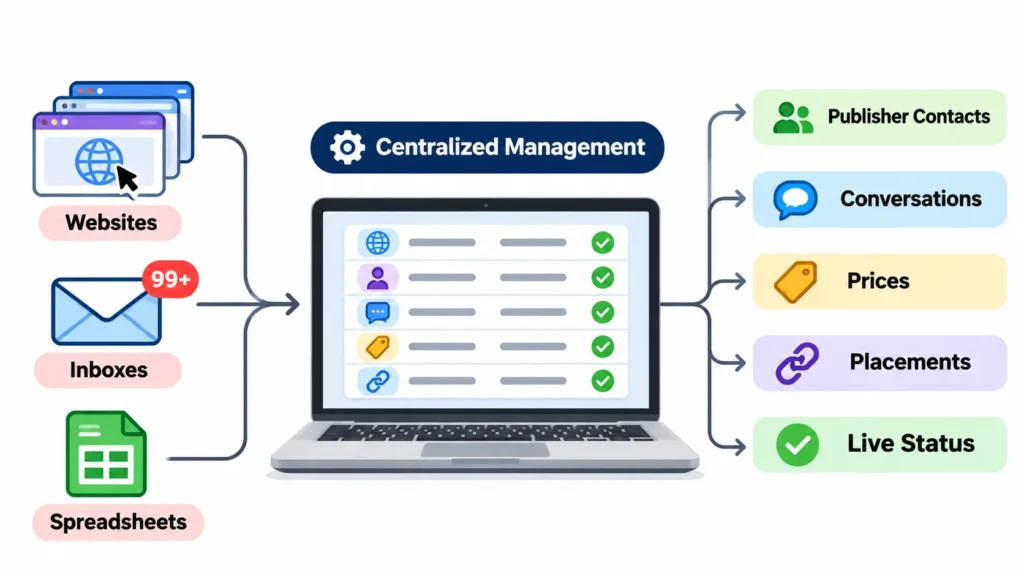
Managing multiple website and publisher connections means keeping every website, publisher contact, conversation, price, and placement in one organized system. Instead of scattered inboxes and spreadsheets, you work from a single database that shows who you contacted, what you agreed, and what actually went live.
It combines two jobs that are usually treated separately:
- Website portfolio management: the sites you own, run, or build links to.
- Publisher relationship management: the outside site owners, editors, and webmasters you work with.
Why combine them? Because in real SEO work, they feed each other. The sites you manage decide what publishers you need. The publishers you trust decide what you can deliver.
Why Managing Multiple Websites and Publisher Connections Is Hard
The difficulty is rarely one big problem. It’s a pile of small ones that grow with every new site and contact.
1. Different platforms and accounts
One client is on WordPress, another on Shopify, a third on a custom build. Each has its own logins, update routines, and quirks. Without a record of who owns what, simple tasks take longer than they should.
2. Scattered publisher information
Contact names, emails, rates, and notes end up in five places. When a teammate leaves, half of that knowledge leaves with them.
3. Too many open conversations
A single campaign can mean 30 publishers at different stages. Some replied, some went quiet, some asked for a lower price. Memory alone can’t track that.
4. Guest posts and link insertions in different states
A guest post might be approved but not written. A link insertion might be live but unverified. If you can’t see status at a glance, deadlines slip.
5. Client campaigns that overlap
Agencies often run several clients in the same niche. Without clear records, you risk pitching the same publisher twice or placing similar content for competing brands.
Build a Centralized Website and Publisher Database
A central database is the foundation. Everything else in this guide depends on it.
Think of it as the single source of truth. If a fact isn’t in the database, it isn’t official.
1. Create a master website inventory
List every site you manage or build links to. Keep one row per site, and use the same columns every time.
Useful fields include:
- Website URL and name
- Niche or industry
- Owner or account contact
- Platform (WordPress, Shopify, custom)
- Hosting provider
- Current status
- Notes
2. Organize publisher contact information
Next, record the people behind the sites you want placements on. Capture the details you’ll actually use:
- Publisher or editor name
- Email address and role (owner, editor, webmaster)
- Preferred way to be contacted
- Past conversations and agreements
- Date of last contact
Search your database before you send any outreach. This one habit prevents duplicate emails to the same person.
3. Categorize websites by niche
Tag each publisher by topic, such as technology, SaaS, finance, marketing, education, healthcare, business, or lifestyle. Good tags let you build a relevant shortlist in minutes instead of hours.
4. Track availability and pricing
Prices and offers change, so record the date next to each one. Here is an illustrative example of what a simple record can look like:
| Website | Niche | Guest Post | Link Insertion | Price | Status |
| example.com | Technology | Available | Available | $100 | Active |
| sample.com | Finance | Available | Unavailable | $150 | Pending |
| demo.com | Business | Unavailable | Available | $80 | Active |
These records are examples only. Use your own sites and real quotes.
5. What should a publisher database contain?
At a minimum, include these columns:
| Field | Why It Matters |
| Website URL | Unique identifier for each record |
| Publisher name | Who you are talking to |
| Contact email | How to reach them |
| Niche | Helps you match relevant campaigns |
| DR / DA | Quick screening metric only |
| Organic traffic | Rough sense of audience size |
| Guest post price | Budget planning |
| Link insertion price | Budget planning |
| Last contact date | Prevents over-contacting |
| Relationship status | Shows where each publisher stands |
Use the Right Tools to Manage Multiple Websites and Publishers
There is no single best tool. The right one depends on your team size and how many publishers you handle.
1. Google Sheets: the best starting point
Sheets are free, flexible, and familiar. It works well for a few dozen publishers. Add filters, color-coded status columns, and a “last contacted” date, and you already have a working system.
The downside is that it gets messy once several people edit it at the same time.
2. Airtable: structured databases
Airtable lets you link tables together. You can connect a publisher to the placements you’ve done with them and the campaigns they belong to. That relational structure is hard to copy in a plain spreadsheet.
3. HubSpot CRM: relationship tracking
A CRM, short for customer relationship management system, stores contacts and logs every interaction. HubSpot’s free CRM is a common choice for teams that want email tracking and deal stages without a big budget. You can treat each publisher as a contact and each placement as a “deal.”
4. Trello and Asana: workflow tracking
Task boards show where every placement sits. A simple set of columns might be:
- Outreach pending
- Publisher replied
- Negotiating
- Content in progress
- Submitted
- Published
- Verified
Trello suits small teams. Asana suits agencies running many campaigns at once.
5. Notion: documentation
Notion works well as a team handbook. Store outreach templates, publisher guidelines, quality checklists, and campaign notes in one place.
6. How to choose the right tool
| Tool | Best For | Main Purpose |
| Google Sheets | Beginners and solo SEOs | Simple tracking |
| Airtable | Growing teams | Relational database |
| HubSpot CRM | Outreach teams | Contact and email history |
| Trello | Small teams | Visual workflow |
| Asana | Agencies | Multi-campaign management |
| Notion | Any team | Documentation |
A practical tip: start with Sheets. Move to Airtable or a CRM only when the spreadsheet starts slowing you down. Switching tools too early often creates more work than it saves.
How to Manage Multiple Publisher Connections Step by Step
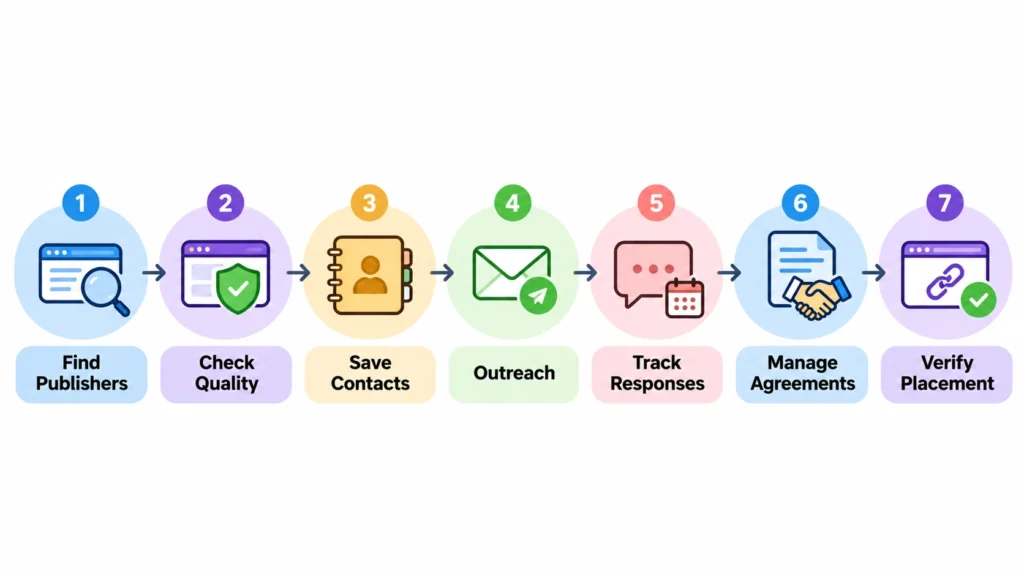
This is the core workflow. Follow it in order, and you will always know where every publisher stands.
The short version:
- Identify relevant publishers.
- Check website quality.
- Store contact details.
- Send personalized outreach.
- Record responses and schedule follow-ups.
- Document the agreement.
- Verify the published result.
Step 1: Identify relevant publishers
Start with relevance. Ask whether the site’s audience would genuinely care about your client’s topic. If you need help identifying suitable contacts, learn how to start finding relevant website owners and publishers in your industry.
Look in your own database first. Then search by niche, review sites your competitors appear on, and ask existing publishers for recommendations.
Step 2: Verify website quality before contacting anyone
Check a few things before you spend time on outreach:
- Organic traffic and its trend. Is it steady or falling?
- Topical relevance. Does the site actually cover your subject?
- Content quality. Are articles useful and well edited?
- Outbound links. Does the site link out to unrelated or spammy pages?
- Editorial standards. Does it have real authors and clear guidelines?
Metrics like Domain Rating (DR) and Domain Authority (DA) are third-party scores. They are useful for quick screening, but Domain Authority is a Moz metric, not something Google uses. A high score does not guarantee a good publisher.
Step 3: Store publisher contact details
Add the publisher to your database right away, even before they reply. Record where you found the contact, because that context helps later.
Step 4: Send personalized outreach
Generic emails get ignored. A good message is short, specific, and respectful of the editor’s time.
Here is a simple example:
Hi Priya,
I read your recent piece on email deliverability and liked the section about warm-up schedules. I work with a SaaS client who has a practical guide on inbox placement that might suit your readers.
Do you accept guest contributions, and if so, what are your guidelines?
Thanks, Alex
Notice what it does. It names a specific article, explains the fit, and asks one clear question.
Step 5: Track responses and follow-ups
Log every reply, even a “no.” Then set a follow-up date. A polite nudge after about a week is common, but adjust it to the publisher’s pace.
If someone declines, mark the status clearly so nobody on your team pitches them again.
Step 6: Keep agreements on record
Once you agree on terms, write them down in the database. Include:
- Content guidelines and word count
- Price and payment terms
- Expected publishing date
- Link attributes (see the note below)
- Editorial requirements
Step 7: Verify published articles and links
Don’t assume a placement is correct because the publisher said it’s live. Check these yourself:
- The live URL loads and the page is indexable
- The link points to the right target URL
- The anchor text matches what was agreed
- The link attributes are correct
A note on sponsored links. Google’s guidance says links that exist in exchange for payment should be marked with rel=”sponsored”. Google’s spam policies also discuss link spam, which includes buying or selling links that pass ranking signals. You can read how to label links in Google’s guide to qualifying outbound links. Always follow the rules that apply to your situation.
Organize Guest Post and Link Insertion Opportunities
Guest blogging and link insertions look similar in a spreadsheet, but they work differently. A guest post is a new article. A link insertion adds a link to an article that already exists.
Keep them separate in your records.
Keep a guest post inventory
List publishers who accept contributed articles. Note their topic preferences, word count limits, and whether they allow author bios.
Keep a link insertion database
Record existing articles where a link would genuinely help the reader. Include the page URL, the paragraph where the link might fit, and the publisher’s price for adding it.
Use one status workflow for both
A simple pipeline keeps everyone aligned:
Research → Contacted → Negotiating → Approved → Content Submitted → Published → Verified
Every placement should sit in exactly one stage at a time.
Monitor your backlinks
Links can be removed, changed, or broken after publication. Review live placements on a schedule, such as monthly or quarterly. Tools like Ahrefs and Semrush can help you spot lost links, and a note in your database keeps the history.
For better tracking, learn how to create a backlink monitoring report to document link status, newly acquired backlinks, and lost placements.
Manage Multiple Client Websites Without Mixing Campaigns
If you run an agency or freelance for several clients, separation matters more than anything else.
Imagine an agency handling 15 clients across five industries. Two of those clients sell project management software. If the team doesn’t track placements per client, both brands could end up on the same blog within the same month. That looks odd to the publisher and weakens both results.
Here is how to prevent that:
- Create a separate record for every client. Include goals, budget, and approved topics.
- Assign publishers to campaigns. A publisher can appear in several campaigns, but every placement is tied to one client.
- Log target URLs and anchor text. This makes reporting accurate and keeps anchor choices varied.
- Track budgets per client. Record what you quoted, what you paid, and what remains.
- Build one shared report. Summarize placements by client each month.
Here is an illustrative tracking table:
| Client | Target Website | Publisher | Placement Type | Status |
| Client A | example.com | publisher1.com | Guest Post | Published |
| Client B | sample.com | publisher2.com | Link Insertion | Pending |
| Client C | demo.com | publisher3.com | Guest Post | Approved |
Automate Repetitive Tasks (Without Losing the Human Touch)
Automation saves hours, but only when it handles admin work and not relationships.
Good tasks to automate:
- Follow-up reminders. Most CRMs and task tools can remind you when a contact has gone quiet.
- Email labels and filters. Label conversations by campaign or stage so they are easy to find.
- Status notifications. Alert the team when a placement moves to “Published.”
- Inventory updates. Use simple spreadsheet formulas or integrations to refresh dates and counts.
- Reports. Pull placement data into a monthly summary automatically.
Be careful with outreach itself. Mass-sent, templated emails tend to read as spam. Automate the tracking, and write the messages yourself.
Maintain Long-Term Relationships With Website Publishers
Publishers remember who treated them well. A reliable network is worth more than a long list of names. You can strengthen these connections by learning the practical strategies for building a strong link building network based on trust, relevance, and long-term collaboration.
Here is what builds trust:
- Be clear. State what you want, what you offer, and your timeline up front.
- Respect guidelines. If a site has editorial rules, follow them. Don’t ask for exceptions on your first email.
- Pay on time. Late payments damage relationships faster than almost anything else.
- Don’t over-follow-up. One or two polite nudges is enough. After that, move on.
- Negotiate fairly. Pushing for the lowest price every time can cost you future access.
- Return to good partners. If a publisher delivers well, work with them again.
- Keep records current. People change jobs and sites change owners. Update contacts when you learn something new.
Community discussions are a useful reality check on how publishers and SEOs actually experience outreach. Threads on SEO and bigseo regularly cover what annoys site owners and what earns replies. Treat them as anecdotal opinions, not rules.
Manage Website Security, Maintenance, and Performance
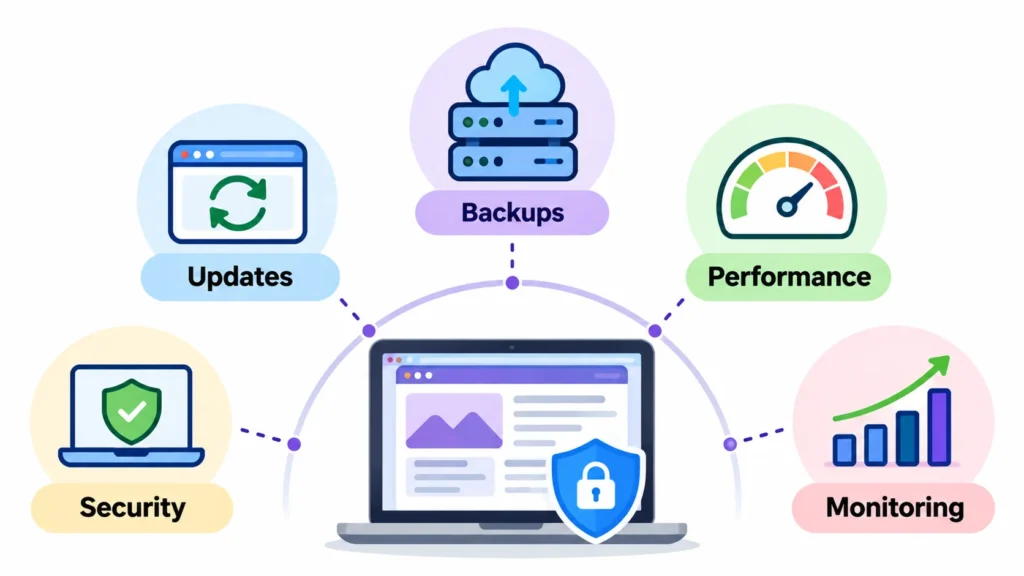
If you also run the websites themselves, a few habits protect everything else you build.
1. Keep software updated
Update your CMS, themes, and plugins on a regular schedule. A content management system such as WordPress needs ongoing care, and outdated plugins are a common weak point.
2. Back up regularly
Automated backups are cheap insurance. Test a restore now and then, because a backup you can’t restore isn’t much use.
3. Control access
Use a password manager, turn on two-factor authentication, and give each person only the access they need. Review the access list every few months and remove anyone who has left.
4. Monitor uptime and speed
Use an uptime monitor so you hear about downtime before your client does.
5. Centralize SEO reporting
Connect your sites to Google Analytics 4 and Google Search Console. Together they show organic traffic, search impressions, click-through rates, and technical issues. Google’s Search Central documentation is the best place to confirm how these tools and signals work.
Common Mistakes to Avoid
These errors show up again and again in link-building operations:
- Keeping separate contact lists. Every person should use the same database.
- Sending duplicate outreach. Always search before you send.
- Ignoring communication history. Re-asking questions a publisher already answered looks careless.
- Choosing publishers only by DR or DA. Relevance and editorial quality matter more.
- Missing deadlines. Record due dates and review them weekly.
- Mixing client campaigns. Keep records separate and clearly labeled.
- Neglecting good publishers. Don’t only message people when you need something.
- Tracking everything by hand. Manual tracking works at small scale and breaks at large scale.
Best Practices for Scaling
When your network grows, consistency becomes your biggest advantage.
- Standardize records. Use the same columns, status names, and formats everywhere.
- Create a qualification checklist. Every new publisher should pass the same quality checks.
- Assign owners. Each publisher relationship should have one responsible team member.
- Review regularly. Once a quarter, flag publishers who haven’t responded or have gone inactive.
- Track costs and results. Know what each campaign spent and what it delivered.
- Build a core network. A smaller group of dependable publishers beats a huge, unreliable list.
Frequently Asked Questions
How do you manage multiple websites at once?
Create a master inventory that lists every site, its platform, owner, login location, and status. Then add a routine for updates, backups, and reporting. Centralized tools and clear ownership make this manageable.
What is the best way to organize publisher contacts?
Store them in one database with fields for name, email, role, niche, pricing, last contact date, and relationship status. Tag each contact by topic so you can filter quickly.
What tools help manage multiple websites?
Common choices include Google Sheets for tracking, Airtable for structured databases, HubSpot CRM for contacts, Trello or Asana for workflows, and Notion for documentation. Google Analytics 4 and Search Console cover performance.
How do you manage multiple publisher relationships?
Record every conversation, set follow-up reminders, honor your agreements, and pay on time. Review your list regularly so you stay in touch with the publishers who deliver.
What is the best CRM for publisher outreach?
It depends on your needs. HubSpot’s CRM is a popular option because it tracks emails and deal stages. Smaller teams may do fine with a spreadsheet, and pipeline tools like Pipedrive are another alternative.
How do you track guest post and link insertion opportunities?
Use separate inventories and one shared status pipeline, from Research through Verified. Log the live URL, anchor text, target link, price, and payment status for each placement.
How can SEO agencies manage multiple link-building campaigns?
Keep a record per client, tie every placement to one campaign, track budgets separately, and produce a single monthly report. This avoids overlap and keeps reporting clean.
How often should you update your publisher database?
Update it whenever something changes, such as a new reply, price, or placement status. Do a fuller review every quarter to remove outdated contacts and flag inactive publishers.
Can you manage multiple websites from one dashboard?
Yes, to a degree. Multi-site CMS setups and management tools can centralize updates, and analytics platforms can combine reporting. How much you can centralize depends on the platforms involved.
How can you automate publisher outreach without losing personalization?
Automate reminders, labels, status updates, and reports. Write the actual outreach emails yourself, even if you use a template as a starting point. Mention something specific about the publisher’s site in each message.
Conclusion
Learning how to manage multiple website and publisher connections is less about buying software and more about building habits. Keep one database. Record every conversation. Use one workflow from first contact to verified link.
Start small. A clean spreadsheet with the right columns will serve you well, and you can upgrade to Airtable or a CRM as your network grows. Combine that system with honest communication, fair payment, and regular reviews, and your publisher relationships will become an asset instead of a headache.