
If you’ve ever exported a backlink report and stared at a spreadsheet with 800 rows, wondering where to even start, you already understand the core problem. Having backlinks isn’t the hard part. Knowing what to do with them is.
Backlink management is the ongoing process of tracking, evaluating, organizing and acting on the links pointing to your website. It goes beyond checking how many links you have. It’s about knowing which ones are working for you, which ones you’ve lost, and which ones need attention.
This guide walks through the full process: discovering your links, judging their quality, auditing your profile, recovering the ones you’ve lost, and turning all of it into something you can actually measure. By the end, you’ll have a repeatable system instead of a one-time cleanup.
What Is Backlink Management?
1. Backlink management definition
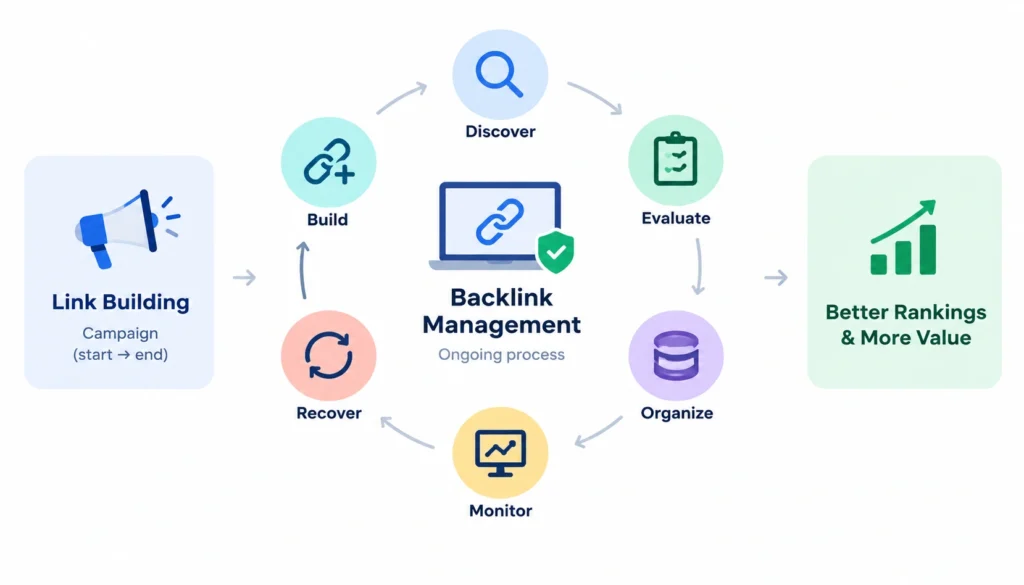
Backlink management is the practice of monitoring, evaluating, organizing and maintaining the external links pointing to your website, so you can protect valuable links, fix or remove problematic ones, and use that data to guide future link-building decisions.
It’s a process, not a single task. You don’t “do” backlink management once and move on. You build a system for it, one that keeps working whether you’re checking it daily or once a quarter.
Most teams get this backwards. They treat link building as the active, ongoing job and backlink management as an occasional cleanup, something you do when rankings dip or before a big audit. In practice, it should be the other way around. Link building is often a campaign with a start and an end. Management is the thing that runs continuously underneath it, making sure the links you already earned keep pulling their weight.
2. Backlink management vs backlink monitoring
People use these two terms interchangeably, but they’re not the same thing. Monitoring is one piece of management: the data-collection layer. Management is the decision-making layer on top of it.
| Backlink monitoring | Backlink management |
| Tracks new, lost and changed links | Tracks, evaluates and acts on links |
| Flags a 404 or lost link | Decides whether that link is worth recovering |
| Reports link status | Assigns an owner and a next step |
| Detects an issue | Resolves the issue |
Monitoring tells you something has changed. Management tells you what to do about it.
A useful way to think about the difference: monitoring is a smoke detector. Management is the fire response plan, the person who checks the batteries, and the decision about whether that particular alarm is a real fire or burnt toast. A lot of teams install the smoke detector and stop there.
3. Why backlink management matters
A link profile that isn’t managed tends to drift. Links break silently, valuable placements disappear when a partner redesigns their site, and nobody notices until rankings shift and someone asks why. By the time that conversation happens, you’re often looking at months of undetected decay, which makes the fix much harder than it needed to be.
Managing your backlinks properly gives you a few concrete things:
- Visibility into what’s actually linking to you right now, not six months ago
- A way to catch lost or broken links before they cost you meaningful traffic or authority
- A framework for judging which links are worth chasing and which aren’t worth the effort
- Data you can hand to a client, a manager, or your own future self, without having to reconstruct the history from memory
There’s also a compounding effect that’s easy to underestimate. Every link you recover, every relationship you maintain with a site that links to you, and every pattern you catch early makes the next round of management cheaper. Neglected profiles get more expensive to fix the longer they sit, because the trail (who to contact, why the link mattered, what the original placement looked like) goes cold.
What Does Backlink Management Include?
At a practical level, backlink management covers five ongoing activities. None of them are complicated in isolation; the difficulty is doing all five consistently, on a schedule, without it turning into a part-time job.
Discovery. Pulling backlink data from multiple sources so you have one accurate picture, not three conflicting ones from three different tools. No single tool sees the entire web, so relying on just one, even a good one, leaves gaps.
Monitoring. Watching for new links, lost links, broken links, and changes to existing ones (a link that switches from dofollow to nofollow, for example, or an anchor text that gets edited after publication).
Quality assessment. Judging whether a link is actually helping you, based on relevance, the quality of the linking site, and where on the page it sits. This is the step most people skip, and it’s the one that actually separates useful management from just watching numbers move.
Organization. Keeping links sorted by referring domain, target page, campaign, and status, so the data is usable instead of just a dump of URLs. An unorganized backlink list is barely more useful than no list at all; you can’t act on 800 undifferentiated rows.
Recovery and action. Following up on lost links worth saving, addressing genuinely problematic ones, and feeding what you learn back into your link-building strategy. This is the step that closes the loop; without it, the first four are just bookkeeping.
How to Evaluate a Backlink’s Quality
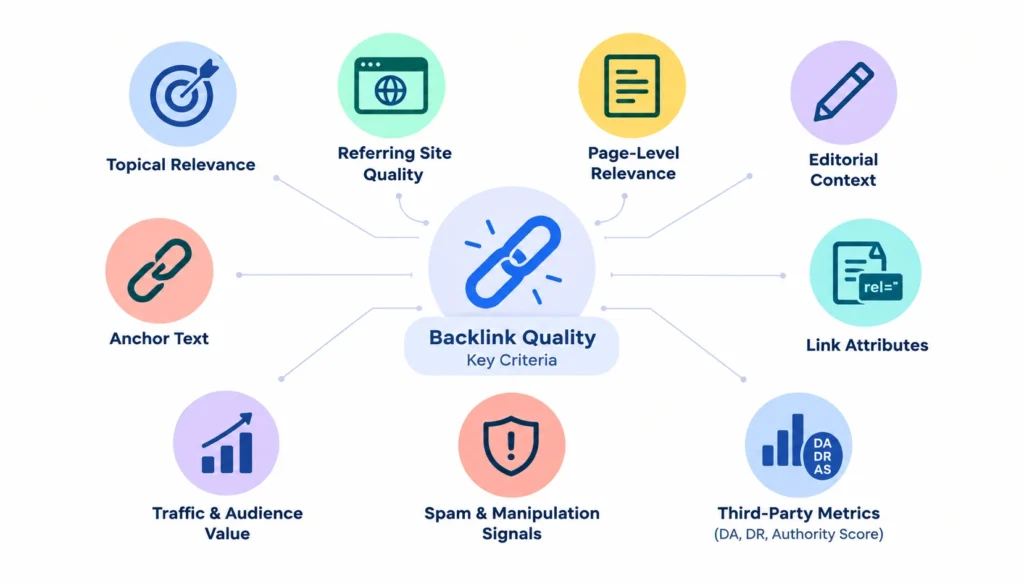
“Get high-quality backlinks” is advice everyone gives and almost nobody defines. Here’s a practical framework you can actually apply, criterion by criterion.
1. Topical relevance. Does the linking site cover a subject related to yours? A link from a gardening blog to a project management SaaS carries little weight, regardless of the site’s authority. Search engines have gotten increasingly good at reading context, not just counting links, so relevance isn’t just a “nice to have,” it’s often the difference between a link that moves the needle and one that’s functionally inert.
2. Quality of the referring site. Is this a real site with real traffic and real content, or a thin domain built mainly to sell links? Check its own organic visibility, whether it publishes original content on a regular cadence, and whether it has a real audience (social presence, comments, engagement) rather than just a domain that exists to host outbound links.
3. Page-level relevance. The linking site can be relevant while the specific page isn’t. A link buried in an old, unrelated post is worth less than one in a fresh, topically aligned article.
4. Editorial context. Was this link earned because your content was genuinely useful, or was it placed as part of a paid or reciprocal arrangement? Editorial links, the kind a writer includes because it genuinely supports their point, tend to hold up better over time, both because they’re less likely to be removed and because they tend to sit in more relevant, better-trafficked content.
5. Anchor text. Does the anchor text read naturally in the sentence, or does it look like it was chosen purely to target a keyword? “Our project management software” reads naturally. “Best project management software 2026” dropped into unrelated prose reads like it was engineered.
6. Link attributes. Is it dofollow, nofollow, sponsored, or UGC? Each tells you something different about how the link was intended to function, and about how much weight it’s likely to carry for SEO purposes versus its value as a traffic or brand-visibility source.
7. Traffic and audience value. Even a nofollow link can send real visitors. Don’t judge a link purely by its SEO signal; check whether people actually click it. A link from a smaller, highly engaged niche community can outperform a bigger but passive site in terms of actual referral value.
8. Spam and manipulation signals. Is the linking domain part of an obvious link network, or does it link out to hundreds of unrelated sites? A quick check of the site’s outbound link patterns, whether it links to gambling, pharma, or unrelated commercial sites en masse, is often a faster tell than any single metric.
Third-party metrics: DA, DR and Authority Score
Domain Authority (Moz), Domain Rating (Ahrefs) and Authority Score (Semrush) are useful as a quick filter, but they’re proprietary estimates built by those companies, not values Google itself calculates or uses. Each tool builds its score differently, using its own link index and its own weighting, which is why the same site can show a DA of 40 on one tool and a DR of 55 on another.
Treat these scores as one diagnostic signal among several, useful for quickly triaging a long list of prospects or referring domains, not a verdict on a link’s actual value. A link from a DR 30 site that’s genuinely relevant and sends real traffic can be worth more than a link from a DR 70 site that’s neither.
How to Audit Your Backlink Profile Step by Step
A backlink audit is where most of the actual management work happens. Here’s a workflow you can repeat quarterly, or more often if you’re managing a fast-moving profile.
- Collect backlink data from Google Search Console, plus a third-party crawler like Ahrefs, Semrush or Moz. GSC shows you what Google has actually indexed; the others fill in gaps and offer historical data GSC doesn’t provide. Using GSC alone will systematically understate your profile, since Google doesn’t surface every link it’s aware of through that interface.
- Consolidate and remove duplicates. Different tools will report the same link with slightly different URLs: trailing slashes, http vs https, www vs non-www. Merge them into one working sheet so you’re not double-counting or chasing the same link twice under two different names.
- Categorize referring domains by relevance, authority tier, and link type (editorial, directory, guest post, profile, forum, etc.). This categorization is what makes the rest of the audit fast; you’re not re-evaluating every link from scratch every quarter, just the new ones and anything flagged as changed.
- Review target URLs. Check which of your pages are getting linked to and whether that matches the pages you actually want to rank. It’s common to find that your highest-authority links point to an old blog post rather than the commercial page you actually care about, which is useful information for internal linking, not just external outreach.
- Analyze anchor text for patterns: is it varied and natural, or repetitive and exact-match heavy? Look at this in aggregate across your whole profile, not link by link.
- Check link attributes to confirm how many links are dofollow versus nofollow, sponsored or UGC. A sudden shift in this ratio (e.g., a wave of new links all marked sponsored) can be a useful early signal about how a recent campaign or mention was actually implemented.
- Find lost and broken backlinks, especially from domains you’d consider valuable. This is usually the step with the highest ROI relative to effort, since recovering a lost link is often cheaper than earning a brand new one.
- Identify potentially problematic links, not to panic over them, but to flag anything worth a closer look. Most of what you find here won’t need action; the point is to have a documented list rather than a vague, unverified worry.
- Prioritize actions. Sort your findings into “recover,” “investigate,” “leave alone,” and “ignore.” This step is what keeps an audit from turning into an unbounded to-do list; not everything found deserves the same urgency.
- Document the outcome. Note what you found and what you did, so the next audit builds on this one instead of starting from zero. A one-paragraph summary per quarter, saved alongside the raw data, saves enormous time later.
How to Handle Toxic or Unwanted Backlinks
This is where a lot of advice online goes too far. A low-quality backlink is not automatically a toxic one, and a toxic one doesn’t automatically need disavowing.
Most low-quality links don’t need action. Google has said for years that its algorithms are generally good at ignoring low-value links on their own. A single irrelevant directory link isn’t going to sink your rankings, and chasing down every mediocre link in your profile is often a poor use of time relative to almost any other SEO activity.
Investigate a link when something looks deliberate. Signs worth a closer look include a sudden spike of links from unrelated, low-quality domains you didn’t build yourself, or links using anchor text that’s clearly manipulative and not something you’d ever choose (exact-match commercial keywords stuffed into obviously unrelated content, for instance).
Contact the site owner first if a link seems like a mistake, an old paid placement you no longer want, or something you can simply ask to have removed or changed. This is almost always faster and less risky than jumping straight to a disavow.
Google’s Disavow Tool is meant for links you believe are actively harming your site and that you can’t get removed manually, not a routine cleanup step. Google’s own Search Central documentation on the disavow tool is explicit that most sites never need to use it. Misusing it, disavowing links that were actually fine, can, in rare cases, do more harm than the links themselves ever would have.
What not to do: don’t disavow links just because a third-party metric flags them as low quality, don’t treat every unfamiliar link as a manual-penalty risk, and don’t pay a “backlink removal service” before you’ve actually confirmed there’s a problem. These services often disavow indiscriminately to demonstrate “activity,” which can strip out perfectly harmless or even valuable links along with the bad ones.
How to Find and Recover Lost Backlinks
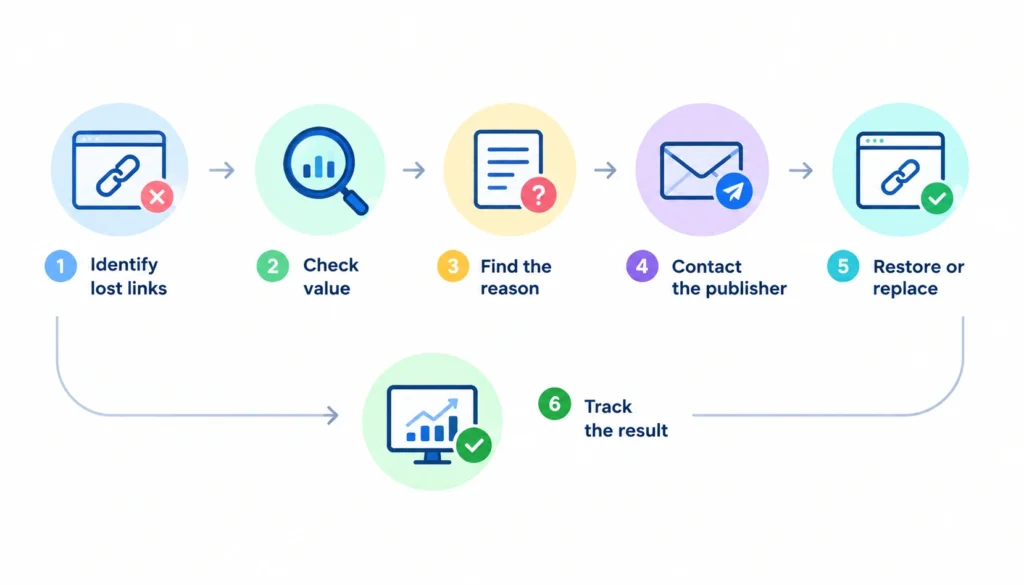
Lost-link recovery is one of the most underused parts of backlink management, mostly because it’s genuinely tedious to do by hand, and because the payoff (a re-added link on a page you don’t own) can feel less exciting than building something new.
Here’s a simple workflow:
- Identify links to your monitoring tool flags as lost.
- Check whether the link was actually valuable, relevant site, decent traffic, editorial placement, before spending time on it.
- Confirm whether your destination page moved, was deleted, or the removal was intentional on the publisher’s side. Each of these calls for a different message.
- Reach out.
A short, direct message works better than a long pitch:
“Hey, I noticed the link to [page] from your [article title] post no longer works. The page moved to [new URL]. Would you mind updating it?”
That’s it. No need to oversell it, remind them why the link mattered, or pitch additional content. Site owners are far more likely to make a quick, low-effort fix than respond to a lengthy request.
Track the outcome either way. Even a “no,” or no response at all, tells you something about that relationship for next time, and keeps you from re-sending the same request months later without realizing you’d already tried.
How to Manage Anchor Text
Anchor text is the clickable text in a link, and its pattern across your backlink profile says a lot about how natural your link growth looks, both to a human reviewing your profile and, to some degree, to search engines evaluating it.
The common types are:
- Branded: your company or product name
- Naked URL: the raw link itself
- Generic: “click here,” “read more,” “this article”
- Descriptive: a few words describing the destination without targeting an exact keyword
- Partial-match: includes part of a target keyword within a natural phrase
- Exact-match: the precise keyword you’d want to rank for
A natural profile leans heavily toward branded and generic anchors, with descriptive and partial-match mixed in, and only a small share of exact-match keyword anchors. This mirrors how people actually link to things when they’re not thinking about SEO; they use the brand name, or generic phrasing, far more often than a precise commercial keyword.
If exact-match anchors make up a large share of your links, that’s usually a sign of deliberate, aggressive link building rather than organic mentions, worth reviewing, not necessarily worth panicking about. Context matters: a newer site with a small link count and a heavy exact-match skew looks different from an established brand where exact-match anchors are a small minority diluted across thousands of natural mentions.
Backlink Monitoring: What to Track
| Metric | What it tells you | What to do about it |
| New backlinks | Your link acquisition rate | Review each for quality before counting it as a win |
| Lost backlinks | Attrition in your profile | Investigate the valuable ones |
| Referring domains | Breadth of your profile | Watch for growth stalling or concentrating in a few sources |
| Anchor text distribution | How natural your profile looks | Check for sudden shifts toward exact-match |
| Link status | Whether links are still live | Recover broken ones that matter |
| Link attributes | Dofollow/nofollow/sponsored mix | Track meaningful changes over time |
| Referral traffic | Real user value, not just SEO value | Prioritize links sending actual visitors |
Worth emphasizing: a “new backlink” alert is not automatically good news. A batch of new links from low-relevance, low-quality domains showing up all at once is worth investigating for where they came from. Sometimes it’s a scraper site, sometimes it’s a competitor’s negative SEO attempt, and sometimes it’s just noise. Don’t let “new links” as a raw count become a vanity metric.
Best Backlink Management Tools
1. LinkColab is built specifically around backlink management rather than general SEO research. It provides a centralized workspace where SEO teams and link builders can organize backlinks, targets, partners, campaigns, and link details instead of relying on spreadsheets and separate tracking systems.
Its real-time link checker is designed to detect changes such as removed, broken, redirected, or changed backlinks, while its link quality checker evaluates signals such as domain, page, relevance, and link status.
LinkColab also includes collaboration features for working with link builders and discovering link-building opportunities. This makes it particularly relevant for agencies, in-house SEO teams, freelancers, and link builders who need to manage and monitor existing links after they have been acquired, rather than simply research potential backlinks.
2. Google Search Console is free and shows you which links Google has discovered pointing to your site. It’s one of the most useful sources for understanding what Google actually sees, though its backlink interface is fairly limited. You get lists of linking pages and domains rather than the advanced filtering, categorization, historical tracking, and competitor analysis available in dedicated SEO platforms.
3. Ahrefs is widely used for backlink research and competitor analysis, with a large link index and strong tools for tracking new and lost backlinks. It also lets you analyze referring domains, anchor text, linked pages, and other backlink trends, making it useful when you need both detailed research and ongoing link-profile analysis.
4. Semrush combines backlink auditing with its broader SEO toolkit. This is useful if you want backlink data alongside keyword research, technical site audits, competitor analysis, and other SEO metrics in one platform. For teams already using Semrush for multiple SEO tasks, keeping backlink management within the same dashboard can simplify the workflow.
5. Moz offers link analysis alongside its Domain Authority metric, which can provide a quick comparative signal when evaluating websites. Its backlink tools can be useful for teams that want straightforward link research without the complexity of some larger SEO platforms.
6. Screaming Frog is primarily a technical SEO crawler rather than a dedicated backlink management platform, but it can still play an important role in backlink recovery and link maintenance. It helps you audit your own site’s internal and outbound links, identify broken URLs, redirects, and other technical issues. This becomes particularly useful when a lost backlink is connected to a URL change, deleted page, redirect, or other issue on your own website.
Dedicated backlink management platforms such as LinkColab focus more on the operational side of link building than research tools like Ahrefs or Semrush.
They can help teams keep track of which backlinks are active, monitor changes, organize campaigns and partners, verify link status, and maintain a central record of link-building activity.
This becomes increasingly useful when you’re managing backlinks across multiple websites or clients, where spreadsheets and manual checks can become difficult to maintain. LinkColab specifically combines backlink management, real-time monitoring, quality checks, and collaboration in one workspace.
Backlink Management: Spreadsheet or Software?
| Feature | Spreadsheet | Dedicated software |
| Basic organization | Works fine | Works fine |
| Automated monitoring | Limited or manual | Built in |
| Alerts | You have to check manually | Automatic |
| Status tracking | Manual updates | Automatic |
| Reporting | Manual | Usually templated |
| Team workflows | Gets messy past a couple of people | Built for it |
| Scaling to multiple sites | Difficult | Easier |
If you’re managing one site with a modest link profile, a well-built spreadsheet is genuinely enough; there’s no need to pay for automation you don’t yet have the volume to justify. A simple schema works well:
- URL
- Referring domain
- Target page
- Anchor
- Attribute
- Status
- Relevance
- Action
- Owner
- Last checked
Software starts to earn its cost once you’re managing multiple domains, working with a team, or reporting to clients on a recurring basis. At that point, the time saved on manual status checks and report assembly usually outweighs the subscription cost fairly quickly.
Managing Backlinks for an Agency
Agencies run into a version of this problem that’s harder than a single-site setup: multiple clients, multiple link-building campaigns, and partners who all need tracking separately, often with different tools, different reporting cadences, and different tolerances for risk.
A workable approach:
- Organize links by client from day one rather than trying to retrofit it later. Mixed data is one of the most time-consuming things to untangle after the fact.
- Assign clear ownership so someone is actually responsible for chasing lost links; “the team” owning a task is functionally the same as no one owning it.
- Track outreach commitments (a guest post promised but not yet published, for example) separately from confirmed, live links, so nothing falls through the cracks between promise and delivery.
- Build reporting templates once so you’re not rebuilding a report from scratch every month. A consistent format also makes it easier for clients to track progress period over period.
A Practical Workflow for a Small SEO Team
Weekly: check for new and lost links, review any significant changes, and follow up on obvious recovery opportunities. This keeps the backlog small and prevents any single week’s issues from piling up unnoticed.
Monthly: analyze referring domain growth, review anchor text distribution, check competitor backlink gaps, and update your list of link-building opportunities.
Quarterly: run a full audit using the ten-step process above, review anything that looks risky, revisit your link-building strategy, and put together a performance report.
This cadence isn’t arbitrary. Weekly checks catch fast-moving issues (a 404 from a URL migration, a sudden spam spike) before they compound, monthly checks catch slower trends (anchor text drift, domain concentration), and the quarterly audit is where you step back and look at the whole picture rather than reacting link by link.
Backlink Management Metrics and KPIs
It helps to split your metrics into layers instead of tracking everything as one undifferentiated pile.
- Link-profile metrics: referring domains, new and lost links, anchor text distribution
- SEO metrics: visibility and ranking trends for the pages receiving links
- Referral metrics: actual traffic sent by your backlinks, not just their theoretical SEO value
- Business metrics: leads, signups or revenue that can be traced back to referral traffic from your links
A word of caution here: it’s tempting to draw a straight line from “we got this link” to “rankings went up,” but rankings move for dozens of reasons at once: algorithm updates, competitor activity, content changes, seasonality. Treat backlink data as one input into your SEO picture, not proof of a single cause and effect. The clearest, least ambiguous signal you actually have is referral traffic; that one you can attribute directly.
Common Backlink Management Mistakes
Focusing only on the number of backlinks, without asking whether they’re actually relevant or valuable, is probably the most common one. A profile with 200 relevant, editorial links usually beats one with 2,000 low-quality ones, both for search visibility and for the actual business value of the traffic they send.
Treating third-party scores like DA or DR as if they’re Google’s own ranking metrics is another. They’re estimates from third-party companies, useful for comparison, not gospel.
Ignoring lost backlinks because monitoring feels like a “nice to have” rather than a routine task.
Disavowing links reflexively instead of investigating first, often driven by anxiety about an unfamiliar link rather than actual evidence of harm.
Building links without a system to track what you built, where, and why, which makes every future audit and every recovery effort slower and more error-prone than it needs to be.
Managing everything by hand well past the point where it’s actually sustainable, the flip side of over-investing in software too early is under-investing once the profile has genuinely outgrown a spreadsheet.
Backlink Management Checklist
- Collect backlink data from multiple sources
- Consolidate and deduplicate
- Identify and categorize referring domains
- Review target URLs
- Analyze anchor text distribution
- Check link attributes
- Find lost links
- Find broken links
- Review suspicious or low-quality links
- Recover links worth saving
- Identify competitor link opportunities
- Track new links as they come in
- Measure referral traffic from key links
- Put together a report
A Realistic Example
Imagine a B2B SaaS company with just over 1,000 backlinks across 250 referring domains. They run their first real audit and find something they hadn’t noticed: 30 previously valuable referring domains have dropped their links entirely, and 15 high-value links now point to a 404 because of an old URL restructure.
The team categorizes what’s left, flags the lost links worth chasing, and starts outreach to the sites that dropped them, leading with a straightforward note pointing to the correct URL. In parallel, they spot three competitor backlinks from industry roundups they were never invited to and pitch themselves for the next one.
Three months later, they’ve recovered eight of the thirty lost links and picked up two new editorial placements neither tool had suggested. This is an illustrative scenario, not a documented case study, but it reflects the kind of outcome a structured audit typically surfaces: a mix of modest, unglamorous wins (a handful of recovered links) alongside one or two opportunities that only surfaced because someone was actually looking closely at the data rather than just watching a total-link-count number tick up or down.
Frequently Asked Questions About Backlink Management
What is backlink management?
It’s the ongoing process of monitoring, evaluating and acting on the backlinks pointing to your website, not just tracking how many you have.
How often should you check your backlinks?
Light monitoring weekly or monthly, with a full audit at least once a quarter.
What’s the difference between backlink monitoring and backlink management?
Monitoring track changes. Management evaluates those changes and decides what to do about them.
How do you identify a valuable backlink?
Look at topical relevance, the quality of the linking site, page-level context, and whether it sends real traffic, not just its DA or DR score.
Should you remove toxic backlinks?
Not automatically. Most low-quality links don’t need action. Investigate before acting, and try contacting the site owner before reaching for Google’s Disavow Tool.
Final Takeaway
Backlink management, done properly, follows a consistent cycle: discover the links pointing to your website, evaluate their quality and relevance, organize the data, monitor for changes, recover valuable links when they are lost, build new links deliberately, and measure the results that actually matter to your business.
This approach helps you move beyond simply counting backlinks and instead understand how your link profile supports your broader SEO strategy.
A good next step is to export your current backlink data and sort it into four simple buckets: valuable, lost, broken, and worth a closer look. Valuable links can be prioritized for protection and monitoring, lost links can be investigated for recovery, broken links can be checked for URL or redirect issues, and questionable links can be reviewed before deciding whether any action is necessary.
This simple exercise gives you a clearer picture of the current state of your backlink profile and often uncovers practical opportunities that would otherwise remain hidden. From there, you can turn your findings into a repeatable backlink management process rather than treating link analysis as a one-time SEO task.