
If you’ve ever pulled up a backlink report and felt a small thrill at seeing a link from a high-authority site, you already know how easy it is to mistake a big number for a good link. A high-quality backlink isn’t defined by one metric. It’s defined by relevance, the quality of the site linking to you, where the link sits on the page, and whether a real person would ever click it.
This guide walks through a repeatable process for judging any backlink you come across, whether you’re auditing your own site, checking a competitor’s, or deciding if a guest post offer is worth your time.
What Is Backlink Quality?
1. Definition of a High-Quality Backlink
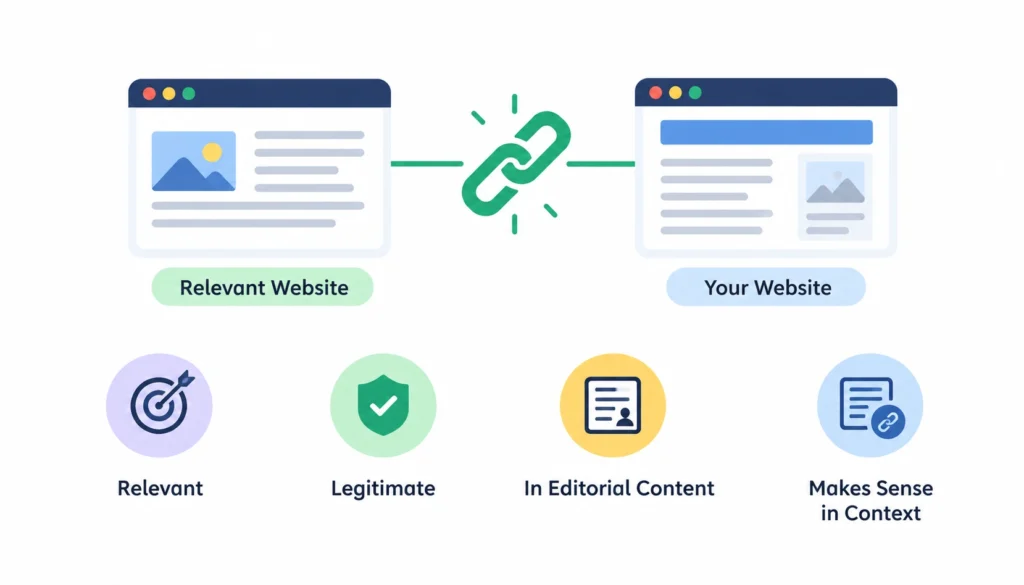
A high-quality backlink comes from a relevant, legitimate website, sits in editorial content that a reader would actually engage with, and points to a page that genuinely fits the context. It doesn’t have to come from a massive site. It has to make sense.
2. Why Backlink Quality Matters
Google has said for years that it treats links as one of several signals for ranking pages, and that unnatural or manipulative link patterns can trigger action against a site. Google’s own documentation on link spam spells this out directly. So chasing volume without checking quality can work against you, not for you.
3. Why More Backlinks Does Not Always Mean Better SEO
Ten links from sites that have nothing to do with your industry rarely help as much as two links from sites your actual customers read. Link building isn’t a numbers game anymore, and treating it that way is one of the fastest ways to waste a marketing budget.
4. Backlink Quality Is a Spectrum, Not a Yes/No Classification
Most backlinks aren’t clearly “good” or “bad.” They fall somewhere in between: decent relevance but weak authority, strong authority but a nofollow tag, real audience but a slightly odd placement. Part of learning to evaluate links is getting comfortable with that gray area instead of looking for a single rule that settles it.
What Makes a Backlink High Quality?
1. Topical Relevance
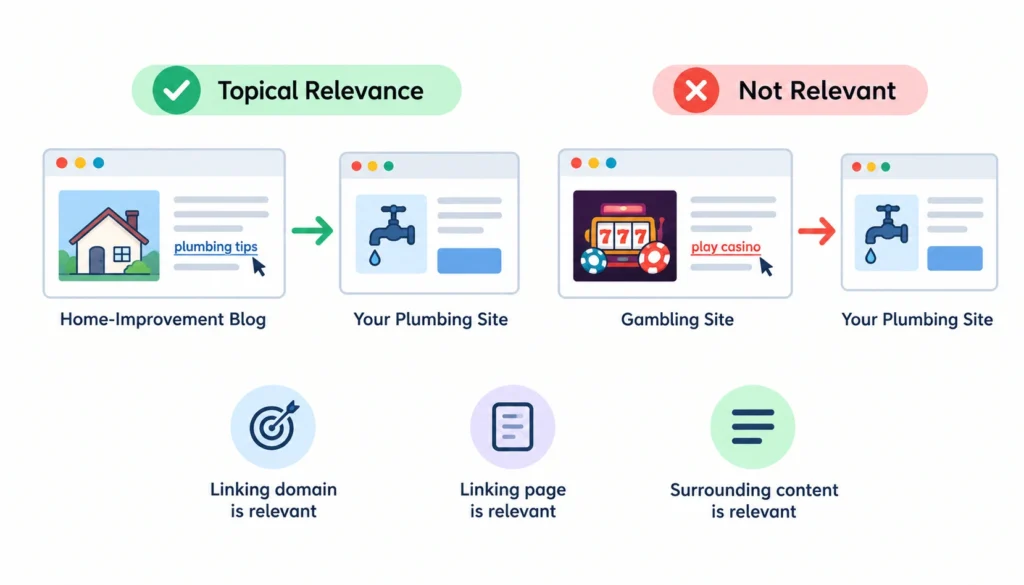
Relevance is the first thing to check, before you even look at any metrics. Ask whether the linking domain, the linking page, and the paragraph around the link all relate to your topic. A link to your plumbing site from a home-improvement blog makes sense. A link from an unrelated gambling site doesn’t, no matter what its authority score says.
2. Source and Page Quality
Open the page. Read it. Does it look like something a person wrote for other people, or does it read like it was assembled to hold links? Thin, scraped, or auto-generated content is a warning sign even if the domain itself has decent stats.
3. Authority and Link Strength
Authority still matters, just not on its own. Domain-level and page-level scores give you a rough sense of a site’s standing, and referring domains tell you how many separate sites vouch for it. But third-party metrics like Domain Rating or Domain Authority are estimates built by SEO tool companies, not numbers Google publishes or uses directly. Treat them as one data point among several, not the verdict.
4. Natural Anchor Text
The words used in the link tell you a lot about intent.
Branded Anchors
Something like “check out Acme Tools.” These tend to happen naturally, since people describe brands the way they actually know them.
Partial-Match Anchors
These describe the topic loosely, such as “a good project management tool,” without repeating your exact target phrase.
Exact-Match Anchors
These repeat your target keyword word for word. A handful of these across your profile is normal. Dozens, all pointing at the same page, usually means someone built those links on purpose.
Generic Anchors
Phrases like “read more here” or “this article.” Common, low-risk, and rarely a sign of anything manipulative.
5. Editorial Link Placement
Where a link sits on the page matters almost as much as the link itself. A link buried in the body of an article, surrounded by relevant text, was probably placed because it added something. A link stuffed into a footer or a sidebar that appears on every page of a site tells a different story. It’s often there for SEO reasons alone.
6. Link Attributes
Not every link is meant to pass the same signal. A standard follow link is the default. rel=”nofollow” tells search engines not to treat it as an endorsement. rel=”sponsored” marks paid placements, and rel=”ugc” flags user-generated content like blog comments or forum posts. You can read the full spec on Google’s link attributes documentation.
7. Referral Traffic Potential
Even a nofollow link can be worth having if it sits on a page real people visit. A mention in a well-read publication can send you actual customers, which matters regardless of what it does for your rankings.
8. Destination-Page Relevance
Check where the link sends visitors, too. A link that drops someone on your homepage when the surrounding content was about a specific product is a small mismatch, but it’s still worth noticing. It usually means the link wasn’t placed with much thought.
How to Evaluate a Backlink Step by Step
Here’s the process I use when I’m going through a backlink report, one link at a time.
Step 1: Identify the Referring Page and Domain
Open the actual URL. Don’t judge a link from a report row alone.
Step 2: Check Topical Relevance
Does the site’s overall focus and this specific page’s topic connect to yours?
Step 3: Evaluate the Referring Website
Is it a real, active site? Does it publish content people actually read, or does it look built purely to sell links?
Step 4: Evaluate the Linking Page
Read the article or page itself, not just the paragraph around your link.
Step 5: Inspect the Backlink’s Placement
Body content, sidebar, footer, or author bio: each tells a different story.
Step 6: Analyze Anchor Text and Surrounding Context
What words lead into the link, and what does the anchor itself say?
Step 7: Check Follow, Nofollow, and Other Rel Attributes
This affects how you interpret the link’s SEO value, though not necessarily its marketing value.
Step 8: Review Traffic and Audience Signals
A site with almost no organic visibility or social presence probably isn’t sending you real readers.
Step 9: Compare Referring-Domain Diversity
Is this one of many links from the same domain, or one of many distinct domains?
Step 10: Evaluate the Destination Page
Does the link land somewhere that fits the context it came from?
Step 11: Claide What Action to Take
Not every link needs a response. Some just need to sit in your report as confirmed good.
Backlink Quality Checklist
Run through this list for any link you’re unsure about:
- Relevant website
- Relevant page
- Useful surrounding context
- Natural anchor text
- Editorial placement
- Legitimate, active website
- No obvious link-scheme pattern
- Appropriate rel attribute
- Some potential for referral traffic
- Relevant destination page
- No suspicious sitewide pattern
If a link checks most of these boxes, it’s probably fine. If it checks almost none, it’s worth a closer look.
How to Use SEO Metrics Without Misjudging Backlink Quality
1. Domain Rating (DR)
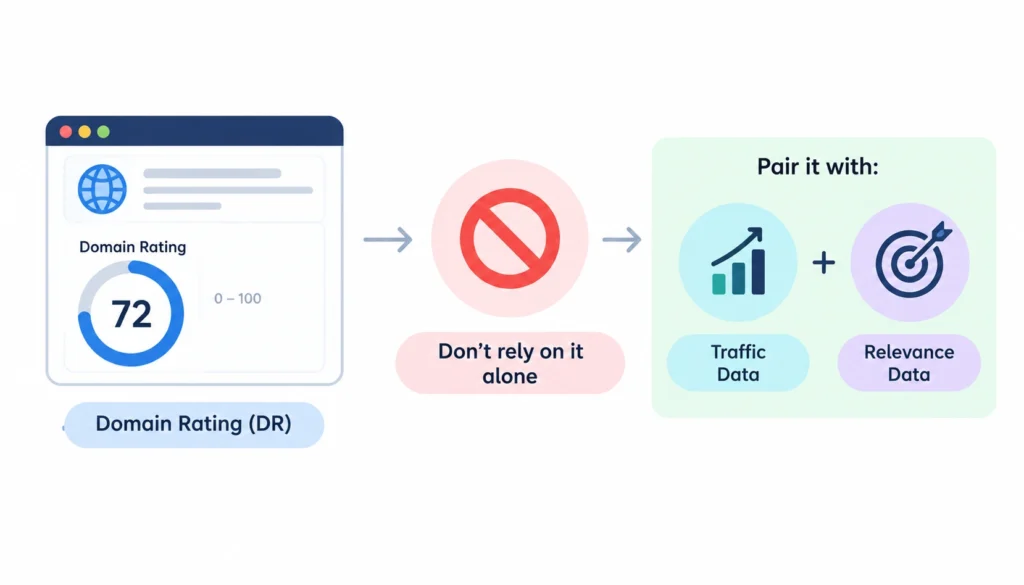
Ahrefs’ proprietary score estimating a domain’s overall backlink strength on a 0 to 100 scale. Ahrefs itself advises against using DR as a standalone quality measure, and recommends pairing it with traffic and relevance data.
2. Domain Authority (DA)
Moz’s equivalent score, built with a different methodology. Like DR, it’s a prediction tool, not a Google ranking factor.
3. URL Rating (UR)
A page-level version of DR. Useful when a strong domain has one weak, thin page linking to you, since the domain score alone would hide that.
4. Referring Domains
The count of distinct domains linking to a page or site. This usually matters more than raw backlink count, since 200 links from five domains carries less weight than 50 links from 50 domains.
5. Organic Traffic
A rough gauge of whether a site actually has visitors. Pair it with a quick look at the site itself, since traffic estimates from third-party tools are approximations.
6. Why No Single Metric Is Enough
Every one of these numbers is a proxy built by a company trying to model something Google keeps private. They’re useful for triage, for deciding what to check first, but none of them replaces actually opening the page and reading it.
High-Quality vs. Low-Quality Backlinks
| Factor | High-quality signal | Low-quality signal |
| Relevance | Topically related | Unrelated |
| Content | Useful, original | Thin or scraped |
| Placement | Editorial, body copy | Footer or sidebar |
| Anchor | Natural | Manipulative, repeated exact-match |
| Domain | Legitimate, active | Link farm or PBN pattern |
| Traffic | Real audience | No apparent audience |
| Pattern | Naturally acquired | Artificially repeated |
Backlink Quality Examples
Example 1: Relevant Industry Publication
A mid-size marketing blog links to your SaaS tool in a roundup of project-management software, with a branded anchor and a short explanation of what the tool does. Relevant, editorial, and worth protecting.
Example 2: Small but Highly Relevant Website
A niche blog with modest traffic links to your guide from a related article. Low authority, but the exact audience you want. Worth more than its DR suggests.
Example 3: High-DR but Irrelevant Website
A large news site links to you from an unrelated celebrity gossip article, probably picked up automatically through a widget or syndication feed. Investigate before assuming it’s a win.
Example 4: Exact-Match Anchor Used Repeatedly
The same keyword phrase links to the same page from a dozen low-quality directories. This is a classic pattern flagged in Google’s spam guidance, and it’s worth reviewing closely.
Example 5: Sitewide Footer Backlink
Your logo and link appear in the footer of a partner’s site, on every page. Not inherently bad, but it inflates your link count without adding much context. Treat it as one link, not hundreds.
Example 6: Nofollow Link From a Major Publication
A large outlet mentions you with a nofollow tag. It won’t pass the same SEO signal as a follow link, but the exposure and referral traffic can still be worth having. Discussions on r/SEO come back to this point often. People get too focused on the nofollow tag and miss the actual traffic sitting behind it.
How to Find and Analyze Your Best Backlinks
Once you know what makes a backlink valuable, the next step is finding the links pointing to your site and comparing them using consistent criteria. No single tool has a complete view of the web, so it is useful to compare data from multiple sources rather than relying on one database or authority score.
1. Ahrefs
A paid SEO platform built around its own large crawl database. Its Domain Rating (DR) and URL Rating (UR) metrics are useful for assessing the relative strength of referring domains and individual pages. You can also inspect referring domains, anchor text, linked pages, and other backlink details to identify which links deserve a closer look.
2. Semrush
Another comprehensive paid SEO platform with its own backlink database and analysis features. It can help you identify referring domains, anchor text, link attributes, and potentially valuable or suspicious backlinks. Because Semrush and Ahrefs use different crawlers and databases, their backlink reports rarely match exactly, making cross-checking useful when auditing a profile.
3. Moz
Moz is best known for Domain Authority (DA), its proprietary metric for estimating the ranking strength of a domain. Its Link Explorer can also help you review linking domains, inbound links, anchor text, and other backlink information. As with DR, DA is a third-party metric and should be treated as one signal rather than a definitive measure of backlink quality.
4. Majestic
Majestic uses its own link index and is particularly known for Trust Flow and Citation Flow. Trust Flow focuses on the quality of links pointing to a site, while Citation Flow focuses more broadly on the quantity or influence of those links. Looking at these metrics alongside relevance and the actual linking page can provide another perspective when evaluating backlinks.
5. Google Search Console
Google Search Console is free and provides Google’s own reported view of links to your site through its Links report. It can show top linking sites, top linked pages, and commonly used linking text. Its data is not intended to be a complete backlink database, but it is valuable to check alongside third-party tools because different platforms discover and report different links.
6. Free Backlink-Checking Options
For a quick spot-check, free tools such as SEO Review Tools’ backlink checker can provide useful information without requiring a full paid SEO subscription. Depending on the available data, you can review details such as anchor text, follow or nofollow status, referring domains and IPs, and destination URLs. These tools are best used for quick checks or smaller backlink samples rather than as a replacement for a comprehensive backlink database.
How to Use These Tools Together
The most reliable approach is to compare signals instead of chasing a single score. For example, a backlink with a high DR or DA may still be less useful if it comes from an unrelated page with little real audience or suspicious link patterns. Conversely, a smaller but highly relevant website with useful content and genuine visitors may deserve closer attention even if its authority metric is modest.
Start with a third-party tool to discover backlinks, use Google Search Console as an additional data source, and then manually inspect the most important links. Look at relevance, source quality, placement, anchor text, link attributes, traffic potential, and the destination page before deciding how valuable each backlink actually is.
How to Spot Potentially Spammy or Manipulative Backlinks
Not every low-quality backlink is automatically harmful, and a single questionable link does not necessarily indicate a problem with your backlink profile. The goal is to look for patterns and context that suggest a link exists primarily to manipulate search rankings rather than to provide genuine value to users.
1. Irrelevant Domains
A backlink deserves closer inspection when the referring website has little or no topical connection to your business, industry, or content. For example, a finance website linking to a local plumbing business without any meaningful context may be difficult to justify editorially. Relevance is not an absolute requirement for every legitimate link, but repeated links from unrelated sites can be a warning sign.
2. Thin or Autogenerated Content
Some low-quality sites publish large amounts of thin, repetitive, or automatically generated content primarily to host links. Pages may contain little original information, awkward wording, excessive outbound links, or articles that appear to exist mainly for SEO purposes. Look at the actual page containing your backlink rather than judging the entire domain from its metrics alone.
3. Link Farms and PBN Patterns
Link farms and private blog networks (PBNs) are associated with creating or controlling websites primarily to generate backlinks. Warning signs can include several sites using very similar templates, publishing overlapping content, linking heavily to the same group of domains, or showing other obvious relationships.
A cluster of related websites is not automatically a PBN, so look for multiple signals before drawing a conclusion. Wikipedia’s overview of private blog networks can provide a basic introduction to the concept.
4. Excessive Sitewide Links
A backlink that appears across hundreds or thousands of pages, such as in a footer, sidebar, or sitewide widget, deserves additional review. Sitewide links can have legitimate reasons, for example, a software provider credit or business partnership, but a large number of repeated links from an unfamiliar site can indicate an unnatural pattern.
5. Repeated Exact-Match Anchors
Pay attention when many referring pages use exactly the same keyword-rich anchor text pointing to the same destination page. Natural backlink profiles usually contain a mixture of branded, URL-based, descriptive, partial-match, and other anchor variations. A heavily repeated commercial keyword can therefore be a useful signal to investigate, particularly when combined with other questionable patterns.
6. Sudden Unusual Backlink Spikes
A sudden increase in backlinks is not automatically a problem. A successful campaign, news story, product launch, viral mention, or widely shared piece of content can naturally generate many links in a short period.
The important question is why the spike happened. If hundreds of links appear within a short period and come from unrelated, low-quality, or similar-looking websites without an obvious reason, investigate the sources and acquisition pattern more closely.
7. Paid or Manipulative Link Patterns
Links obtained primarily to manipulate search rankings can create problems when they violate search-engine spam policies. Warning signs may include obvious link-selling networks, large numbers of commercially optimized links, or arrangements where websites exist primarily to pass ranking signals.
Google’s Search Essentials spam policies provide the primary guidance on link spam and other manipulative practices. Use those guidelines as the reference point instead of relying solely on third-party “toxic backlink” scores.
8. Look for Patterns, Not One Bad Link
The most important rule is to avoid judging a backlink based on one signal alone. An unrelated domain, a low authority score, or a nofollow attribute does not automatically make a backlink harmful. Instead, evaluate the combination of relevance, content quality, placement, anchor text, acquisition pattern, and the overall behavior of the referring domain.
This approach helps separate ordinary low-value links from patterns that genuinely deserve further investigation.
What Should You Do With Low-Quality Backlinks?
When to Simply Monitor a Backlink
When a link looks weak but harmless: low authority, mildly odd placement, but nothing manipulative. Most links fall here, and most need no action at all.
When to Contact the Site Owner
When a link is factually wrong, points to a dead page, or was placed somewhere you’d rather it wasn’t, and the site seems legitimate enough to respond.
When Removal May Make Sense
When you have a relationship with the linking site and the link is clearly harmful or was placed as part of a scheme you no longer want to be associated with.
When to Investigate Google’s Disavow Process
Only after you’ve confirmed a genuine pattern of manipulative links, ideally tied to a manual action or a clear drop in visibility. Google’s disavow tool documentation explains when it’s actually meant to be used.
Why You Should Not Disavow Links Automatically
Google has repeatedly said most sites never need to use the tool, and disavowing good links by mistake can do more harm than the bad links ever would have.
How to Prioritize Backlinks During an Audit
| Priority | Characteristics | Action |
| High | Relevant, editorial, legitimate site, real audience | Protect and nurture |
| Medium | Relevant but weaker authority or traffic | Monitor |
| Review | Suspicious patterns or poor content quality | Investigate |
| Manipulative | Clear evidence of an intentional link scheme | Take appropriate action |
Sort your full backlink list into these four buckets before you do anything else. It turns an overwhelming spreadsheet into a short list of links that actually need a decision.
Frequently Asked Questions About Backlink Quality
What Makes a Backlink High Quality?
Relevance to your topic, a legitimate and active linking site, editorial placement, natural anchor text, and a link that leads somewhere that makes sense.
How Do You Measure Backlink Quality?
By combining third-party metrics like DR or DA with a manual check of relevance, content quality, placement, and traffic. No single number tells the whole story.
Is a High DA or DR Backlink Always Good?
No. A high-authority link from an irrelevant or spammy page can matter less than a lower-authority link from a genuinely relevant, well-run site.
Are Nofollow Backlinks Valuable?
They can be, especially for referral traffic and visibility, even though they don’t pass the same ranking signal as a follow link.
Can Low-Quality Backlinks Hurt SEO?
A small number rarely causes problems. A large, clearly manipulative pattern can trigger a manual action from Google.
Should You Remove Toxic Bcklinks?
Rarely, and only after confirming a genuine spam pattern, ideally tied to a manual action. It’s not a routine maintenance task.
How Many Backlinks Do You Need?
There’s no fixed number. A handful of relevant, high-quality links usually outperforms a large pile of weak ones.
What Is the Difference Between a Backlink and a Referring Domain?
A backlink is one link. A referring domain is one distinct site linking to you, which might account for several backlinks at once. For a plain-language definition, Wikipedia’s entry on backlinks is a decent starting point.
Final Verdict
Judging a backlink means looking beyond a single metric. Check its relevance to your topic, the quality and credibility of the source, where the link appears on the page, whether the anchor text feels natural, its link attributes, potential referral traffic, and whether it points to a genuinely relevant destination page.
You should also consider how that link fits into your overall backlink profile rather than judging it in isolation. Authority metrics such as DA, DR, and similar scores can help you identify links worth investigating, but they should be treated as a starting point, not a final verdict.
A link from a highly authoritative site isn’t automatically valuable if the page is irrelevant, the placement is unnatural, or the site shows other quality concerns.
By combining multiple signals and looking at the bigger picture, you can identify the backlinks that genuinely support your SEO efforts and focus your time on building and maintaining links that are relevant, credible, and useful.