
If you’ve just opened your backlink report and seen a pile of spammy-looking links pointing at your site, take a breath first. Not every strange-looking backlink is a threat, and reacting to each one as if it’s an emergency usually wastes more time than it saves.
This guide walks through how to actually tell a harmful backlink from a merely low-quality one, how to investigate before you act, and when disavowing a link makes sense versus when it’s overkill. The goal isn’t to scare you into cleaning up everything. It’s to give you a clear process so you only spend effort where it counts.
What Are Harmful Backlinks?
A harmful backlink is a link pointing to your site that was created specifically to manipulate search rankings, rather than because someone genuinely found your content useful. Think paid links stuffed with exact-match anchor text, links from private blog networks, or thousands of auto-generated forum posts linking back to your domain.
That’s different from a link that’s just weak. A backlink from a small, dormant blog with almost no authority isn’t automatically harmful. It’s just not doing much for you either way.
1. Harmful vs toxic vs spammy vs unnatural backlinks
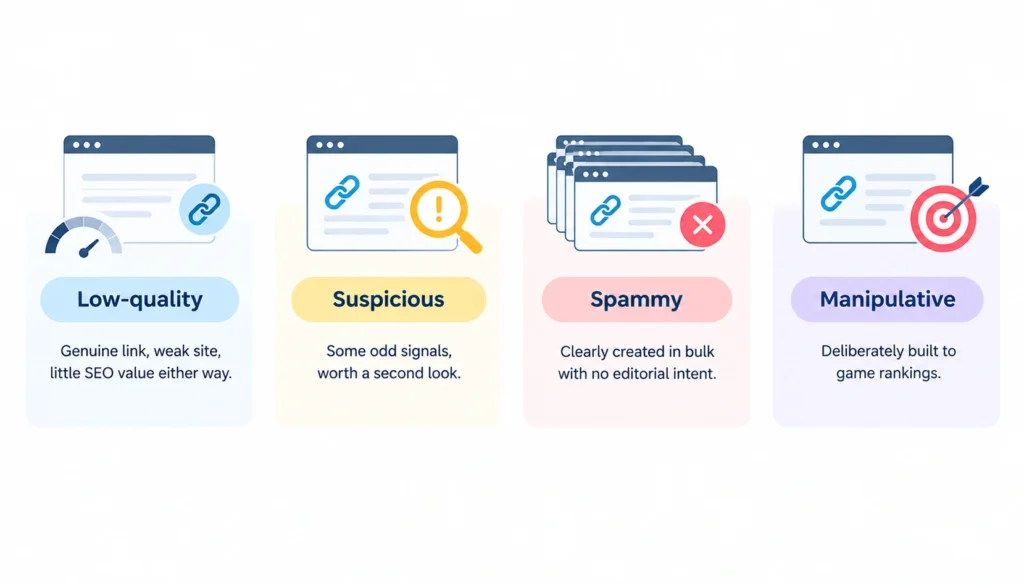
These terms get thrown around interchangeably, but they’re not quite the same thing:
- Low-quality: genuine link, weak site, little SEO value either way
- Suspicious: some odd signals, worth a second look
- Spammy: clearly created in bulk with no editorial intent
- Manipulative: deliberately built to game rankings
“Toxic” is mostly a term SEO tools invented, not a Google classification.
2. Does Google officially use the term “toxic backlink”?
No. Google talks about link spam and unnatural links, not “toxicity.” The toxicity scores you see in Ahrefs, Semrush, or SE Ranking are each vendor’s own scoring model, built from things like anchor text patterns, referring domain quality, and known spam networks. They’re useful for triage. They’re not a verdict from Google.
3. Why a low-quality backlink isn’t automatically harmful
Google’s own search help pages state that its systems generally figure out which links to trust on their own, and that most sites will never need to touch the disavow tool. That’s a strong signal that a single weak or odd link rarely does damage on its own.
What actually matters is pattern and intent. One weird link from an old directory site is noise. Five thousand identical anchor-text links appearing across three hundred new domains in two weeks is a pattern, and that’s worth investigating.
Can Harmful Backlinks Hurt Your SEO?
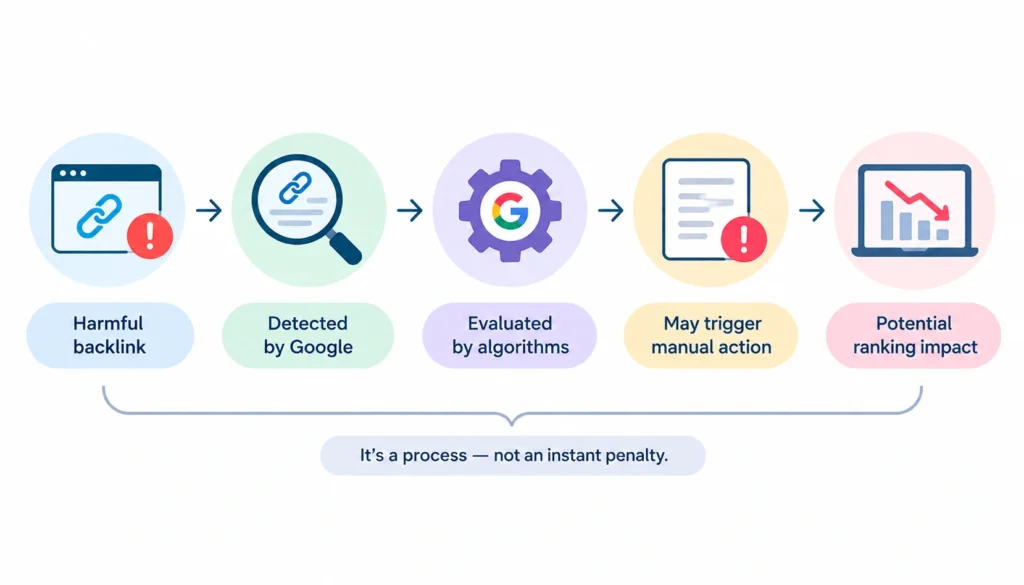
Sometimes, yes. But the path from “bad link” to “ranking damage” has more steps than most articles suggest.
1. When Google may simply ignore unwanted links
Google’s algorithms are built to devalue links that look manipulative rather than penalize the site receiving them. If someone builds a spam network and points it at your domain without your involvement, Google’s systems are generally designed to just not count those links, rather than hold it against you.
2. When manipulative link patterns become a concern
The risk grows when the pattern is large, coordinated, and tied to something you actually did: a paid link campaign you ran, a guest-post ring you participated in, or a private blog network you built or bought into. That’s the scenario manual actions are meant to catch.
3. Algorithmic systems vs manual actions
There’s a real difference between an algorithm quietly discounting a link and a human reviewer at Google issuing a manual action against your site. The first happens constantly and invisibly. The second is rare and shows up as a message in Search Console’s Manual Actions report.
4. Why one strange backlink usually isn’t a crisis
If you found one odd backlink today, your ranking probably isn’t in danger. Save the alarm for patterns, not single data points.
10 Signs a Backlink May Need Investigation
None of these guarantee a link is harmful on their own. They’re flags for further review, not automatic red cards.
- The link was clearly created to manipulate rankings, not to help readers
- It comes from a known link network or PBN
- It’s part of a paid link arrangement built for SEO value
- It uses unnatural, commercial exact-match anchor text
- The same link template appears across hundreds of pages
- The referring site has nothing to do with your niche
- The referring page is thin, auto-generated, or scraped content
- The link showed up as part of a sudden, unexplained spike
- The page hosting the link has an excessive number of outbound links
- Several links share the same manipulation fingerprint: same anchor, same template, same timing
Google’s spam policies list buying or selling links for ranking purposes, excessive link exchanges, and automated link creation as concrete examples of link spam worth knowing by name.
How to Find Harmful Backlinks
You can’t evaluate what you haven’t seen. Start with data, not guesswork.
Step 1: Export your backlink data
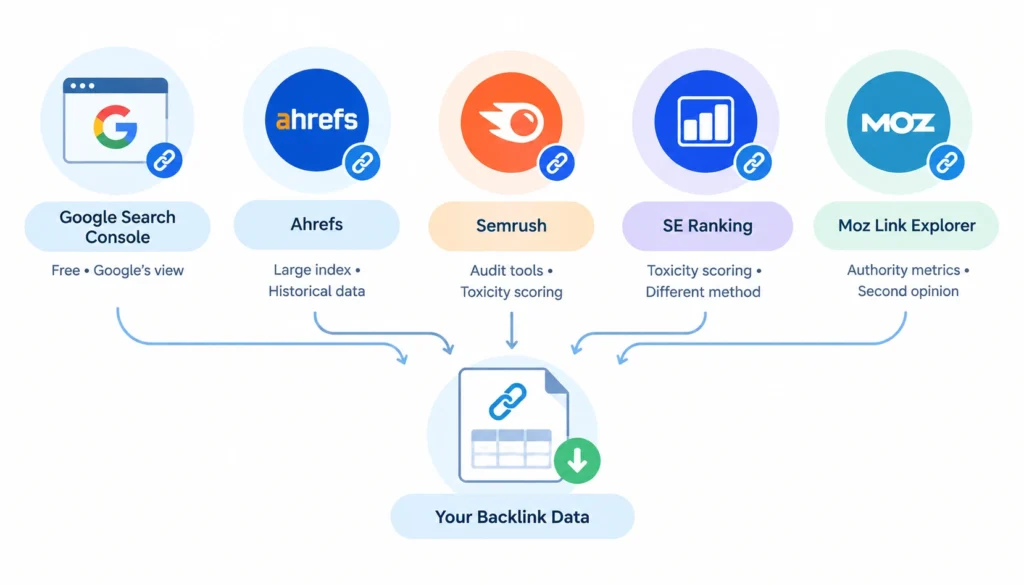
Pull link data from more than one source:
- Google Search Console: free, and it’s the closest thing to Google’s own view of your links, though it isn’t a complete list
- Ahrefs: large index, strong for historical link data
- Semrush: solid audit tooling with its own toxicity scoring
- SE Ranking: similar toxicity scoring approach, different methodology
- Moz Link Explorer: useful second opinion on authority metrics
Step 2: Combine multiple backlink sources
No single tool has a complete map of every link pointing at your site. Google itself notes that its Links report in Search Console is a sample, not an exhaustive list. Cross-checking two or three sources catches links that any one tool misses.
Step 3: Group backlinks by referring domain
Look at domains, not individual URLs. A hundred links from one spam domain is one problem to solve, not a hundred.
Step 4: Review the referring page
Open the actual page. Is there real content around the link, or is it dropped into a footer, sidebar, or comment thread with nothing else on the page?
Step 5: Review anchor text
Branded and naked-URL anchors are normal. A wall of exact-match commercial phrases pointing at the same page is a red flag.
Step 6: Check link placement and attributes
A link buried in a widget or template that appears sitewide behaves differently than one placed inside an article by an editor who chose to link to you.
Step 7: Look for patterns across domains
Same hosting IP range, same site template, same registration date, same anchor text: these repeated fingerprints across dozens of “different” domains usually mean one network, not organic interest.
How to Decide Whether a Backlink Is Actually Harmful
Ask these questions for each link you’re unsure about:
- Is the referring website relevant to your topic or industry?
- Does the page around the link offer real value to a reader?
- How was the link likely acquired: editorial mention, paid placement, automated tool?
- Is the anchor text natural, or clearly optimized for a keyword?
- Where does the link sit on the page, in the body or tucked into a footer?
- Is this an isolated case, or part of a wider pattern you’ve already spotted?
- Did you or your team pay for or build this link?
If most answers point toward “relevant, genuine, editorial,” leave it alone. If most point toward “irrelevant, paid, patterned,” it’s worth deeper review.
Don’t Confuse Low Authority With Harmful
This mix-up causes more unnecessary link removals than almost anything else.
1. Why low Domain Authority isn’t proof of toxicity
Domain Authority (Moz) and Domain Rating (Ahrefs) measure link equity, not spam risk. A brand-new legitimate blog will have a low score simply because it hasn’t earned many links yet, not because it’s dangerous.
2. What third-party metrics can and can’t tell you
These scores can tell you how much ranking power a domain might pass along. They can’t tell you whether a link was placed with manipulative intent. That judgment call still needs a human looking at context.
3. Example: Low-authority legitimate link vs manipulative high-authority link
A small local news blog linking to your guide, with a DA of 12, is a genuine editorial link. Keep it. A site with DA 60 that sells guest posts in bulk, stuffed with commercial anchor text, is a manipulative link regardless of its authority score. Authority and intent are two different axes; don’t collapse them into one.
How to Classify Every Backlink You Find
Once you’ve reviewed a link, sort it into one of five buckets:
| Classification | What it looks like | Typical response |
| Keep | Relevant, editorial, genuine | No action |
| Monitor | Weak but real, no manipulation signs | Check periodically |
| Review | Mixed or unclear signals | Investigate further |
| Remove or qualify | Clear manipulation evidence | Contact site owner |
| Consider disavow | Large-scale pattern, removal failed | Evaluate against Google’s criteria |
This framework does the real work here: it stops you from jumping straight from “this looks bad” to “disavow it,” and forces a step of actual judgment in between.
What to Do After You Identify a Harmful Backlink
Option 1: Leave it alone
Most unsolicited, low-quality links from sites you have no relationship with fall here. If it’s not part of a pattern and you didn’t create it, it’s usually not worth your time.
Option 2: Request removal
Find the site owner’s contact: a footer email, an About page, or a WHOIS lookup if the site allows it. Send a short, specific request naming the exact URL and the page it’s on. Follow up once, politely, after a week or two. Keep a simple log of who you contacted and when, so you’re not chasing the same site twice.
Google’s own manual-action guidance recommends reaching out to site owners and asking them to either remove the link or prevent it from passing ranking value with an appropriate link attribute.
Option 3: Ask for proper link qualification
Sometimes removal isn’t realistic: a paid placement you agreed to, or a comment you can’t delete. In that case, ask the site to add the right attribute instead:
- rel=”nofollow”: general “don’t pass ranking credit” signal
- rel=”sponsored”: for paid or advertising relationships
- rel=”ugc”: for user-generated content like comments or forum posts
Option 4: Consider disavow
Reserved for cases where removal has failed and the pattern is substantial enough to matter. More on that below.
When Should You Use Google’s Disavow Tool?
This is where a lot of advice online gets it wrong, treating disavow as a routine cleanup step. Google’s own documentation says the opposite: most sites never need it, and using it carelessly can actually hurt your search performance rather than help it.
1. Google’s criteria for disavowal
Disavow makes sense when you have a substantial number of spammy or artificial links you can’t get removed, and you’re concerned they could trigger a manual action, or you’ve already received one tied to unnatural links.
2. Manual action and unnatural links
If Search Console shows a manual action for unnatural links, disavow becomes a genuine tool for building your reconsideration case, alongside documented removal attempts.
3. Substantial artificial or spammy link patterns
This is the scale that matters for disavow: not one or two odd links, but a real volume of links you can clearly tie to manipulation and can’t get taken down.
4. When removal attempts aren’t successful
If you’ve made a genuine, documented effort to get a link removed and the site owner won’t respond or won’t act, disavow becomes a reasonable fallback rather than a first move.
5. Why unnecessary disavowal can be risky
Disavowing links you don’t actually need to disavow can strip away link equity you didn’t need to lose. Treat it as a scalpel, not routine maintenance.
6. Domain-level vs URL-level disavowal
Disavow entire domains when the whole site is spam. Disavow individual URLs when only specific pages on an otherwise legitimate site are the problem, so you’re not writing off the whole domain over one bad page.
How to Request Harmful Backlink Removal
Once you’ve identified a backlink that genuinely warrants removal, start by finding the right contact person. Check the referring website’s footer, contact page, editorial information, or WHOIS details for an email address.
If the site has a webmaster, editor, or site owner contact, use that rather than sending the request to a generic address whenever possible.
Before reaching out, record the exact URL of the page containing the backlink, the URL of your own page being linked to, and the anchor text used. This gives the site owner everything they need to locate the link quickly and prevents unnecessary back-and-forth.
Keep your removal request short and specific. Explain that you are requesting the removal of a particular link and include the relevant URLs. There’s usually no need for a long explanation about SEO, rankings, or why you consider the site harmful.
If you don’t receive a response, follow up once or twice at most. Some websites may be inactive or simply unwilling to make changes, so spending excessive time chasing a single backlink usually isn’t worthwhile.
Keep a record of your outreach attempts and the outcome, such as removed, no response, declined, or site unavailable. This record can be useful if you later need to review the link or consider other actions.
Finally, avoid paying spammy websites to remove backlinks. Some site owners may demand money after receiving a removal request, but paying them can encourage the same behavior to continue.
For large backlink profiles, prioritize links based on their actual risk and focus your outreach on the links that genuinely require action rather than trying to remove every low-quality backlink.
How SEO Tools Help You Handle Harmful Backlinks
SEO tools can make backlink analysis much faster, especially when a website has hundreds or thousands of referring domains. However, each platform collects and evaluates backlink data differently, so it helps to use these tools as sources of evidence rather than treating any single score as a final judgment.
- Google Search Console: Provides Google’s own backlink reporting through the Links report and is free to use. It can help you review top linking sites, pages receiving links, and common link text. However, the report is not a complete list of every backlink to your site.
- Semrush Backlink Audit: Provides a broader backlink dataset and uses its own toxicity signals to flag potentially risky links. It can help you review suspicious domains in bulk and generate a disavow file when disavowal is actually appropriate.
- SE Ranking Toxicity Score: Uses a separate proprietary scoring system to identify potentially risky backlinks. It can be useful as a second opinion, particularly when a link is already raising concerns in another tool.
- Ahrefs: Offers a large backlink index and historical data that can help you investigate how a backlink profile has changed over time. This is particularly useful for spotting sudden increases in referring domains, repeated anchor text, or other unusual patterns.
- Moz: Provides backlink and domain-level metrics that can add authority and link-context information to your investigation. Its metrics can help with comparison, but they should not be treated as Google’s own assessment of link quality.
The key is to compare the evidence across tools. A backlink that receives a high-risk score in one platform but appears relevant, editorial, and naturally acquired may simply need manual review rather than removal.
Treat every toxicity or authority score as a prioritization signal, not a final ruling. Different vendors use different databases, algorithms, and scoring criteria, so the same backlink can receive very different scores across platforms.
Discussions among SEO practitioners, including on Reddit’s r/SEO community, also frequently highlight these differences.
The final decision should therefore consider the actual linking page, relevance, anchor text, placement, acquisition method, and whether the link forms part of a broader manipulative pattern.
10 Harmful Backlink Examples and What to Do With Each
| Backlink example | Main concern | Suggested action |
| Relevant editorial link | None | Keep |
| Small legitimate blog | Low authority only | Monitor |
| Random directory listing | Weak relevance | Review |
| Paid ranking link | Manipulation | Remove or qualify |
| PBN link | Link scheme | Address |
| Exact-match anchor network | Manipulative pattern | Investigate |
| Sitewide footer link | Scale and placement | Review |
| Spam blog comment | Artificial placement | Usually ignore, or review if repeated |
| Hacked page link | Compromised content | Investigate |
| Large-scale link network | Systematic manipulation | Remediate |
How to Handle a Large-Scale Spam Backlink Problem
If you’re dealing with thousands of spammy backlinks rather than a handful of suspicious links, manually reviewing every URL can quickly become inefficient. In this situation, focus on identifying patterns and sources rather than treating every backlink as a separate problem.
Start by grouping backlinks by referring to the domain. A list containing 1,000 links may look serious at first, but if most of those links come from just 20 domains, the problem may be much more manageable.
Look for domains generating unusually large numbers of links, sitewide links, obvious link networks, or repeated placements across similar pages.
Next, examine your anchor-text distribution. A large concentration of exact-match commercial phrases can be more informative than simply counting the number of backlinks.
Compare these patterns with your own link-building history to determine whether the links came from an old outreach campaign, paid placement, directory submission, or another activity that may have been forgotten.
You should also check Google Search Console for a Manual Action before assuming that a large number of spammy links has resulted in a Google penalty.
Google may simply ignore many unwanted or low-quality links, so a large backlink count does not automatically mean that your site has been penalized.
Keep a record of your investigation and any removal efforts. Document the domains reviewed, links you contacted site owners about, responses received, and links that could not be removed. This creates a clear audit trail and can be useful if you later need to demonstrate the steps you took in response to a manual action.
Only after reviewing the overall pattern, attempting reasonable removal or qualification where appropriate, and assessing the situation should you consider Google’s Disavow Tool.
Disavowal is a specialized option rather than a routine cleanup step, so avoid creating a large disavow file simply because an SEO tool has flagged thousands of links.
What About Negative SEO and Unsolicited Spam Links?
Yes, someone can build spam links pointing at a competitor’s site. No, this rarely causes real damage on its own, because Google’s systems are generally built to discount links it doesn’t trust rather than punish the site receiving them.
A sudden, large, unexplained spike in low-quality links from unrelated sites is worth documenting and watching. It’s not, by itself, proof that you’re under attack or that your rankings are at risk. Collect evidence (export dates, domain lists, anchor patterns) before assuming the worst or taking action.
How to Monitor Your Backlink Profile After Cleanup
Cleanup isn’t a one-time event. Set up a recurring check:
- Track new referring domains as they appear
- Watch for sudden anchor-text shifts
- Note unusual backlink growth spikes
- Confirm links you asked to be removed are actually gone
- Check the Manual Actions report in Search Console regularly
- Put a recurring audit on the calendar, quarterly works for most sites
How to Prevent Harmful Backlinks in the Future
The cheapest fix is avoiding the mess in the first place:
- Stay away from link schemes and paid ranking links entirely
- Vet any link-building partner or agency before hiring them
- Review sponsored and paid placements for proper rel=”sponsored” tagging
- Keep an eye on guest-post campaigns run on your behalf
- Build links through genuinely useful content and real outreach instead
- Keep a standing backlink monitoring routine rather than only checking when something looks wrong
Harmful Backlink Audit Checklist
- [ ] Export backlink data from at least two sources
- [ ] Group links by referring domain
- [ ] Review suspicious referring pages
- [ ] Check relevance to your niche
- [ ] Review anchor text patterns
- [ ] Check link placement and attributes
- [ ] Look for cross-domain patterns
- [ ] Check the Manual Actions report
- [ ] Classify each link using the five-category framework
- [ ] Request removal where justified
- [ ] Request qualification where removal isn’t realistic
- [ ] Consider disavow only after removal attempts fail
- [ ] Monitor the profile going forward
Frequently Asked Questions
What are harmful backlinks?
Links pointing to your site that were created to manipulate rankings rather than to genuinely help readers, such as paid links, PBN links, or bulk automated link placements.
Can harmful backlinks hurt SEO?
Sometimes, mainly when they form a large, coordinated pattern tied to your own actions. A single odd link rarely causes real damage.
Should I remove every toxic backlink a tool flags?
No. Treat tool scores as a starting point for review, not an instruction to act. Investigate context before removing anything.
Does Google ignore spam backlinks?
Often, yes. Google’s systems are generally designed to discount links they don’t trust rather than penalize the site receiving them.
Are low-authority backlinks harmful?
Not automatically. Low authority just means weak link value, not manipulation.
Final Verdict
Don’t treat every flagged backlink as an emergency. A backlink can look suspicious in an SEO tool without actually requiring removal or disavowal.
Investigate the context first, including the referring site’s relevance, link placement, anchor text, how the link was acquired, and whether it is part of a broader manipulative pattern.
Use a keep-monitor-review-remove-disavow framework to organize your decisions. Keep legitimate and relevant links, monitor weak but genuine ones, review links with one or two warning signs, request removal or proper qualification when a link is clearly problematic, and consider disavowal only when the circumstances genuinely justify it.
Handling harmful backlinks well is less about reacting quickly and more about reacting accurately. In many cases, Google can simply ignore unwanted or low-quality links, meaning that most of your backlink profile probably doesn’t need to be touched. Focus your time on genuine patterns of manipulation and use the least aggressive action that the evidence supports.