Most guides tell you to find your lost backlinks and email everyone who used to link to you. That sounds simple, but it can waste a lot of time, and it can lead you to fix problems that don’t actually require outreach.
Many “lost” backlinks aren’t truly lost. A link may point to a page that now returns a 404, a URL that changed during a site migration, or a resource that can be restored or redirected in a few minutes.
Others may appear lost because of a temporary crawl issue or a change in how a backlink tool reports the link. And some backlinks come from pages or websites that are gone for good, making recovery unrealistic.
The real opportunity is to separate these situations before you start sending emails. A backlink from a relevant, valuable website may be worth recovering, while a low-value link from a dead or irrelevant site may not deserve your attention at all.
This guide shows you how to reclaim lost backlinks in the right order: verify that the backlink is actually lost, identify why it disappeared, fix the issues you control, prioritize the recovery opportunities that matter, and contact publishers only when outreach is likely to pay off.
The goal isn’t to recover every lost link, it’s to recover the right ones with as little wasted effort as possible.
What Is Link Reclamation?
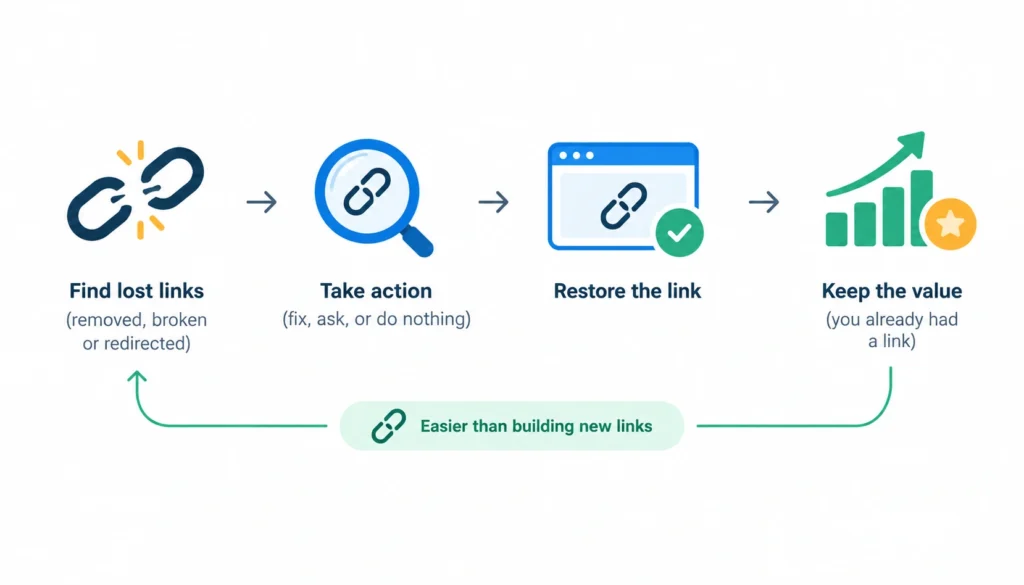
Link reclamation is the process of finding backlinks that used to point to your site but were removed, broken, or redirected, then taking the right action to restore them. Depending on the cause, that might mean fixing your own URL, asking the publisher for an update, or deciding to do nothing.
The key idea is that you’re recovering something you already had. That makes it easier than building new links, because the publisher already chose to link to you.
1. Link reclamation vs. broken link building
People mix these up. The difference is who owns the problem.
| Link reclamation | Broken link building | |
| Did you have the link before? | Yes | No |
| Goal | Restore an existing link | Win a new link |
| Starting point | Your own backlink history | Another site’s dead resource |
| Pitch | “Your link to us stopped working” | “You have a dead link; here’s a replacement” |
2. Link reclamation vs. unlinked mentions
An unlinked mention is a page that names your brand without linking to you. You never had a link there, so it’s a new-link opportunity. It’s related work, but it isn’t reclamation.
Why Do Backlinks Get Lost?
Backlinks disappear for a handful of reasons:
- The publisher removes your link during an edit.
- The linking page is deleted.
- Your destination URL changes.
- Your page returns a 404 or 410 error.
- A site migration changes your URL structure.
- A redirect breaks or points somewhere irrelevant.
- Content is merged, rewritten, or replaced.
- A file, tool, or image the link pointed to is moved.
- A canonical or indexing change affects the page.
- Your backlink tool reports a loss that didn’t happen.
The last one catches people out. Backlink tools work from their own crawls. A crawl error on their side can show up as a lost link even though the link is still live.
Should You Reclaim Every Lost Backlink?
No. Aim to recover the links worth recovering, not the highest count.
Ask these questions about each one:
- Is the referring site relevant to your topic? A link from a industry publication beats one from an unrelated directory.
- Does the linking page get traffic? A page nobody visits sends little value.
- How important is the page it linked to? A link to a money page matters more than one to an old announcement.
- Was the link editorial? A link inside a useful article is stronger than one in a footer or a list of 200 sites.
- Did it send real visitors? Check your analytics for referral traffic.
- What was the anchor text? Natural, descriptive anchors are worth more than stuffed ones.
Don’t lean on Domain Rating or Domain Authority alone. They’re third-party scores, not something Google uses. Skip links that look spammy, too. Losing those may be fine.
How to Find Lost Backlinks
Method 1: Ahrefs
In Ahrefs, open Site Explorer, enter your domain, and go to Backlinks, then filter for Lost links. Set a date range, sort by referring-domain strength, and look at the loss reason the tool shows. Ahrefs explains its own approach in its link reclamation guide.
Method 2: Semrush
Semrush’s Backlink Analytics has a similar lost-links view. Filter by date and export the list. The workflow is the same: export, then verify the links manually to determine whether the backlink was actually removed, the page was deleted, or the link was changed.
Method 3: LinkColab
LinkColab can be useful when you want to monitor your existing backlink portfolio rather than repeatedly checking for lost links manually. Add the backlinks you’re managing to the platform and use its monitoring features to identify changes in their status.
This approach is particularly useful for link-building campaigns where you need to keep track of many acquired links over time. Instead of discovering a lost backlink weeks or months later during a manual audit, ongoing monitoring can help you identify changes sooner. You can then verify the affected page and contact the site owner or investigate whether a redirect, deleted page, broken URL, or other technical change caused the loss.
LinkColab is therefore more complementary to tools such as Ahrefs and Semrush than a direct replacement for them. Those platforms are useful for discovering and researching lost backlinks across a large link index, while a dedicated management platform can help you keep track of the links you’ve already acquired.
Method 4: Google Search Console
Search Console shows your top linked pages and linking sites. It doesn’t keep a history of lost links, so you can’t see exactly what disappeared. But you can export the report on a schedule and compare exports. A drop in a page’s linking sites is a clue that deserves further investigation.
Method 5: A site crawler
Tools like Screaming Frog or Sitebulb crawl your own site and list URLs returning 404 errors. Match that list against your backlink exports. Any 404 URL with external links is a quick win because the backlink may be recoverable through a redirect, page restoration, or outreach to the linking site.
Method 6: Analytics and server logs
Look for referral traffic that suddenly dropped, and for requests to URLs that now return errors. Server logs can reveal old URLs that people still visit and that may still be referenced by external websites. This can help you find lost-link opportunities that aren’t obvious from a standard backlink report.
A free workflow
You don’t need a paid tool to start. Combine Search Console exports, a spreadsheet, a free crawl of your site, and your analytics referral data. It’s slower and less complete, but it can catch some of the biggest problems.
If you’re managing a larger backlink portfolio, a monitoring platform such as LinkColab can make the process more systematic by keeping acquired links organized and helping you identify changes in their status. The basic workflow is simple: find the link → record it → monitor it → verify the loss → investigate the cause → reclaim it when possible.
Verify That the Backlink Is Actually Lost
Never treat a tool’s “lost” label as proof. Check each important link by hand before you do anything.
- Open the referring page. Does it load?
- Search the page for your domain. Use Ctrl+F or view the source.
- Check where the link goes. Is it pointing at the right URL?
- Check your target URL. Does it return a 200, a 404, or a redirect?
- Look at the link attributes. It may now carry nofollow, ugc, or sponsored. The link still exists, but its value may have changed.
- Check indexing. A noindex tag or a canonical pointing elsewhere on the referring page can change how much it counts.
- Check the domain. Is the site still live?
If the link is there, mark the report as a false positive and move on. The Wikipedia page on link rot gives useful background on why links break so often over time.
Lost Backlink Recovery Decision Matrix
Use this table after you’ve verified each link.
| Situation | Recover? | Action |
| Link removed from a live page | Usually | Contact the publisher |
| Your URL returns a 404 | Yes | Restore the page or add a 301 redirect |
| Your URL moved | Yes | Add a 301 to the closest relevant page |
| Referring page deleted | Sometimes | Contact the publisher if the site is valuable |
| Referring site gone | Usually no | Move on |
| Broken redirect | Sometimes | Fix the redirect |
| Relevant 301 already works | Usually no | Verify and monitor |
| Canonical changed | Case by case | Investigate the setup |
| Source page is noindex | Case by case | Judge how much the page matters |
| Crawl error in the tool | Not yet | Recheck later |
| Tool “dropped” the link | Not necessarily | Verify by hand |
How to Reclaim Backlinks You Broke
If the problem is on your site, fix it before you email anyone. It’s faster, and it needs no one’s permission.
1. Restore the page or add a 301 redirect
If the old page still has value, bring it back. If the content moved, use a 301 redirect, which tells browsers and search engines the move is permanent. Google’s documentation on redirects recommends permanent redirects when a page moves.
2. Pick the closest match, not the homepage
Send the old URL to the most relevant current page. If /old-guide/ became /new-guide/, redirect it there. Sending everything to the homepage clears the error but gives visitors and search engines a poor match.
If nothing relevant exists, don’t force a redirect. A 404 or 410 can be the honest answer.
3. Keep redirects short
Avoid chains where A goes to B, then C, then D. Point the old URL straight at the final page. Then update your own internal links so they skip the redirect entirely.
4. Test the fix
Load the old URL in a browser and confirm it lands where you expect. Check the status code with a crawler. Then recheck in a few weeks.
Be careful about promises here. Google treats a permanent redirect as a strong signal, but that doesn’t mean every redirect passes the same value the old page had.
How to Reclaim a Link Removed by a Publisher
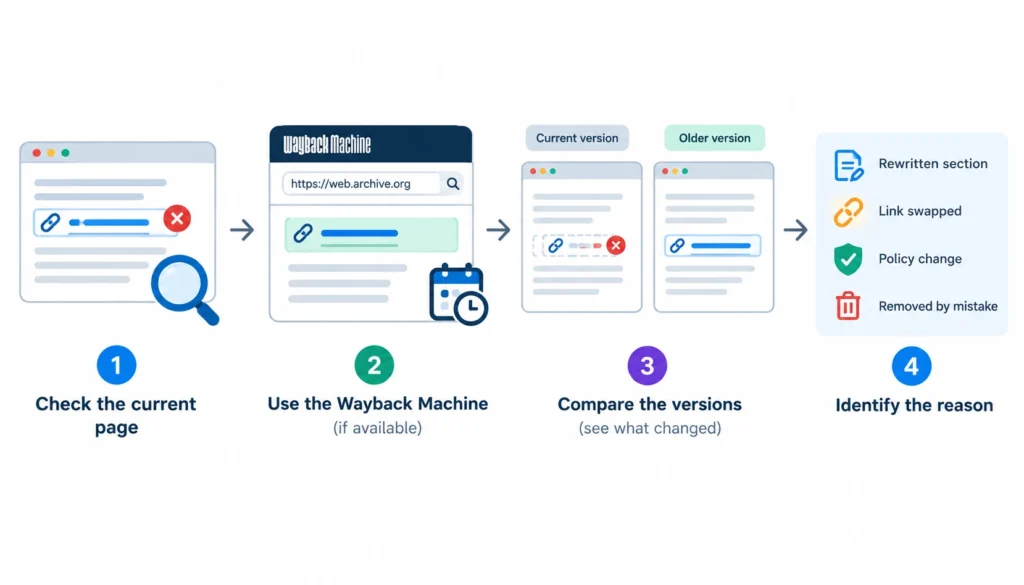
Start by working out why the link disappeared before contacting the publisher. The reason matters because it tells you whether the link is realistically recoverable and what kind of outreach, if any, makes sense.
First, open the current referring page and confirm that your link is actually gone. If possible, compare the current version with an older copy in the Wayback Machine to see what changed. You may find that the entire section was rewritten, the article was replaced, or your link was simply removed while the rest of the content stayed intact.
Common reasons include:
- The article was updated and your link was cut. The publisher may have rewritten a section, removed outdated references, or shortened the article.
- Your link was swapped for a competitor’s. This can happen when the publisher finds another resource they consider more relevant or current.
- The site changed its policy on external links. Some publishers reduce outbound links, remove commercial references, or change how they link to external sources.
- The link was removed by mistake. A content editor may have deleted it during an update without realizing that the reference was still useful.
- The linked content changed or became outdated. If your original page no longer exists or no longer supports the claim it was linked to, the publisher may have removed it intentionally.
Once you understand the reason, decide whether the backlink is actually worth pursuing. Look at the relevance and quality of the referring page, its organic visibility or traffic, the context of the link, and the importance of the page it originally pointed to.
A link from a relevant, established article that receives traffic and naturally references your content is a strong outreach candidate. A link from a thin, outdated, irrelevant, or low-quality page may not justify the time required to recover it.
If the opportunity is worthwhile, keep the outreach simple. Explain that you noticed the reference disappeared, point out why your resource is still relevant, and provide the correct URL.
Avoid treating the email like a generic link-building pitch, the goal is to restore a useful editorial reference, not pressure the publisher into adding a link.
Finally, don’t assume that every removed backlink needs to be recovered. The objective is to reclaim valuable links, not maximize the number of links in your recovery spreadsheet.
How to Write a Link Reclamation Email
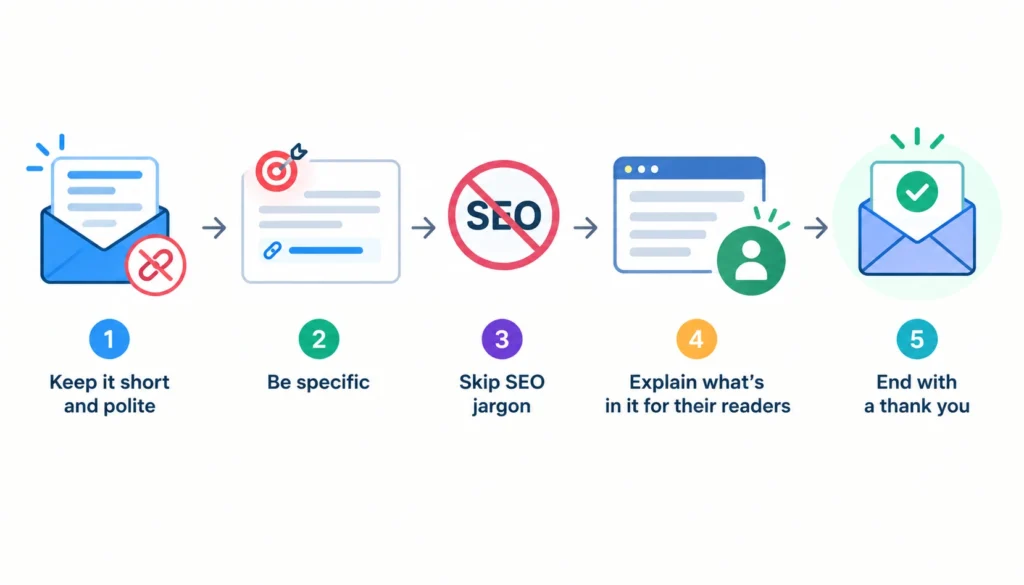
Keep it short, polite, and specific. Skip SEO jargon. The publisher doesn’t care about your rankings, so explain what’s in it for their readers.
What to include
- The exact article
- What you noticed (a broken or missing link)
- The correct URL
- A one-line reason it helps their readers
Template
Subject: Quick fix for a link in your [article title] post
Hi [Name],
I was reading your article “[title]” and noticed the link to [our resource] no longer works. It’s now here: [new URL].
If you’re able to update it, readers will get to the right page. Happy to send anything else that would help.
Thanks,
[Your name]
Follow-up
Send one follow-up after about a week. If there’s no reply, stop. Pushing further rarely helps and can hurt the relationship.
How to Reclaim Backlinks After a Website Migration
Migrations are where most big link losses happen. Plan for them.
Before the move:
- Export your backlinks and your top linked pages.
- Map every old URL to its new equivalent.
During the move:
3. Set up permanent redirects on the server.
4. Test them before launch.
After the move:
5. Watch for new 404s in Search Console and your crawler.
6. Contact the publishers behind your best links and ask them to update the URL.
Google’s guidance on site moves with URL changes covers URL mapping and redirects in detail. It also suggests updating important external links where you can.
Here’s a realistic example. A company renames /old-guide/ to /new-guide/, and 20 sites still link to the old address, which now returns a 404. Emailing all 20 would be the slow route. The better route is to redirect the old URL, confirm it works, then contact only the five or six referring sites that matter most.
How to Reclaim Links to Deleted or Merged Content
When you prune, consolidate, or remove pages from your website, check the backlinks pointing to those URLs before deleting them. A page that looks outdated or low-value from a content perspective may still have valuable backlinks from relevant websites. Removing it without a plan can turn those links into broken references.
The right action depends on what happened to the original content:
- If the page had strong, relevant backlinks, consider restoring it. This can make sense when the page still serves a useful purpose and has links from authoritative or relevant websites.
- If you merge the content into another page, redirect the old URL to the most relevant replacement. The new page should genuinely cover the topic or fulfill the intent of the old page rather than simply being the closest URL available.
- If an important website links to the old page, consider asking the publisher to update the link directly. A direct link to the new destination can provide a cleaner experience for users and avoids relying solely on a redirect.
- If the old page has no meaningful replacement, don’t force a redirect. Sending users to an unrelated page, or redirecting every deleted URL to the homepage, doesn’t create a useful destination. In some cases, letting the old URL remain gone is the better choice.
Before making the change, record the important backlinks pointing to the page, identify their referring domains, and note which URLs can serve as legitimate replacements. After implementing redirects or restoring content, test the old URL and verify that the important backlinks still resolve correctly.
The key is to treat content pruning and backlink management as the same workflow. Delete or merge content only after checking what external links it has earned and deciding where those links should lead next.
How to Reclaim Links to PDFs, Tools, and Other Assets
Backlinks don’t only point to blog posts. People link to PDFs, calculators, images, and downloads.
Find the missing file, restore it if you can, or host it at a stable address. If it moved, redirect the old file URL. Then reach out to your most important referring sites. Assets are easy to overlook, so check them during every audit.
How to Prioritize Lost Backlinks
Score each link on relevance, page traffic, destination importance, referral traffic, editorial quality, and effort to recover. Then sort them into three groups:
- Priority 1: Recover now. High relevance, easy fix or strong publisher.
- Priority 2: Recover when you have time.
- Priority 3: Monitor or ignore.
Don’t build the score around DR alone.
How to Track Reclaimed Backlinks
A simple spreadsheet is enough. Use these columns:
| Column | Why you need it |
| Referring domain and URL | Know the source |
| Old and current target URL | Track where it pointed |
| Loss reason | Guide the action |
| HTTP status | Confirm the state |
| Anchor text and link attribute | Judge the value |
| Traffic and relevance | Set priority |
| Action and outreach date | Track the workflow |
| Response and recovery status | Report results |
| Verification date | Confirm the link is live |
How to Measure Link Reclamation Success
Track what you can prove:
- Links and referring domains recovered
- Referral traffic regained
- Important pages protected
- Recovery rate (recovered vs. attempted)
- Time spent per recovered link
You can also watch rankings and organic traffic. Just don’t credit one reclaimed link for a ranking change. Many things move rankings at once.
How to Prevent Losing Backlinks
Prevention is cheaper than recovery.
- Check backlinks before you delete or move a URL.
- Keep a redirect map up to date.
- Test migrations before they go live.
- Monitor 404 errors regularly.
- Keep linked assets online.
- Watch your best links closely.
Link Reclamation Checklist
- [ ] Export lost backlinks
- [ ] Verify each loss by hand
- [ ] Identify the cause
- [ ] Check your target URL’s status
- [ ] Fix your own technical issues first
- [ ] Remove false positives
- [ ] Prioritize the best opportunities
- [ ] Contact publishers where needed
- [ ] Follow up once
- [ ] Verify restored links
- [ ] Record results
- [ ] Schedule the next audit
For real-world discussion, practitioners swap lost-link stories and outreach results in communities like r/SEO on Reddit. For general background on the topic, see Wikipedia’s Backlink and URL redirection pages.
Frequently Asked Questions About Lost Backlinks
What is link reclamation in SEO?
It’s the process of finding backlinks that were removed, broken, or redirected, and restoring the ones worth keeping. The fix may be technical, or it may need outreach.
How do I reclaim lost backlinks?
Find the lost links, verify each one, work out the cause, fix your own URLs, prioritize the valuable links, contact publishers when needed, and confirm the link is back.
How do I find lost backlinks?
Use a backlink tool such as Ahrefs or Semrush, compare Search Console exports over time, and crawl your site for 404 errors that have external links.
Can I reclaim a backlink pointing to a 404 page?
Yes. Restore the page or add a 301 redirect to the closest relevant URL. Publisher outreach is often unnecessary.
Should I redirect old URLs to the homepage?
Usually not. Redirect to the closest relevant page. If none exists, leave the 404 or 410 in place.
Final Verdict
Don’t chase every lost backlink. A backlink report can show dozens or even hundreds of “lost” links, but not all of them represent a problem, or an opportunity worth pursuing.
A better approach is to work through each loss systematically: verify that the backlink is actually gone, identify why it disappeared, fix any technical issues you control, and then prioritize the links that are genuinely valuable.
If a high-quality, relevant publisher removed a useful link, outreach may be worthwhile. If the link comes from an irrelevant or low-value page that is no longer active, your time may be better spent elsewhere.
When you do contact publishers, make the request specific and useful rather than treating it like a generic link-building email. And once you’ve made a technical fix or received a positive response, verify that the backlink has actually been restored and points to the right destination.
The goal of link reclamation isn’t to recover every backlink you’ve ever lost. It’s to recover the right backlinks efficiently, protect valuable links from future losses, and build a repeatable process for monitoring your backlink profile over ti